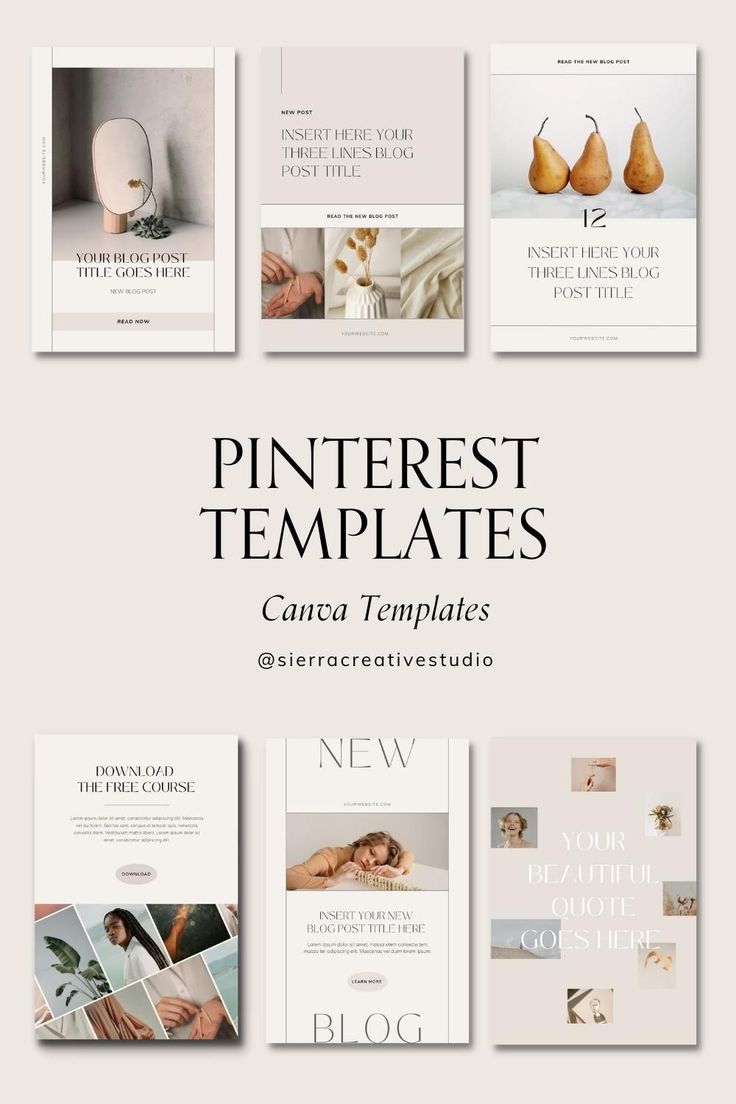
Pinterest is a visual discovery platform where people search for ideas, inspiration, products, tutorials, and useful information. Because Pinterest is highly visual, the design of your Pin plays an important role in attracting attention. A well-designed Pin can make your content easier to understand and encourage users to click on it.
Whether you are a blogger, business owner, creator, marketer, or beginner, Pinterest templates can help you create professional-looking Pins more efficiently.
What Are Pinterest Templates?
Pinterest templates are pre-designed layouts that can be customized for creating Pinterest Pins. They usually include spaces for images, headlines, descriptions, logos, and other design elements.
Templates provide a basic structure for your content. You only need to replace the sample text and images with your own information.
Table of Contents
Why Are Pinterest Templates Important?
Creating every Pin from scratch can take a lot of time. Templates simplify the process and help you maintain a consistent visual style.
Templates can help you:
- Save design time
- Create Pins more quickly
- Maintain consistent branding
- Organize your content
- Make professional-looking designs
- Experiment with different layouts
- Create multiple Pins efficiently
For businesses, consistency is especially useful because users can recognize content from the same brand more easily.
1. Blog Post Pinterest Templates
Blog post templates are useful for bloggers, websites, and content marketers. These templates are designed to promote articles and encourage users to visit the website.
A good blog Pin can include:
- Blog title
- Main image
- Short supporting text
- Website or brand name
- Call to action
For example, if your blog is about SEO, your Pin title could be:
“10 SEO Tips for Beginners”
The design should make the main topic immediately clear. Avoid adding too much text because users should be able to understand the Pin quickly.
2. Product Promotion Templates
Product templates are useful for online stores, boutiques, and businesses that want to showcase products.
A product Pin can include a product image, product name, short benefit, and brand logo.
For example, a fashion business could create a Pin with:
“New Party Wear Collection”
along with a high-quality product photograph.
The template should keep the product as the main visual focus. Use simple text and enough space around the product image.
3. Pinterest Business Templates
Businesses can use Pinterest templates to promote their services, offers, educational content, and brand messages.
A business template may include:
- Business logo
- Brand colors
- Main headline
- Supporting information
- Website
- Call to action
For example:
“Grow Your Business with Digital Marketing”
This type of Pin can link to a service page or blog article.
4. Infographic Pinterest Templates
Infographic templates are useful when you want to share several pieces of information in one visual design.
They can be used for:
- Statistics
- Step-by-step guides
- Checklists
- Tutorials
- Comparisons
- Educational information
For example, an infographic titled “5 Steps to Improve Your SEO” can show five simple steps in a vertical layout.
Keep each section short and easy to read. Too much information can make the design difficult to understand.
5. Quote Pinterest Templates
Quote templates are popular for motivational, educational, lifestyle, and personal-brand content.
A quote template usually contains a large quote in the center with a simple background and brand name.
For example:
“Success starts with consistent action.”
6. Tips and Tricks Templates
Tips templates are excellent for educational and informational content.
For example:
“7 Instagram Marketing Tips for Beginners”
You can use a strong headline at the top and add a relevant image or simple graphic below it.
7. Fashion Pinterest Templates
Fashion businesses and creators can use templates to showcase outfits, styling ideas, collections, and fashion trends.
A fashion template can include:
- Large fashion photograph
- Short headline
- Collection name
- Brand logo
- Website or social media handle
For example:
“5 Western Outfit Ideas for Women”
Use high-quality photographs and avoid overcrowding the design with too many decorative elements.
8. Travel Pinterest Templates
Travel content works particularly well with visual designs. Travel bloggers and tourism businesses can use templates for destination guides, travel tips, itineraries, and places to visit.
Examples include:
- Best Places to Visit in India
- Manali Travel Guide
- Weekend Trip Ideas
- Travel Packing Checklist
- Budget Travel Tips
Use attractive destination photographs and clear headlines to make the Pin visually appealing.
9. Step-by-Step Pinterest Templates
Step-by-step templates are useful for tutorials and guides.
For example:
“How to Create a Pinterest Business Account”
The Pin can show steps such as:
- Create an account.
- Select Business Account.
- Add business information.
- Complete your profile.
- Start creating Pins.
A simple numbered layout can make complicated information easier to understand.
10. Seasonal Pinterest Templates
Seasonal templates can be used for holidays, festivals, events, sales, and seasonal trends.
Examples include:
- Diwali decoration ideas
- Christmas gift ideas
- Wedding outfit ideas
- Summer fashion trends
- Winter travel destinations
- New Year marketing ideas
Seasonal content can help businesses create timely Pins that match what their audience is interested in during a particular period.
How to Choose the Right Pinterest Template
Choosing the right template depends on your content and audience.
First, identify your purpose. Are you promoting a blog, product, service, or educational article?
Next, choose a layout that supports your message.
Consider these factors:
- Content type
- Target audience
- Brand style
- Image quality
- Text readability
- Call to action
- Overall simplicity
A template should support your content rather than distract from it.
Keep Your Pinterest Design Simple
A common mistake is adding too many elements to a Pin. Too many colors, fonts, images, and text can make a design confusing.
Try to keep your design clean.
Use one main headline, one or two fonts, a clear image, and a simple color combination. Your most important information should be visually prominent.
Remember that Pinterest users scroll through many Pins. Your design should communicate the main idea quickly.
Use Consistent Branding
If you are creating Pinterest content for a business, maintain consistent branding across your Pins.
Use similar:
- Fonts
- Colors
- Logo placement
- Design style
- Image style
For example, if your brand uses a specific font and color combination, use those elements across your Pinterest templates.
This can make your content look more professional and recognizable.
Add Keywords to Your Pinterest Pins
Design is important, but Pinterest SEO also matters. Use relevant keywords in your Pin titles and descriptions.
For example, if your content is about digital marketing, related keywords might include:
- Digital marketing tips
- Social media marketing
- SEO tips
- Online marketing
- Content marketing
Use keywords naturally and make sure they accurately describe the content.
Create Multiple Versions of a Template
You do not have to use the exact same design for every Pin. Create a few variations of your main template.
For example, you could have:
- Template A for blog posts
- Template B for tips
- Template C for products
- Template D for quotes
This creates variety while maintaining a consistent brand identity.
Pinterest Templates and Canva
Canva is a popular design tool that can be used to create and customize Pinterest Pins. It provides many ready-made layouts and design elements.
You can select a template, replace the text, upload your own images, add your logo, and adjust colors and fonts.
Even beginners can create professional-looking designs without advanced graphic design skills.
Tips for Creating Better Pinterest Templates
Follow these simple tips when creating your templates:
- Use clear and readable fonts.
- Keep the headline short.
- Use high-quality images.
- Maintain consistent branding.
- Leave enough empty space.
- Use relevant keywords.
- Add a clear call to action.
- Avoid excessive text.
- Test different layouts.
- Check your analytics and improve your designs.
Conclusion
Pinterest templates make it easier to create attractive and consistent Pin designs. They can save time and help bloggers, businesses, creators, and marketers publish content more efficiently.
From blog posts and product promotions to infographics, quotes, fashion, travel, and educational content, there are many types of Pinterest templates you can use.
The key is to choose a template that matches your content and audience. Keep your design simple, use readable text, add high-quality visuals, and maintain consistent branding.