Category: Social Media Marketing

  • How to grow with Social Media Marketing Agency

    How to grow with Social Media Marketing Agency

    In today’s digital world, social media has become an important part of business marketing. Platforms such as Facebook, Instagram, LinkedIn, YouTube, Pinterest, and X help businesses connect with customers, promote products, and build brand awareness. However, managing social media effectively requires planning, creativity, consistency, and knowledge of digital marketing.

    A Social Media Marketing Agency helps businesses manage their social media presence and reach the right audience. From creating content and managing social media accounts to running paid advertising campaigns, an agency can provide different services according to a business’s goals.

    What Is a Social Media Marketing Agency?

    A Social Media Marketing Agency is a company or professional team that helps businesses promote their brands, products, or services through social media platforms.

    The agency creates and manages social media strategies based on the target audience and business objectives. It may handle content creation, posting, engagement, advertising, analytics, and account management.

    For example, a fashion brand may use Instagram and Facebook to showcase new products, while a B2B company may focus more on LinkedIn. A social media marketing agency can help select suitable platforms and create content for each audience.

    Why Is Social Media Marketing Important?

    Social media gives businesses an opportunity to communicate directly with their customers. People spend a significant amount of time consuming content on social platforms, making them useful channels for brand communication.

    A strong social media presence can help businesses introduce their brand to new audiences, share useful information, answer customer questions, and promote products or services.

    Social media can also support other digital marketing activities such as website traffic generation, content marketing, lead generation, and online advertising.

    Services Offered by a Social Media Marketing Agency

    A professional social media marketing agency may provide several services. These services can be customized according to the size and requirements of a business.

    1. Social Media Strategy

    A successful campaign starts with a proper strategy. The agency studies the business, competitors, target audience, products, and marketing goals.

    Based on this information, it creates a social media plan. The strategy may include platform selection, content types, posting frequency, audience targeting, and advertising plans.

    2. Social Media Account Management

    Managing social media accounts regularly can take a lot of time. Agencies can manage business profiles and maintain a consistent online presence.

    Account management may include publishing posts, updating profile information, responding to comments, monitoring messages, and maintaining the overall brand image.

    3. Content Creation

    Content is an important part of social media marketing. Agencies can create different types of content, including images, videos, reels, carousels, stories, infographics, and text posts.

    The content is normally created according to the brand’s style and target audience. Good content should be useful, engaging, and relevant to the business.

    4. Social Media Advertising

    Organic reach is only one part of social media marketing. Businesses can also use paid advertising to reach specific audiences.

    Agencies can help create and manage advertising campaigns on platforms such as Facebook, Instagram, LinkedIn, and YouTube. Campaigns can be designed for different objectives, including brand awareness, website traffic, leads, app promotion, or sales.

    5. Community Management

    Social media is not only about publishing posts. Businesses also need to interact with their audience.

    Community management includes replying to comments and messages, answering customer questions, and encouraging conversations. Regular interaction can help businesses maintain relationships with their followers.

    6. Social Media Analytics

    Data helps businesses understand whether their social media activities are working effectively.

    Agencies can monitor metrics such as reach, impressions, engagement, clicks, follower growth, video views, leads, and conversions. These insights can be used to improve future campaigns.

    Benefits of Hiring a Social Media Marketing Agency

    Working with an agency can provide several benefits for businesses.

    Saves Time

    Social media requires regular content creation, posting, engagement, and monitoring. An agency can handle these activities while business owners focus on other important tasks.

    Professional Content

    Marketing agencies usually have experience in content planning, design, copywriting, and campaign management. This can help businesses maintain a more organized and consistent social media presence.

    Better Audience Targeting

    Understanding the target audience is important for successful marketing. Agencies can research audience interests, demographics, behaviors, and platform usage to create more relevant campaigns.

    Consistent Posting

    Consistency helps businesses stay active on social media. An agency can create content calendars and maintain a regular posting schedule.

    Data-Based Decisions

    Instead of relying only on assumptions, agencies can use analytics and campaign data to understand performance. This allows businesses to identify successful content and improve weaker campaigns.

    How a Social Media Marketing Agency Works

    The process generally starts with understanding the business and its goals.

    First, the agency studies the brand, products or services, competitors, existing social media profiles, and target audience.

    Next, it develops a social media strategy. Suitable platforms, content formats, posting schedules, and campaign objectives are selected.

    After the strategy is finalized, the agency creates and publishes content. Paid campaigns may also be launched when required.

    The agency then monitors performance and prepares reports. Based on the results, the strategy can be adjusted to improve future performance.

    Choosing the Right Social Media Marketing Agency

    Choosing an agency is an important decision because different agencies may specialize in different industries and services.

    Before selecting an agency, understand what services you need. Some businesses may require only content management, while others may need complete social media advertising and lead-generation services.

    Check the agency’s experience, portfolio, communication process, reporting system, and pricing structure. It is also useful to understand how the agency measures campaign performance.

    A good agency should clearly explain its strategy, deliverables, timelines, and expected marketing objectives rather than making unrealistic promises.

    Social Media Platforms for Business

    Different platforms can serve different purposes.

    Facebook: Useful for community building, content sharing, advertising, and reaching a broad audience.

    Instagram: Popular for visual content, reels, stories, product promotion, fashion, lifestyle, and brand building.

    LinkedIn: Suitable for professional networking, B2B marketing, recruitment, industry content, and business communication.

    YouTube: Useful for long-form videos, tutorials, product demonstrations, reviews, educational content, and brand storytelling.

    Pinterest: Useful for visual discovery and can support traffic generation for suitable websites and businesses.

    X: Can be useful for real-time conversations, updates, news-related content, and audience engagement.

    The best platform depends on the target audience and business objectives.

    Organic vs Paid Social Media Marketing

    Social media marketing can generally include both organic and paid activities.

    Organic marketing involves creating and sharing content without paying for every individual impression or click. Examples include regular posts, reels, stories, comments, and community engagement.

    Paid social media marketing uses advertising budgets to reach selected audiences. Businesses can create campaigns based on objectives such as awareness, traffic, leads, or conversions.

    Many businesses use a combination of organic and paid marketing to build their presence and support specific campaigns.

    Social Media Marketing and SEO

    Social media and SEO are different digital marketing channels, but they can support each other.

    Useful social media content can increase awareness of a brand and encourage people to visit its website. Social platforms can also help distribute blog posts, videos, guides, and other content.

    SEO focuses primarily on improving visibility in search engines, while social media marketing focuses on reaching and engaging audiences on social platforms.

    Using both strategies can create a broader digital marketing approach.

    Measuring Social Media Marketing Success

    Businesses should track measurable goals instead of focusing only on the number of followers.

    Important metrics may include:

    • Reach
    • Impressions
    • Engagement rate
    • Likes and comments
    • Shares and saves
    • Video views
    • Website clicks
    • Leads
    • Conversions
    • Cost per lead
    • Return on advertising spend

    The right metrics depend on the campaign objective. For example, a brand awareness campaign may focus on reach and impressions, while a lead-generation campaign may focus on leads and cost per lead.

    Common Social Media Marketing Mistakes

    Businesses sometimes make mistakes that can reduce the effectiveness of their social media efforts.

    One common mistake is posting without a clear strategy. Another is focusing only on promotional content. Audiences often respond better when businesses provide useful, entertaining, educational, or informative content.

    Inconsistent posting, ignoring comments, using irrelevant hashtags, and failing to analyze performance can also affect results.

    Businesses should continuously test different content formats and use performance data to improve their strategy.

    Social media continues to change as user behavior and platform features evolve. Short-form video, creator collaborations, interactive content, live content, and personalized communication remain important areas for many businesses.

    Artificial intelligence is also increasingly being used for content ideas, research, customer support, analytics, and marketing workflows. However, businesses should review AI-generated content carefully to maintain accuracy and brand quality.

    The key is to focus on audience needs rather than following every trend without a clear purpose.

    Final Thoughts

    A Social Media Marketing Agency can help businesses build their online presence, create consistent content, engage with customers, and manage paid advertising campaigns.

    The most effective social media strategy depends on the business, target audience, industry, budget, and marketing objectives. A clear strategy combined with quality content, regular engagement, advertising, and performance analysis can create a strong social media marketing system.

    Whether you are a small business, startup, personal brand, or established company, social media can be an important part of your digital marketing strategy. By choosing the right platforms and focusing on meaningful content and measurable goals, businesses can use social media to increase awareness, connect with customers, and support long-term online growth.
  • How to Make a Twitter Profile Image: Best Ideas & Tips

    How to Make a Twitter Profile Image: Best Ideas & Tips

    Your Twitter profile image is one of the first things people notice when they visit your account. Whether you use Twitter for personal branding, business, networking, content creation, or simply sharing your interests, a good profile image can help create a strong first impression.

    A profile image should be clear, recognizable, and suitable for your account. It does not always need to be professionally designed. The most important thing is that it represents you or your brand clearly.

    What Is a Twitter Profile Image?

    A Twitter profile image is the small image displayed next to your name on your Twitter profile and posts. It helps people identify your account quickly.

    Your profile image should match the purpose of your account and create a consistent visual identity.

    Why Is a Good Twitter Profile Image Important?

    A profile image may look like a small part of your account, but it can have an important role in your online presence.

    1. Creates a Good First Impression

    When someone visits your profile, your profile image is one of the first visual elements they see. A clear and attractive image can make your profile look more organized and trustworthy.

    2. Helps People Recognize You

    A consistent profile image makes it easier for followers to recognize your posts. This is particularly useful when people see your content in their feed.

    3. Supports Personal Branding

    If you are building a personal brand, using the same or similar profile image across social media platforms can help create consistency.

    4. Makes Your Profile Look Professional

    A high-quality image can improve the overall appearance of your Twitter profile. A professional image is especially useful for freelancers, professionals, entrepreneurs, and businesses.

    Best Twitter Profile Image Ideas

    There are many different types of images you can use depending on your account.

    1. Professional Headshot

    A professional headshot is a simple option for professionals, students, consultants, marketers, freelancers, and business owners.

    Choose a clear photo where your face is easy to see. Use a simple background and good lighting. Avoid using heavily edited photos that make your appearance difficult to recognize.

    2. Personal Branding Photo

    If you are a content creator or personal brand, you can use a photo that represents your personality.

    Businesses can use their logo as a Twitter profile image. A logo can help customers identify the official account.

    Make sure the logo is clear and readable. If your logo contains a lot of small text, consider using a simplified version for your profile image.

    4. Creative Illustration

    Artists, designers, and creators can use an illustration or digital avatar. This can give your account a unique visual identity.

    The design should still be easy to recognize and should represent your personality or content niche.

    5. Minimal Profile Design

    Minimal designs can also work very well. You can use a simple background, initials, symbol, or clean graphic.

    Avoid adding too many elements. A simple design often looks better when displayed at a small size.

    6. Niche-Based Image

    Your profile image can also reflect your niche.

    For example, a photographer might use a professional portrait or photography-related design. A fashion creator could use a stylish personal photo. A technology brand could use a modern logo.

    How to Choose the Right Twitter Profile Image

    Choosing the right image depends on your account type and goals.

    First, decide what your account represents. If the account is focused on you personally, a clear personal photograph may be appropriate. If it represents a company, a recognizable logo may be better.

    Next, consider whether the image is easy to recognize at a small size. Twitter profile images are displayed relatively small, so complicated designs may lose their impact.

    Finally, make sure the image looks consistent with your profile name, bio, header image, and overall content.

    Tips for Creating a Professional Twitter Profile Image

    Use a High-Quality Image

    Always start with a good-quality image. Blurry or pixelated images can make your profile look less professional.

    Keep the Main Subject Centered

    Since profile images are displayed in a circular format, keep the important part of the image near the center.

    If you are using a photograph, make sure your face is not too close to the edge.

    Use Good Lighting

    Good lighting can make a significant difference in a profile photo. Natural lighting can help produce a clean and clear image.

    Avoid very dark photographs where your face or important details cannot be seen.

    Avoid Too Much Text

    Adding text to a profile image can make it difficult to read, especially on mobile devices. If text is necessary, keep it short and large enough to remain visible.

    Maintain Brand Consistency

    If you use Twitter as part of your business or personal branding strategy, try to maintain a consistent visual style across your social media accounts.

    Your colors, logo, photography style, and overall design can help create a recognizable brand identity.

    Twitter Profile Image and Header Image

    The profile image usually represents you, your brand, or your account. The header image provides additional space for branding, information, creativity, or visual storytelling.

    For example, a business could use its logo as the profile image and use the header image to showcase products, services, or a brand message.

    Common Twitter Profile Image Mistakes

    Avoiding common mistakes can improve the appearance of your account.

    Using a Blurry Photo

    Low-quality images can make your profile look unfinished. Always use a clear and sharp image.

    Using a Crowded Design

    Too many colors, objects, or words can make the image difficult to understand.

    Choosing an Unrelated Image

    Your profile image should have some connection to your account. Using a random image can make it difficult for visitors to understand who or what the account represents.

    Changing Your Image Too Often

    Changing your profile image frequently can make it harder for followers to recognize your account.

    For branding purposes, consider keeping the same profile image for a reasonable period unless there is a specific reason to change it.

    Ignoring Mobile Appearance

    Many people use social media on smartphones. Before using an image, check how it looks when displayed at a small size.

    Tools to Create Twitter Profile Images

    You do not necessarily need advanced graphic design skills to create a good profile image.

    Design tools such as Canva can be useful for creating simple profile graphics, logos, and personal branding images. You can start with a template and customize the design according to your needs.

    Photo editing applications can also help you crop, resize, adjust brightness, and improve the overall appearance of your image.

    When editing a photograph, avoid excessive filters that make the image look unnatural.

    Twitter Profile Image Ideas for Different Users

    Different users can choose different styles.

    For students: Use a clear and friendly personal photograph.

    For professionals: Use a clean headshot with simple lighting and background.

    For influencers: Use a recognizable personal-branding photo.

    For businesses: Use a clear logo or brand symbol.

    For creators: Consider a creative portrait, illustration, or avatar.

    For photographers: Use a strong personal photograph or recognizable brand logo.

    For fashion accounts: Use a stylish but clear portrait or brand image.

    The best choice depends on your audience and the purpose of your profile.

    How to Make Your Profile Image More Recognizable

    Recognition is particularly important for social media branding. Use an image that is visually different enough to identify quickly.

    For a personal account, keep your face clearly visible. For a business account, use a simple logo with strong visual elements.

    You can also maintain the same profile image across different platforms. This can make it easier for people to identify your official accounts.

    Final Thoughts

    A Twitter profile image is a small but important part of your social media presence. The right image can make your profile look clear, professional, creative, and recognizable.

    Whether you choose a professional headshot, business logo, personal branding photo, illustration, or simple graphic, focus on quality and relevance. Make sure the image is clear, centered, easy to recognize, and suitable for your account.

  • Why Choose Instagram APK Download? Latest Features &Benefits

    Why Choose Instagram APK Download? Latest Features &Benefits

    Instagram is one of the most popular social media platforms for sharing photos, videos, Stories, Reels, and messages. It allows users to connect with friends, creators, businesses, and communities around the world. With regular updates, Instagram continues to introduce new features and improvements for Android users.

    Many people search for “Instagram APK download” when they want to install or update Instagram on an Android device. An APK, or Android Package Kit, is the file format used to install applications on Android devices. However, downloading an APK from an unknown website can create security and privacy risks.

    What Is Instagram APK?

    APK stands for Android Package Kit. It is the package file used by Android to install applications.

    When you install an Android application from the Google Play Store, the installation process is normally handled automatically. An APK file provides the application package directly.

    People may search for an Instagram APK when they cannot access an app store, want to reinstall an application, or are looking for a particular version. However, not every APK available online is trustworthy.

    How to Download Instagram Safely

    Open the Google Play Store on your Android smartphone and search for Instagram. Check that the application is published by the official developer, then select the install or update option.

    After installation, open the app and log in using your Instagram account.

    Keeping the app updated is also important because updates can include new features, performance improvements, bug fixes, and security-related improvements.

    Why Avoid Unknown APK Websites?

    Searching for “Instagram APK download” can produce many third-party websites. Some websites may offer modified or unofficial versions of the application.

    Installing an APK from an unknown source can potentially expose your device to malware or other unwanted software.

    Before installing any APK, consider:

    • Who published the file?
    • Is the source official?
    • Has the file been modified?
    • Does the download require unusual permissions?
    • Does the website look trustworthy?
    • Is an official download option available?

    If the official version is available through the Google Play Store, it is generally better to use that option.

    Latest Instagram Features

    Instagram regularly updates its application with new features and improvements. Available features can vary depending on the user’s account, device, location, and app version.

    Some of Instagram’s major features include:

    1. Instagram Reels

    Reels allow users to create and share short-form videos. Users can add music, text, effects, filters, and other creative elements.

    Reels are widely used by creators, influencers, businesses, and individuals for entertainment and content marketing.

    Businesses can also use Reels to showcase products, share tutorials, introduce services, and communicate with their audience.

    2. Instagram Stories

    Instagram Stories allow users to share photos and videos that appear temporarily on their profile and to followers.

    Stories can include features such as:

    • Text
    • Stickers
    • Music
    • Polls
    • Questions
    • Links
    • Location tags

    Businesses can use Stories to share announcements, offers, behind-the-scenes content, and daily updates.

    3. Instagram Direct Messages

    Instagram Direct allows users to communicate privately with other users.

    You can send text messages, photos, videos, posts, Reels, and other supported content through Direct Messages.

    Businesses can also use Instagram messaging to communicate with customers and respond to inquiries.

    4. Explore

    The Explore section helps users discover content from accounts they may not follow.

    Content shown in Explore can be influenced by a user’s interactions and interests.

    For creators and businesses, appearing in discovery areas can provide opportunities to reach people beyond their existing followers.

    5. Instagram Feed

    The Instagram Feed is where users can view posts from accounts they follow along with other recommended content.

    Users can share photos, videos, and other supported content through their profiles.

    Businesses can use feed posts to build their visual identity and regularly communicate with their audience.

    6. Instagram Notes

    Instagram Notes provide a short way to share updates with selected people or followers, depending on the available settings.

    They can be useful for sharing simple thoughts, announcements, or quick updates without creating a full post or Story.

    Instagram for Business

    Instagram is not only used for personal communication. Businesses can use professional accounts to promote their products and services.

    An Instagram professional account can provide tools for understanding content performance and managing a business presence.

    Businesses can use Instagram to:

    • Promote products
    • Build brand awareness
    • Share educational content
    • Communicate with customers
    • Generate website traffic
    • Publish promotional content
    • Analyze account performance

    A consistent content strategy can help businesses build an active presence on the platform.

    Instagram Analytics

    Professional Instagram accounts can access insights and performance information for supported content.

    Analytics can help businesses and creators understand how their content performs.

    Depending on the available features, users may be able to review information related to:

    • Views
    • Reach
    • Engagement
    • Interactions
    • Followers
    • Content performance

    Analyzing these metrics can help users understand what type of content their audience responds to.

    Instagram APK vs Official App

    The main difference is how the application is obtained.

    The official Instagram app is distributed through official app stores and channels. An APK is an Android application package that can be installed manually.

    Using an APK is not automatically unsafe, but the source is extremely important. An APK downloaded from an unknown website may not be the original application.

    For everyday users, the official app store is usually the simpler and safer choice.

    How to Keep Instagram Safe

    Users should take basic security steps when using Instagram.

    Use a strong and unique password for your account. Enable two-factor authentication if it is available to you.

    Avoid sharing login details with other people or entering your Instagram password on suspicious websites.

    Be careful with messages that ask you to click unknown links or provide account information.

    You should also keep your Instagram app and Android operating system updated.

    Common Instagram APK Download Mistakes

    People searching for APK files can sometimes make mistakes that create security problems.

    Common mistakes include:

    • Downloading from unknown websites
    • Installing modified versions
    • Ignoring security warnings
    • Giving unnecessary permissions
    • Using outdated versions
    • Entering login details into suspicious apps
    • Disabling important security features

    Before installing an application, always consider whether you actually need an APK file or whether the official app store provides the application.

    Instagram APK for Android Users

    Android users may encounter APK files because Android supports application package installation.

    However, manually installing an APK can require additional device settings and security considerations. The exact process can also vary depending on the Android version and device manufacturer.

    If Instagram is available through the Google Play Store, users generally do not need to manually install an APK.

    The official app store can handle installation and updates more conveniently.

    Benefits of Using the Official Instagram App

    Using the official Instagram application provides several practical benefits.

    Users can receive official updates, access supported features, and get improvements released by the developer.

    The official application also reduces the risk associated with downloading software from unknown sources.

    For most users, this makes the official app store the preferred way to install Instagram.

    Tips for a Better Instagram Experience

    To get more value from Instagram, keep your profile updated and use the features that are relevant to your goals.

    If you are a creator, focus on high-quality Reels, Stories, and informative posts.

    If you run a business, use a professional account and monitor your content performance.

    You can also organize your content strategy around specific topics and use relevant captions and hashtags.

    Avoid copying content without permission and follow Instagram’s community and platform rules.

    Conclusion

    Instagram APK is a term commonly used for the Android package file of the Instagram application. While APK installation can be useful in certain situations, downloading application files from unknown third-party websites can create security and privacy risks.

    For most Android users, the safest and easiest option is to download or update Instagram through the official Google Play Store.

    Instagram provides many useful features, including Reels, Stories, Direct Messages, Explore, Feed posts, and professional tools for businesses and creators.

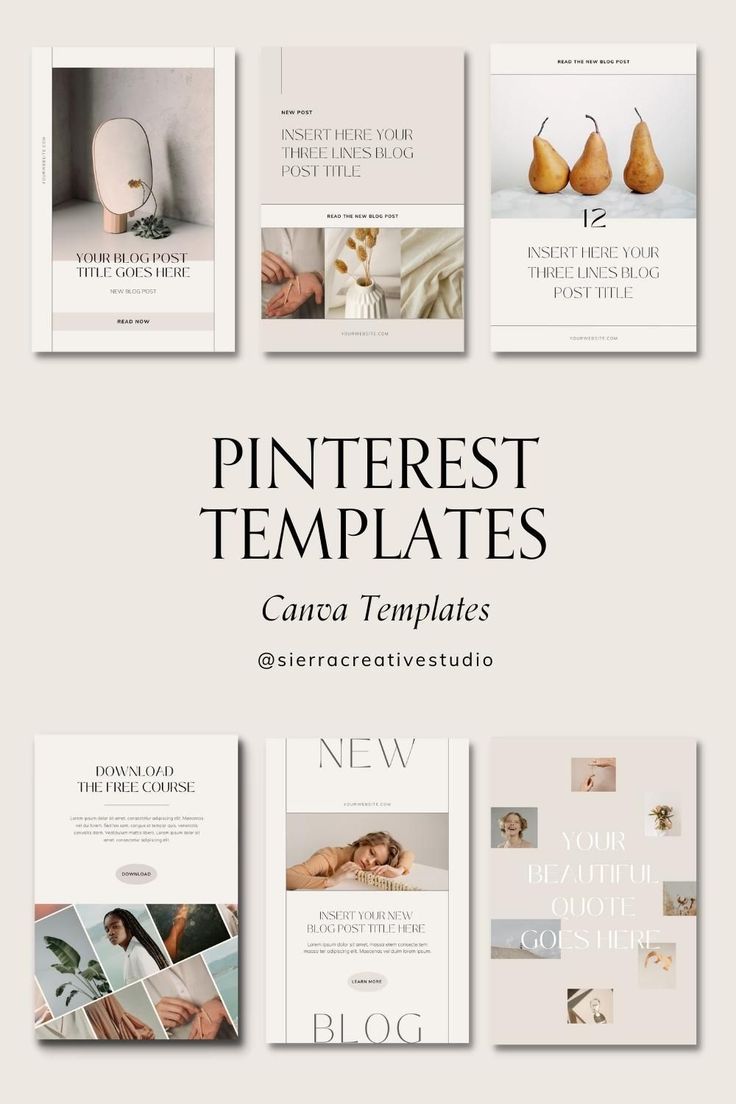
  • Best Pinterest Templates for Creative Pin Designs

    Best Pinterest Templates for Creative Pin Designs

    Pinterest is a visual discovery platform where people search for ideas, inspiration, products, tutorials, and useful information. Because Pinterest is highly visual, the design of your Pin plays an important role in attracting attention. A well-designed Pin can make your content easier to understand and encourage users to click on it.

    Whether you are a blogger, business owner, creator, marketer, or beginner, Pinterest templates can help you create professional-looking Pins more efficiently.

    What Are Pinterest Templates?

    Pinterest templates are pre-designed layouts that can be customized for creating Pinterest Pins. They usually include spaces for images, headlines, descriptions, logos, and other design elements.

    Templates provide a basic structure for your content. You only need to replace the sample text and images with your own information.

    Why Are Pinterest Templates Important?

    Creating every Pin from scratch can take a lot of time. Templates simplify the process and help you maintain a consistent visual style.

    Templates can help you:

    • Save design time
    • Create Pins more quickly
    • Maintain consistent branding
    • Organize your content
    • Make professional-looking designs
    • Experiment with different layouts
    • Create multiple Pins efficiently

    For businesses, consistency is especially useful because users can recognize content from the same brand more easily.

    1. Blog Post Pinterest Templates

    Blog post templates are useful for bloggers, websites, and content marketers. These templates are designed to promote articles and encourage users to visit the website.

    A good blog Pin can include:

    • Blog title
    • Main image
    • Short supporting text
    • Website or brand name
    • Call to action

    For example, if your blog is about SEO, your Pin title could be:

    “10 SEO Tips for Beginners”

    The design should make the main topic immediately clear. Avoid adding too much text because users should be able to understand the Pin quickly.

    2. Product Promotion Templates

    Product templates are useful for online stores, boutiques, and businesses that want to showcase products.

    A product Pin can include a product image, product name, short benefit, and brand logo.

    For example, a fashion business could create a Pin with:

    “New Party Wear Collection”

    along with a high-quality product photograph.

    The template should keep the product as the main visual focus. Use simple text and enough space around the product image.

    3. Pinterest Business Templates

    Businesses can use Pinterest templates to promote their services, offers, educational content, and brand messages.

    A business template may include:

    • Business logo
    • Brand colors
    • Main headline
    • Supporting information
    • Website
    • Call to action

    For example:

    “Grow Your Business with Digital Marketing”

    This type of Pin can link to a service page or blog article.

    4. Infographic Pinterest Templates

    Infographic templates are useful when you want to share several pieces of information in one visual design.

    They can be used for:

    • Statistics
    • Step-by-step guides
    • Checklists
    • Tutorials
    • Comparisons
    • Educational information

    For example, an infographic titled “5 Steps to Improve Your SEO” can show five simple steps in a vertical layout.

    Keep each section short and easy to read. Too much information can make the design difficult to understand.

    5. Quote Pinterest Templates

    Quote templates are popular for motivational, educational, lifestyle, and personal-brand content.

    A quote template usually contains a large quote in the center with a simple background and brand name.

    For example:

    “Success starts with consistent action.”

    6. Tips and Tricks Templates

    Tips templates are excellent for educational and informational content.

    For example:

    “7 Instagram Marketing Tips for Beginners”

    You can use a strong headline at the top and add a relevant image or simple graphic below it.

    7. Fashion Pinterest Templates

    Fashion businesses and creators can use templates to showcase outfits, styling ideas, collections, and fashion trends.

    A fashion template can include:

    • Large fashion photograph
    • Short headline
    • Collection name
    • Brand logo
    • Website or social media handle

    For example:

    “5 Western Outfit Ideas for Women”

    Use high-quality photographs and avoid overcrowding the design with too many decorative elements.

    8. Travel Pinterest Templates

    Travel content works particularly well with visual designs. Travel bloggers and tourism businesses can use templates for destination guides, travel tips, itineraries, and places to visit.

    Examples include:

    • Best Places to Visit in India
    • Manali Travel Guide
    • Weekend Trip Ideas
    • Travel Packing Checklist
    • Budget Travel Tips

    Use attractive destination photographs and clear headlines to make the Pin visually appealing.

    9. Step-by-Step Pinterest Templates

    Step-by-step templates are useful for tutorials and guides.

    For example:

    “How to Create a Pinterest Business Account”

    The Pin can show steps such as:

    1. Create an account.
    2. Select Business Account.
    3. Add business information.
    4. Complete your profile.
    5. Start creating Pins.

    A simple numbered layout can make complicated information easier to understand.

    10. Seasonal Pinterest Templates

    Seasonal templates can be used for holidays, festivals, events, sales, and seasonal trends.

    Examples include:

    • Diwali decoration ideas
    • Christmas gift ideas
    • Wedding outfit ideas
    • Summer fashion trends
    • Winter travel destinations
    • New Year marketing ideas

    Seasonal content can help businesses create timely Pins that match what their audience is interested in during a particular period.

    How to Choose the Right Pinterest Template

    Choosing the right template depends on your content and audience.

    First, identify your purpose. Are you promoting a blog, product, service, or educational article?

    Next, choose a layout that supports your message.

    Consider these factors:

    • Content type
    • Target audience
    • Brand style
    • Image quality
    • Text readability
    • Call to action
    • Overall simplicity

    A template should support your content rather than distract from it.

    Keep Your Pinterest Design Simple

    A common mistake is adding too many elements to a Pin. Too many colors, fonts, images, and text can make a design confusing.

    Try to keep your design clean.

    Use one main headline, one or two fonts, a clear image, and a simple color combination. Your most important information should be visually prominent.

    Remember that Pinterest users scroll through many Pins. Your design should communicate the main idea quickly.

    Use Consistent Branding

    If you are creating Pinterest content for a business, maintain consistent branding across your Pins.

    Use similar:

    • Fonts
    • Colors
    • Logo placement
    • Design style
    • Image style

    For example, if your brand uses a specific font and color combination, use those elements across your Pinterest templates.

    This can make your content look more professional and recognizable.

    Add Keywords to Your Pinterest Pins

    Design is important, but Pinterest SEO also matters. Use relevant keywords in your Pin titles and descriptions.

    For example, if your content is about digital marketing, related keywords might include:

    • Digital marketing tips
    • Social media marketing
    • SEO tips
    • Online marketing
    • Content marketing

    Use keywords naturally and make sure they accurately describe the content.

    Create Multiple Versions of a Template

    You do not have to use the exact same design for every Pin. Create a few variations of your main template.

    For example, you could have:

    • Template A for blog posts
    • Template B for tips
    • Template C for products
    • Template D for quotes

    This creates variety while maintaining a consistent brand identity.

    Pinterest Templates and Canva

    Canva is a popular design tool that can be used to create and customize Pinterest Pins. It provides many ready-made layouts and design elements.

    You can select a template, replace the text, upload your own images, add your logo, and adjust colors and fonts.

    Even beginners can create professional-looking designs without advanced graphic design skills.

    Tips for Creating Better Pinterest Templates

    Follow these simple tips when creating your templates:

    1. Use clear and readable fonts.
    2. Keep the headline short.
    3. Use high-quality images.
    4. Maintain consistent branding.
    5. Leave enough empty space.
    6. Use relevant keywords.
    7. Add a clear call to action.
    8. Avoid excessive text.
    9. Test different layouts.
    10. Check your analytics and improve your designs.

    Conclusion

    Pinterest templates make it easier to create attractive and consistent Pin designs. They can save time and help bloggers, businesses, creators, and marketers publish content more efficiently.

    From blog posts and product promotions to infographics, quotes, fashion, travel, and educational content, there are many types of Pinterest templates you can use.

    The key is to choose a template that matches your content and audience. Keep your design simple, use readable text, add high-quality visuals, and maintain consistent branding.

  • How to Use Pinterest Business for Effective Marketing & Growth

    How to Use Pinterest Business for Effective Marketing & Growth

    Pinterest business is a visual discovery platform where people search for ideas, inspiration, products, services, and useful content. For businesses, Pinterest can be more than a social media platform. It can be used as a marketing channel to increase brand awareness, drive website traffic, showcase products, and reach potential customers.

    A Pinterest Business account provides additional tools such as analytics, advertising options, business profile features, and content performance insights. With the right strategy, businesses can use Pinterest to promote their products, blogs, services, and online stores.

    What Is Pinterest Business?

    Pinterest Business is a professional account designed for businesses, brands, creators, bloggers, and marketers. It provides features that help users publish content and understand how their audience interacts with it.

    Unlike a personal Pinterest account, a business account gives access to tools such as Pinterest Analytics and advertising features. Businesses can also add important information to their profile and connect their website.

    Pinterest works differently from many traditional social media platforms. Users often visit Pinterest with the intention of discovering ideas and finding solutions. This makes it useful for businesses that can create helpful and visually attractive content.

    Why Use Pinterest for Marketing?

    Pinterest can help business reach people who are actively searching for ideas, products, and information. Instead of depending only on followers, businesses can create Pins that continue to attract users through Pinterest search and recommendations.

    Pinterest marketing can help with:

    • Increasing brand awareness
    • Driving website traffic
    • Promoting products and services
    • Sharing blog content
    • Reaching a new audience
    • Building an online presence
    • Generating potential leads
    • Supporting e-commerce marketing

    For example, a fashion business can create Pins featuring outfit ideas, styling tips, seasonal collections, or product designs. A travel website can publish destination guides, travel tips, and itinerary ideas.

    How to Create a Pinterest Business Account

    The first step is to create or convert your Pinterest account into a business account.

    Start by signing in to Pinterest and selecting the option to create a business account or convert an existing account. Add your business name, website, profile picture, and relevant business information.

    Choose a profile name that clearly represents your brand. Your profile description should explain what your business offers and include relevant keywords naturally.

    For example, a digital marketing business could use keywords such as digital marketing, SEO, social media marketing, and online marketing in its profile information.

    Create Relevant Pinterest Boards

    Boards help organize your Pins into different topics. Creating relevant boards makes your profile easier to understand and helps users find related content.

    For example, a fashion brand could create boards such as:

    • New Fashion Trends
    • Party Wear Dresses
    • Western Outfit Ideas
    • Ethnic Wear
    • Wedding Fashion
    • Styling Tips

    A digital marketing website could create boards such as:

    • SEO Tips
    • Social Media Marketing
    • Digital Marketing
    • Blogging Tips
    • Content Marketing

    Keep your board names simple and relevant to the content you plan to publish.

    Create Attractive Pins

    Pins are the main content format on Pinterest business. A Pin can include an image or video, title, description, and link.

    Visual quality is important because Pinterest business is highly visual. Your Pins should be clear, attractive, and easy to understand.

    When creating Pins, focus on:

    • High-quality visuals
    • Clear text
    • Consistent branding
    • Useful information
    • Relevant keywords
    • Strong titles
    • A clear call to action

    For example, instead of creating a Pin with only “SEO,” you could create a more useful design such as “10 Simple SEO Tips for Beginners.”

    Use Pinterest SEO

    Pinterest SEO helps your content appear when users search for specific topics. Keywords can be used naturally in your profile, board names, Pin titles, descriptions, and other relevant areas.

    Start by identifying keywords related to your business.

    For example, a travel business may target keywords such as:

    • Best places to visit in India
    • Travel tips
    • Weekend trips
    • Manali travel guide
    • Budget travel ideas

    Use keywords naturally instead of repeatedly adding the same keyword. The goal should be to create useful content that matches what people are searching for.

    Write Effective Pin Titles and Descriptions

    A good Pin title should clearly tell users what they will find after clicking the Pin.

    For example:

    “10 Easy Instagram Marketing Tips for Beginners”

    is more informative than:

    “Marketing Tips.”

    Your description can provide additional context and naturally include related keywords. Explain what the content offers and why users may find it useful.

    You can also include a relevant call to action, such as “Read the complete guide” or “Discover more tips.”

    Add Your Website Link

    One of the biggest benefits of Pinterest marketing is the ability to send users to your website or other relevant online content.

    When creating a Pin, add the appropriate destination link. This could be:

    • A blog article
    • Product page
    • Landing page
    • Online store
    • Service page
    • Portfolio
    • Registration page

    Make sure the destination page matches the content promised by the Pin. A relevant link provides a better user experience.

    Use Pinterest Analytics

    Pinterest Analytics helps businesses understand how their content is performing. It can provide useful information about impressions, engagement, clicks, and other performance indicators.

    Regularly reviewing analytics can help you identify which types of Pins are getting attention.

    For example, if Pins about “Instagram Marketing Tips” receive more clicks than general marketing content, you may decide to create more content around Instagram marketing.

    Analytics can help you make content decisions based on performance rather than guesswork.

    Create Consistent Content

    Consistency is important for Pinterest marketing. Instead of publishing many Pins one day and then stopping for several weeks, create a regular publishing schedule.

    You can prepare content in advance and maintain a consistent posting routine.

    Your content calendar might include:

    • Educational Pins
    • Blog promotion Pins
    • Product Pins
    • Infographics
    • Tips and tutorials
    • Seasonal content
    • Inspirational content

    The exact posting frequency can vary depending on your business and available resources. Focus on creating useful, high-quality content consistently.

    Use Pinterest for Blog Marketing

    Pinterest can be particularly useful for bloggers and websites. Every blog article can potentially be promoted through multiple visual Pins.

    For example, if you have a blog titled “How to Grow Instagram Followers,” you could create different Pins around topics such as:

    • Instagram growth tips
    • Organic follower growth
    • Instagram content ideas
    • Instagram marketing strategies

    Each Pin can link to the relevant blog article.

    This creates additional opportunities for people to discover your website.

    Pinterest Marketing for E-Commerce

    Online stores can also use Pinterest to showcase products. Businesses can create visually attractive Pins that highlight products and direct interested users to product pages.

    High-quality product images and clear descriptions can make Pins more useful for potential customers.

    Use Pinterest Trends

    Pinterest Trends can help marketers understand what people are searching for and which topics are gaining interest.

    Before creating content, research topics related to your industry. Look for keywords and ideas that match your target audience.

    For example, a beauty brand can research topics related to makeup, skincare, hairstyles, or seasonal beauty trends.

    Using relevant trends can help businesses create content that matches current audience interests. However, trends should still be relevant to your brand.

    Pinterest Advertising

    Pinterest also provides advertising options for businesses that want to promote their content.

    Paid campaigns can be used to increase visibility and reach specific audiences. Depending on the campaign objective, businesses may promote products, website content, or other marketing assets.

    Before running paid campaigns, define a clear objective. Your goal might be website traffic, product promotion, conversions, or brand awareness.

    Start with a suitable budget and monitor campaign performance regularly.

    Common Pinterest Marketing Mistakes

    Businesses sometimes make simple mistakes that can reduce the effectiveness of their Pinterest strategy.

    Common mistakes include:

    • Using low-quality images
    • Ignoring keywords
    • Creating irrelevant boards
    • Posting inconsistent content
    • Using misleading titles
    • Forgetting website links
    • Not checking analytics
    • Focusing only on promotion
    • Copying content without adding value

    Pinterest marketing should focus on providing useful and visually engaging content rather than continuously promoting products.

    Pinterest Marketing Tips for Beginners

    If you are new to Pinterest Business, start with a simple strategy.

    First, complete your business profile and create relevant boards. Then research keywords related to your business and create attractive Pins around those topics.

    Publish content consistently and track performance using analytics. Over time, identify the topics and formats that receive more engagement and clicks.

    Conclusion

    Pinterest Business can be a useful marketing platform for businesses, bloggers, creators, and online stores. It allows brands to showcase visual content, promote products, share helpful information, and drive traffic to their websites.

    Successful Pinterest marketing requires more than simply uploading images. Businesses should focus on Pinterest SEO, attractive Pins, relevant boards, useful content, consistent publishing, and performance tracking.

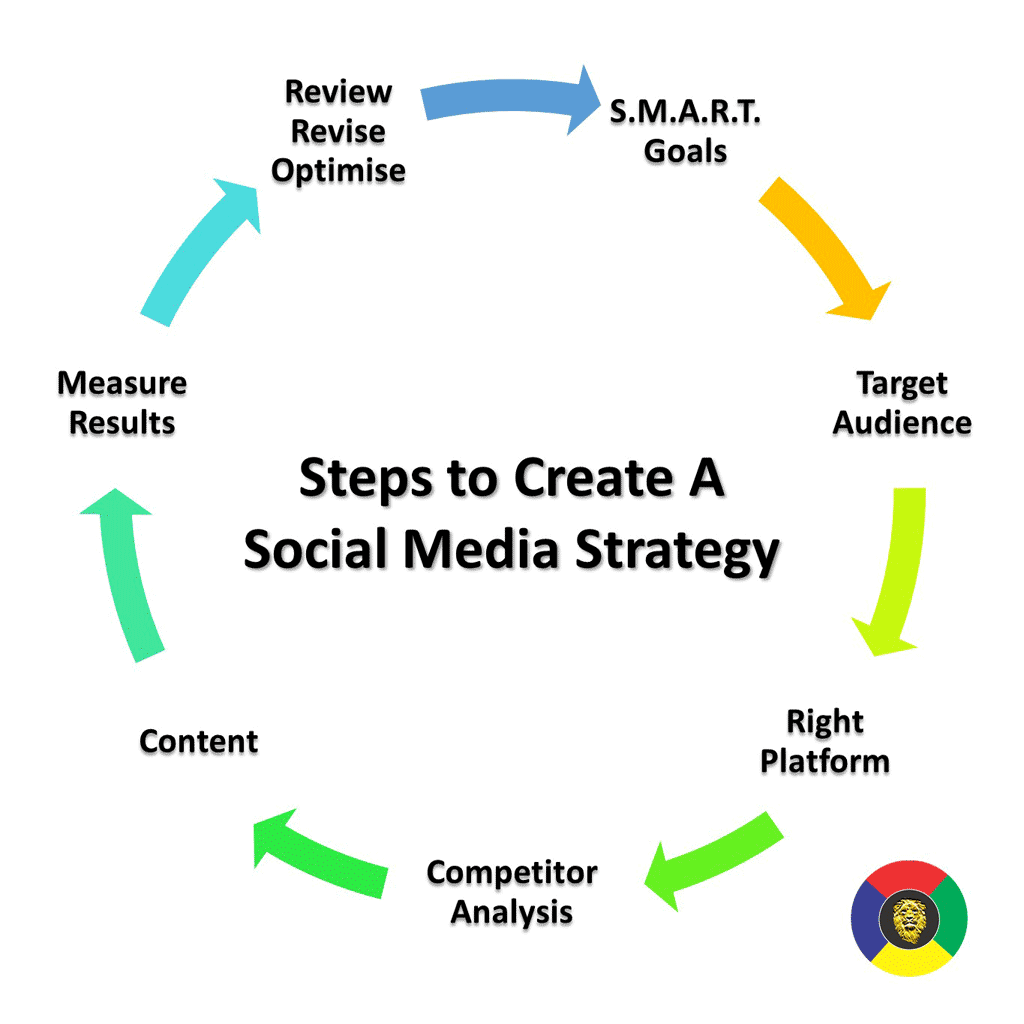
  • What is a Social Media Strategy: How Boost Your Online Growth

    What is a Social Media Strategy: How Boost Your Online Growth

    In today’s digital world, social media has become one of the most important tools for businesses, brands, creators, and individuals. Millions of people use platforms such as Instagram, Facebook, YouTube, LinkedIn, and X every day. Because of this, having a strong social media presence can help a business reach new customers, build brand awareness, increase engagement, and generate sales.

    However, simply posting content on social media is not enough. To achieve consistent results, you need a proper social media strategy. A social media strategy is a planned approach that explains what you want to achieve, who your target audience is, what type of content you should create, which platforms you should use, and how you will measure your results.

    What Is a Social Media Strategy?

    A social media strategy is a detailed plan for using social media platforms to achieve specific marketing or business goals. It includes your target audience, content plan, posting schedule, platform selection, engagement methods, and performance measurement.

    For example, if your goal is to increase brand awareness, you may focus on short videos, educational posts, stories, and collaborations.

    Why Is Social Media Strategy Important?

    A social media strategy provides direction and helps you use your time and resources effectively. Without a strategy, it can be difficult to understand what content works and why your account is not growing.

    Here are some major benefits of having a social media strategy:

    1. Increases Brand Awareness

    Social media can help more people discover your brand. Regular and valuable content can make your brand more recognizable among your target audience.

    2. Builds Audience Engagement

    Social media is not only about publishing content. It is also about communicating with your audience. Comments, likes, shares, messages, polls, and questions can help build stronger relationships.

    3. Helps Generate Leads

    A well-planned social media strategy can encourage interested users to visit your website, send a message, fill out a form, or contact your business.

    4. Supports Sales

    Product demonstrations, customer reviews, offers, tutorials, and informative content can help potential customers understand your products or services.

    5. Builds Trust

    Consistent and useful content can help establish credibility. Sharing knowledge, answering questions, showing behind-the-scenes content, and responding professionally can make your brand appear more trustworthy.

    Step 1: Set Clear Social Media Goals

    The first step is to define what you want to achieve. Your goals should be clear and measurable.

    Common social media goals include:

    • Increasing brand awareness
    • Growing followers
    • Increasing engagement
    • Generating leads
    • Increasing website traffic
    • Promoting products or services
    • Improving customer communication
    • Increasing sales

    Instead of saying “I want more followers,” create a measurable objective such as increasing followers by a specific amount within a particular period.

    Step 2: Understand Your Target Audience

    Knowing your audience is essential for successful social media marketing.

    You should understand:

    • Age group
    • Location
    • Interests
    • Problems and needs
    • Buying behavior
    • Preferred social media platforms
    • Type of content they enjoy

    For example, a fashion business may target people interested in clothing, beauty, lifestyle, and fashion trends. A professional training company may focus on students, job seekers, and working professionals.

    When you understand your audience, you can create content that is more relevant to them.

    Step 3: Choose the Right Social Media Platforms

    You do not need to use every social media platform. Choose platforms that match your audience and business goals.

    Instagram

    Instagram is useful for visual content such as Reels, photos, Stories, product showcases, fashion, beauty, lifestyle, and brand content.

    Facebook

    Facebook can help businesses build communities, share updates, promote products, and communicate with customers.

    YouTube

    YouTube is useful for long-form videos, tutorials, reviews, educational content, Shorts, and detailed demonstrations.

    LinkedIn

    LinkedIn is mainly focused on professional networking, career content, business communication, industry knowledge, and professional branding.

    Choosing the right platforms allows you to focus your efforts instead of spreading your resources too widely.

    Step 4: Create a Strong Content Strategy

    Content is one of the most important parts of a social media strategy. Your content should provide value and match your goals.

    You can create different types of content, such as:

    Educational Content

    Teach your audience something useful through tips, guides, tutorials, and how-to posts.

    Informative Content

    Share industry updates, facts, news, statistics, or useful information.

    Promotional Content

    Promote your products, services, offers, discounts, or new launches.

    Entertainment Content

    Use creative videos, trends, relatable posts, and entertaining content to increase engagement.

    User-Generated Content

    Customer reviews, testimonials, photos, and videos can provide social proof and show real experiences with your brand.

    A good content strategy should maintain a balance between promotional and valuable content.

    Step 5: Create a Content Calendar

    A content calendar helps you organize your social media activities in advance.

    Your calendar can include:

    • Date
    • Platform
    • Content topic
    • Content format
    • Caption
    • Hashtags
    • Call-to-action
    • Publishing time

    For example, you could plan educational content on Monday, a Reel on Wednesday, and promotional content on Friday.

    Planning ahead can save time and help maintain consistency.

    Step 6: Focus on Quality and Consistency

    Posting frequently is useful, but quality should not be ignored. Your content should be clear, visually appealing, useful, and relevant to your audience.

    Consistency is also important. Regular posting helps your audience know when to expect new content.

    Step 7: Use Hashtags and Keywords

    Relevant hashtags and keywords can help users discover your content.

    Instead of using random or unrelated hashtags, choose hashtags connected to your topic, industry, product, or audience.

    Step 8: Engage With Your Audience

    Social media is a two-way communication channel. Do not only post content and leave.

    Respond to comments and messages, ask questions, conduct polls, reply to customer queries, and encourage discussions.

    Step 9: Analyze Your Performance

    Analytics help you understand whether your strategy is working.

    Important metrics include:

    • Reach
    • Impressions
    • Likes
    • Comments
    • Shares
    • Saves
    • Video views
    • Profile visits
    • Website clicks
    • Follower growth
    • Leads and conversions

    Step 10: Improve Your Strategy

    Social media trends and audience behavior change over time. Therefore, your strategy should not remain exactly the same forever.

    Review your performance regularly and identify which content performs well and which content needs improvement.

    Experiment with different topics, formats, captions, posting schedules, and creative ideas. Use your analytics to make informed changes.

    Common Social Media Strategy Mistakes

    Many businesses make simple mistakes that can reduce their social media performance.

    Common mistakes include:

    • Posting without a clear goal
    • Targeting the wrong audience
    • Using too many unrelated hashtags
    • Posting only promotional content
    • Ignoring comments and messages
    • Inconsistent posting
    • Copying competitors without adding value
    • Not checking analytics
    • Focusing only on follower numbers
    • Not adapting to audience interests

    Avoiding these mistakes can make your social media activities more organized and effective.

    Conclusion

    A strong Social Media Strategy can help businesses and creators build their online presence, connect with their target audience, increase engagement, generate leads, and support business growth. The key is to create a clear plan instead of posting content randomly.

    Start by setting specific goals, understanding your audience, selecting the right platforms, creating valuable content, maintaining a content calendar, engaging with followers, and monitoring your analytics.

  • Instagram Marketing: Complete Guide for Beginners

    Instagram Marketing: Complete Guide for Beginners

    Instagram Marketing is a powerful way to promote a business, product, service, or personal brand online. Instagram allows businesses and creators to connect with their target audience through photos, Reels, Stories, and other content formats. With the right strategy, Instagram can help increase brand awareness, audience engagement, website traffic, and potential customers.

    What Is Instagram Marketing?

    Instagram Marketing means using Instagram to promote a business, product, service, or personal brand. It includes creating content, interacting with followers, using relevant hashtags and keywords, collaborating with creators, and running paid advertisements..

    1. Create a Professional Instagram Profile

    Important profile elements include:

    • Simple and memorable username
    • Clear profile picture or business logo
    • Informative Instagram bio
    • Relevant keywords
    • Website or business link
    • Clear description of your products or services

    Your profile should immediately tell visitors who you are and what type of content they can expect.

    2. Understand Your Target Audience

    Think about your audience’s needs, questions, problems, interests, and preferences. For example, a fashion business can create styling tips, outfit ideas, and new collection posts, while a digital marketing business can share SEO and social media tips.

    When your content matches your audience’s interests, it becomes more relevant and useful.

    3. Create Valuable Content

    Content is the foundation of Instagram Marketing. Instead of posting only promotional content, create posts that educate, entertain, inspire, or solve problems.

    Some useful content ideas are:

    • Educational posts
    • Tips and tricks
    • Tutorials
    • Product demonstrations
    • Customer reviews
    • Behind-the-scenes content
    • FAQs
    • Industry updates

    A good content strategy should provide value while naturally promoting your brand.

    4. Use Instagram Reels

    Reels are short-form videos that can help businesses and creators introduce their content to new audiences. You can create simple Reels using a smartphone and basic editing tools.

    Try creating videos around quick tips, tutorials, product demonstrations, common questions, or behind-the-scenes activities. Start your video with a clear and interesting idea so viewers understand the topic quickly.

    5. Use Instagram Stories

    Instagram Stories are useful for sharing regular updates and communicating with followers. Stories can make your account feel more active and personal.

    Interactive Story features can encourage followers to participate and communicate with your brand.

    6. Use Keywords and Hashtags

    Keywords help describe your content and can help users understand what your account is about. Use relevant keywords naturally in your profile and captions.

    Hashtags can also help categorize your content. Choose hashtags that are directly related to your niche instead of using unrelated popular hashtags.

    7. Engage With Your Audience

    Instagram Marketing is not only about publishing posts. Building relationships with your audience is equally important.

    Regular engagement can help create a stronger community around your brand and give you a better understanding of what your audience wants.

    8. Collaborate With Other Creators

    Collaborating with relevant creators or businesses can help you introduce your content to a new audience.

    Popular collaboration ideas include:

    • Joint Reels
    • Interviews
    • Live sessions
    • Product demonstrations
    • Educational content
    • Shared campaigns

    When choosing a collaboration partner, consider whether their audience is relevant to your niche rather than focusing only on their follower count.

    9. Instagram Marketing for Small Businesses

    Instagram can be especially useful for small businesses that want to build an online presence. Businesses can use the platform to showcase products, explain services, answer questions, and communicate with potential customers.

    For example, a clothing business can share new arrivals, styling ideas, product videos, and customer reviews. A restaurant can showcase dishes, menu updates, special offers, and behind-the-scenes content.

    The main goal is to show customers how your products or services can meet their needs.

    10. Use Instagram Advertising

    Businesses can also use paid Instagram advertising to reach selected audiences. Ads can support different marketing objectives depending on the business and campaign.

    Instagram advertising can be used for:

    • Brand awareness
    • Website traffic
    • Lead generation
    • Product promotion
    • Customer engagement

    Before starting an advertising campaign, define your objective, target audience, budget, and message. Review campaign performance regularly and make improvements based on the data.

    11. Track Your Instagram Performance

    Analytics help you understand which content is performing well. Instead of guessing what your audience likes, use available performance information to improve your strategy.

    Important metrics include:

    • Reach
    • Views
    • Likes
    • Comments
    • Shares
    • Saves
    • Profile visits
    • Website actions
    • Follower growth

    For example, if educational Reels receive more saves and shares than other content, you can consider creating more educational videos.

    12. Avoid Common Instagram Marketing Mistakes

    Beginners often make mistakes that can make their Instagram strategy less effective.

    Avoid these common mistakes:

    • Posting without a content strategy
    • Using unrelated hashtags
    • Ignoring comments and messages
    • Posting inconsistently
    • Focusing only on follower numbers
    • Making every post a sales message
    • Buying fake followers

    Instead, focus on building a genuine audience that is interested in your content, products, or services.

    13. Stay Consistent

    Consistency is important for building an Instagram presence. You do not necessarily need to post every day. Create a realistic schedule that you can maintain for the long term.

    Plan your content in advance and use a mixture of Reels, Stories, carousel posts, and other suitable formats. Review your results regularly and improve your strategy based on what you learn.

    Conclusion

    Instagram Marketing can help beginners build brand awareness, connect with potential customers, promote products and services, and develop an online community.

    To get started, create a professional profile, understand your target audience, publish valuable content, use Reels and Stories, engage with followers, and track your performance.

  • Get Instagram Followers Organically in 2026

    Get Instagram Followers Organically in 2026

    Instagram has become one of the most useful platforms for building a personal brand, promoting a business, and connecting with a target audience. In 2026, getting Instagram followers organically is still possible, but it requires consistency, useful content, and a clear strategy. Organic followers are people who choose to follow your account because they genuinely like your content or find it useful.

    Unlike paid followers or fake accounts, organic followers can interact with your posts, watch your Reels, share your content, and become loyal customers or community members. If you want to Get Instagram Followers Organically in 2026, focus on creating valuable content and building real relationships with your audience.

    1. Optimize Your Instagram Profile

    Your Instagram profile is the first thing people see when they discover your account. A professional and clear profile can encourage visitors to follow you.

    Use a simple username that represents your brand or niche. Add a clear profile picture and write a short bio explaining who you are and what type of content you provide.

    You can also add relevant keywords to your bio so users can quickly understand your content. If you have a website, store, or other important page, add the link to your Instagram profile.

    2. Create High-Quality Content

    Content is one of the most important parts of Instagram growth. Create posts that educate, entertain, inspire, or solve problems for your audience.

    Use a mixture of Reels, carousel posts, photos, Stories, and other available Instagram formats. Try to maintain a consistent visual style so people can recognize your content easily.

    Instead of posting only promotional content, provide useful information that your audience wants to save and share.

    3. Focus on Instagram Reels

    Reels can help your content reach people who do not already follow you. Create short and engaging videos around topics related to your niche.

    Start your Reel with an interesting hook. Keep the information clear and avoid unnecessary introductions. Use captions or on-screen text when it helps viewers understand the video.

    You can create tutorials, tips, product demonstrations, behind-the-scenes videos, FAQs, or entertaining content based on your audience.

    4. Use Relevant Keywords and Hashtags

    Instagram search can help people discover content based on keywords. Use relevant words in your captions, profile bio, and content where appropriate.

    Hashtags can also provide additional context about your content. Instead of using random or unrelated hashtags, choose hashtags that are relevant to your topic and audience.

    For example, a digital marketing account might use hashtags related to digital marketing, SEO, social media marketing, and content marketing.

    5. Post Consistently

    Consistency is important when trying to grow your Instagram account organically. You do not need to post every hour or create content every day if you cannot maintain the quality.

    Create a realistic posting schedule and follow it regularly. You can plan your content for the week in advance and use Instagram’s scheduling features when appropriate.

    Consistent posting helps your audience know when to expect new content.

    6. Understand Your Audience

    To attract organic followers, you need to understand who you are creating content for.

    Think about your audience’s interests, questions, problems, and goals. Then create content that provides useful answers.

    Instagram Insights can help you understand information about your audience and content performance. Use this information to identify which topics and formats receive stronger engagement.

    7. Encourage Engagement

    Organic Instagram growth is not only about gaining followers. Engagement is also important for building a community.

    Ask questions in your captions and encourage people to share their opinions. Use Stories to create polls, quizzes, questions, and other interactive content.

    When people comment on your posts, respond to them naturally. Meaningful conversations can help build relationships with your audience.

    8. Use Instagram Stories Regularly

    Stories are useful for staying connected with your existing audience. They can also make your account feel more personal and active.

    Share behind-the-scenes content, daily updates, tips, polls, questions, product information, or short videos.

    You can also use Stories to direct followers toward new posts, Reels, products, or other important content.

    9. Collaborate With Other Creators

    Collaboration can introduce your account to a new audience. Find creators or businesses that have an audience related to your niche.

    You can create collaborative Reels, educational posts, interviews, product demonstrations, or other useful content.

    Choose collaborations based on audience relevance rather than follower count alone. A smaller but relevant audience can be valuable for organic growth.

    10. Avoid Buying Fake Followers

    Buying followers may make your follower number look higher, but fake or inactive accounts usually do not provide meaningful engagement.

    A large follower count with very low engagement can also make it harder to understand your real audience.

    Instead of buying followers, focus on attracting people who are genuinely interested in your content. Real followers are more likely to watch your content, comment, share posts, and return to your profile.

    11. Analyze Your Instagram Performance

    Regularly check your Instagram analytics to understand what is working.

    Look at metrics such as views, reach, interactions, shares, saves, profile visits, and follower growth. Compare different types of content and identify patterns.

    For example, if educational Reels receive more saves and shares than regular photos, you can create more educational video content.

    Use data to improve your strategy instead of simply posting without checking results.

    12. Be Patient and Consistent

    Organic Instagram growth does not usually happen overnight. Some posts may receive limited reach, while others may perform much better.

    Do not stop creating content because one post did not perform well. Learn from your results, improve your content, and continue experimenting.

    The goal should be to build a genuine audience rather than focusing only on a follower number.

    Conclusion

    If you want to Get Instagram Followers Organically in 2026, focus on quality content, consistency, audience engagement, Reels, Stories, relevant keywords, and genuine relationships.

    Optimize your profile, understand your audience, analyze your performance, and avoid shortcuts such as buying fake followers. Organic growth takes time, but it can help you build a stronger and more engaged Instagram community.

  • Social Marketing Agency for Business Growth: 2026 Guide

    Social Marketing Agency for Business Growth: 2026 Guide

    In 2026, social media continues to play an important role in digital marketing and business growth. Customers use social platforms to discover brands, research products, communicate with businesses, and make purchasing decisions. For businesses that want to build a strong online presence, working with a social marketing agency can provide professional support and a structured marketing strategy.

    A social marketing agency helps businesses manage their social media presence, create engaging content, reach target audiences, generate leads, and improve brand visibility. Whether you are a small business, startup, online store, service provider, or established company, a well-planned social media strategy can help you compete in the digital marketplace.

    What Is a Social Marketing Agency?

    A social marketing agency is a professional company or team that helps businesses promote their brands, products, and services through social media platforms.

    • Social media strategy
    • Content creation
    • Social media management
    • Community engagement
    • Paid social media advertising
    • Influencer marketing
    • Social media analytics
    • Lead generation
    • Brand promotion
    • Campaign management

    Why Social Marketing Is Important in 2026

    Social media has become an important part of the customer journey. People can discover a business through a short video, read comments and reviews, visit the brand profile, and then contact the business or visit its website.

    In 2026, businesses need more than just regular posting. They need content that is useful, engaging, relevant, and suitable for their target audience.

    A professional social marketing strategy can help businesses:

    • Increase online visibility
    • Build brand awareness
    • Reach potential customers
    • Improve audience engagement
    • Generate leads
    • Promote products and services
    • Drive website traffic
    • Support sales
    • Build customer relationships

    Major Services Offered by a Social Marketing Agency

    Different agencies provide different services, but most social marketing agencies offer several core services.

    1. Social Media Strategy

    A successful campaign starts with a clear strategy. An agency first understands the business, target audience, competitors, goals, and available resources.

    2. Content Creation

    Content is one of the most important parts of social media marketing.:

    • Reels and short videos
    • Images and graphics
    • Carousels
    • Stories
    • Educational posts
    • Promotional posts
    • Product videos
    • Captions
    • Infographics

    3. Social Media Management

    This can include scheduling posts, publishing content, responding to comments, monitoring messages, managing communities, and maintaining the brand’s online presence.

    4. Paid Social Media Advertising

    Organic content is only one part of social media marketing. Businesses can also use paid advertising to reach specific audiences.

    A social marketing agency may help with:

    • Campaign planning
    • Audience targeting
    • Ad creative
    • Budget management
    • Campaign monitoring
    • Performance analysis
    • Conversion tracking

    Paid advertising can be useful when a business wants to promote a product, generate leads, drive website traffic, or reach a specific audience.

    5. Social Media Analytics

    Agencies can monitor metrics such as:

    • Reach
    • Impressions
    • Engagement
    • Video views
    • Clicks
    • Profile visits
    • Follower growth
    • Leads
    • Conversions

    Analytics can also help identify which content formats and topics receive better audience responses.

    Benefits of Hiring a Social Marketing Agency

    Professional Expertise

    Social media marketing requires knowledge of content, advertising, audience targeting, analytics, and platform features. An experienced agency can bring specialized skills to your marketing efforts.

    Saves Time

    Managing multiple social media accounts can take a significant amount of time. An agency can handle planning, content, publishing, and reporting while business owners focus on other important responsibilities.

    Consistent Content

    Consistency is important for maintaining an active online presence. Agencies can create content calendars and publishing schedules to help businesses maintain regular activity.

    Better Audience Targeting

    A social marketing agency can research the target audience and create campaigns designed around their interests, needs, and online behavior.

    Data-Based Decisions

    Instead of relying only on assumptions, agencies can use analytics to understand performance and make adjustments based on available data.

    How to Choose a Social Marketing Agency in 2026

    Choosing the right agency requires careful research. Businesses should look beyond attractive promises and examine the agency’s services, communication process, experience, and reporting methods.

    Consider the following factors:

    Check Their Experience

    Look at the agency’s previous work and experience with businesses similar to yours.

    Understand Their Services

    Make sure the agency provides the services you actually need. For example, some businesses may need content creation, while others may need paid advertising or lead generation.

    Review Their Strategy

    Ask how they plan to understand your audience, select platforms, create content, and measure results.

    Ask About Reporting

    A professional agency should provide clear performance reports. You should be able to understand what activities were completed and how campaigns performed.

    Consider Communication

    Good communication is important. Discuss how often you will receive updates and how you can provide feedback.

    Understand Pricing

    Agency pricing can vary depending on services, campaign size, content requirements, advertising budgets, and business goals. Understand what is included before signing an agreement.

    Social Media Platforms for Business Growth

    A social marketing agency may use different platforms depending on the target audience and business objectives.

    Instagram

    Instagram is useful for visual marketing, Reels, Stories, product promotion, lifestyle content, and brand building.

    Facebook

    Facebook can support community building, business promotion, customer communication, and paid advertising.

    YouTube

    YouTube is suitable for tutorials, educational videos, product demonstrations, reviews, Shorts, and long-form content.

    LinkedIn

    LinkedIn is valuable for B2B marketing, professional networking, recruitment, thought leadership, and business-related content.

    Other Platforms

    Depending on the audience and industry, businesses may also use platforms such as Pinterest, X, Snapchat, or other emerging social networks.

    The right platform depends on where your target audience spends time and what type of content your business can produce effectively.

    Social Marketing Strategy for Small Businesses

    Small businesses do not always need to be active on every platform. Instead, they can focus on one or two platforms where their target customers are most active.

    A simple strategy can include:

    1. Define a specific business goal.
    2. Identify the target audience.
    3. Select relevant social platforms.
    4. Create a monthly content calendar.
    5. Publish educational and engaging content.
    6. Share product or service information.
    7. Respond to comments and messages.
    8. Test paid advertising when appropriate.
    9. Monitor analytics.
    10. Improve the strategy based on results.

    This approach can help small businesses build their presence gradually without unnecessarily spreading their resources.

    SEO and Social Media Marketing

    Social media and SEO are different digital marketing channels, but they can support each other.

    For example, a business targeting the keyword “social marketing agency” can create an SEO-friendly blog, optimize its title and headings, and promote the article through relevant social media channels.

    Common Social Marketing Mistakes

    Businesses should avoid several common mistakes:

    • Posting without a strategy
    • Focusing only on follower count
    • Ignoring audience comments
    • Using irrelevant hashtags
    • Posting too much promotional content
    • Copying competitors
    • Not tracking performance
    • Using the same content everywhere without adaptation
    • Expecting instant results
    • Not updating the strategy

    Social media marketing usually requires consistent effort, testing, and optimization.

    Future of Social Marketing in 2026

    Social marketing continues to evolve as platforms, content formats, and audience behavior change. Short-form video, creator collaborations, personalized content, social commerce, community engagement, and data-driven marketing remain important areas for businesses to consider.

    Artificial intelligence and automation can also assist marketers with tasks such as content ideas, research, scheduling, and analysis. However, businesses should still maintain human creativity, brand identity, accuracy, and meaningful communication with customers.

    The most useful approach is to combine technology with a clear understanding of the audience and business goals.

    Conclusion

    A Social Marketing Agency for Business Growth can help businesses build a stronger online presence through strategy, content creation, social media management, advertising, engagement, and analytics. In 2026, having a social media account is not enough. Businesses need a clear plan that connects social media activities with measurable business objectives.

    Whether you are a startup, small business, online store, or established company, the right social media strategy can help you reach relevant audiences and build long-term brand relationships.

  • Long Tail Keywords: Complete Guide to SEO Success

    Long Tail Keywords: Complete Guide to SEO Success

    SEO is not only about targeting popular keywords with thousands of monthly searches. Sometimes, specific and less competitive search terms can bring more valuable visitors to your website. This is where long tail keywords become important. They are longer and more specific search phrases that usually target a particular need, question, or search intent.

    For beginners and small websites, using specific keywords can be a practical way to attract relevant organic traffic. Instead of competing only for broad terms, you can create content around detailed searches that closely match what users are looking for.

    What Are Long Tail Keywords?

    Long tail keywords are longer, more specific keyword phrases that usually contain three or more words. They describe a particular search rather than a broad topic.

    For example:

    • SEO
    • SEO tips
    • SEO tips for beginners
    • SEO tips for beginners to improve website rankings

    The last example is more specific and clearly explains what the searcher wants to find.

    Long-tail search terms can have lower search volume than broad keywords, but they can also be less competitive and more closely connected to a user’s search intent.

    Why Are Long Tail Keywords Important for SEO?

    Using specific keywords can help you build a more focused SEO strategy. When your content directly answers a detailed search query, users may find it more relevant to their needs.

    One major advantage is lower keyword competition. Broad keywords can be difficult for new websites to rank for because many established websites are already targeting them. Specific phrases may provide additional opportunities to appear in search results.

    Another benefit is relevance. Someone searching for “how to do keyword research for a new website” has a clearer intention than someone simply searching for “keyword research.”

    Long-tail queries can therefore help you create content that answers specific questions and provides useful information.

    Long Tail Keywords vs Short Tail Keywords

    Short-tail keywords are broad search terms, usually consisting of one or two words. Examples include “SEO,” “digital marketing,” and “shoes.”

    Long-tail keywords are more specific, such as:

    • how to improve SEO for a new website
    • best SEO tools for beginners
    • how to choose keywords for a blog
    • how to write SEO-friendly blog posts

    The main difference is specificity.

    Short-tail keywords may have higher search volume, but they can also have strong competition and broad search intent. Long-tail keywords generally have more specific intent, which can make them useful for targeted content.

    A balanced SEO strategy can include both types of keywords rather than relying on only one.

    Benefits of Using Long Tail Keywords

    1. Lower Competition

    Many specific search phrases have fewer websites competing directly for them. This can create opportunities for newer websites and smaller businesses.

    However, lower competition does not guarantee rankings. Content quality, website authority, backlinks, technical SEO, and search intent also affect performance.

    2. Better Search Intent

    Specific queries often provide more information about what a person wants.

    For example, “SEO” is extremely broad. A search such as “how to check SEO score of a website” gives a much clearer indication that the user wants instructions or a tool.

    Understanding search intent allows you to create content that answers the user’s actual question.

    3. Easier Content Planning

    Long-tail search phrases can give you ideas for blog posts, guides, FAQs, and tutorials.

    For example, instead of creating one general article about “SEO tools,” you could create separate content around:

    • free SEO tools for beginners
    • best keyword research tools
    • website SEO analysis tools
    • free tools to check backlinks

    This approach can help you build a broader content strategy around related topics.

    4. More Relevant Traffic

    Traffic is useful when visitors are actually interested in your content. Specific keywords can help you target users who are searching for a particular solution.

    For example, a person searching for “how to create internal links in WordPress” is likely looking for practical instructions. A detailed article addressing that exact topic can provide a more relevant experience.

    How to Find Long Tail Keywords

    There are several ways to discover useful search phrases.

    Use Google Search

    Start typing a broad topic into Google and look at autocomplete suggestions. These suggestions can reveal phrases people commonly search for.

    You can also check the “People also ask” section and related searches at the bottom of the results page. These areas can provide additional keyword ideas.

    Use Keyword Research Tools

    SEO tools such as Google Keyword Planner, Semrush, Ahrefs, and other keyword research platforms can help identify related search terms.

    When researching keywords, look at factors such as:

    • Search volume
    • Keyword difficulty
    • Search intent
    • Relevance
    • Competition
    • Related keywords

    Do not choose a keyword only because it has high search volume. A highly relevant keyword with lower competition may be more useful for a new website.

    How to Choose the Right Long Tail Keywords

    The best keyword is not necessarily the one with the highest search volume. It should match your content, audience, and purpose.

    First, make sure the keyword is relevant to your website. Then consider what the searcher expects to find.

    For example, if your article explains how to perform keyword research, a phrase such as “how to do keyword research for beginners” may be more relevant than a broad term like “SEO.”

    Also consider keyword difficulty. If your website is new, targeting extremely competitive terms may be challenging. Building content around more specific topics can help you cover smaller search opportunities while developing your website’s overall topical relevance.

    How to Use Long Tail Keywords in a Blog

    Once you have selected a keyword, use it naturally throughout your content. Avoid repeating it excessively because keyword stuffing can make an article difficult to read and may create a poor user experience.

    You can use your primary keyword in important areas such as:

    • SEO title
    • Meta description
    • Introduction
    • Relevant headings
    • Main body content
    • URL, when appropriate
    • Image alt text, when descriptive and relevant

    You should also include related keywords and variations naturally. Search engines can understand related concepts, so you do not need to repeat exactly the same phrase in every paragraph.

    Long Tail Keywords and Voice Search

    Specific search queries are also relevant to conversational searches. People using voice assistants may ask complete questions instead of typing short phrases.

    For example, instead of searching “best SEO tools,” someone might ask, “What are the best free SEO tools for beginners?”

    Creating content that answers natural-language questions can help your website address these types of searches.

    Common Mistakes to Avoid

    One common mistake is choosing keywords only because they have high search volume. High volume does not automatically mean high-value traffic.

    Another mistake is forcing a keyword into every paragraph. Your content should be written primarily for readers.

    It is also important not to target unrelated keywords simply because they appear to have low competition. Every keyword should have a clear connection to your topic.

    Finally, avoid creating many pages that target almost identical search terms without adding unique value. Instead, organize related topics carefully and use internal linking to connect useful content.

    Final Thoughts

    Long tail keywords are an important part of a practical SEO strategy, especially when you want to target specific search intent. Their longer and more detailed nature can help you create focused content for users looking for particular answers.

    Instead of focusing only on search volume, consider relevance, competition, search intent, and the value your content provides. Use keyword research tools, Google suggestions, related searches, and competitor research to discover useful phrases.

    When used naturally alongside strong content, internal linking, technical SEO, and other optimization techniques, long-tail search terms can become a valuable part of your overall SEO strategy.