Tag: SEO Strategy

  • What is a Social Media Strategy: How Boost Your Online Growth

    What is a Social Media Strategy: How Boost Your Online Growth

    In today’s digital world, social media has become one of the most important tools for businesses, brands, creators, and individuals. Millions of people use platforms such as Instagram, Facebook, YouTube, LinkedIn, and X every day. Because of this, having a strong social media presence can help a business reach new customers, build brand awareness, increase engagement, and generate sales.

    However, simply posting content on social media is not enough. To achieve consistent results, you need a proper social media strategy. A social media strategy is a planned approach that explains what you want to achieve, who your target audience is, what type of content you should create, which platforms you should use, and how you will measure your results.

    What Is a Social Media Strategy?

    A social media strategy is a detailed plan for using social media platforms to achieve specific marketing or business goals. It includes your target audience, content plan, posting schedule, platform selection, engagement methods, and performance measurement.

    For example, if your goal is to increase brand awareness, you may focus on short videos, educational posts, stories, and collaborations.

    Why Is Social Media Strategy Important?

    A social media strategy provides direction and helps you use your time and resources effectively. Without a strategy, it can be difficult to understand what content works and why your account is not growing.

    Here are some major benefits of having a social media strategy:

    1. Increases Brand Awareness

    Social media can help more people discover your brand. Regular and valuable content can make your brand more recognizable among your target audience.

    2. Builds Audience Engagement

    Social media is not only about publishing content. It is also about communicating with your audience. Comments, likes, shares, messages, polls, and questions can help build stronger relationships.

    3. Helps Generate Leads

    A well-planned social media strategy can encourage interested users to visit your website, send a message, fill out a form, or contact your business.

    4. Supports Sales

    Product demonstrations, customer reviews, offers, tutorials, and informative content can help potential customers understand your products or services.

    5. Builds Trust

    Consistent and useful content can help establish credibility. Sharing knowledge, answering questions, showing behind-the-scenes content, and responding professionally can make your brand appear more trustworthy.

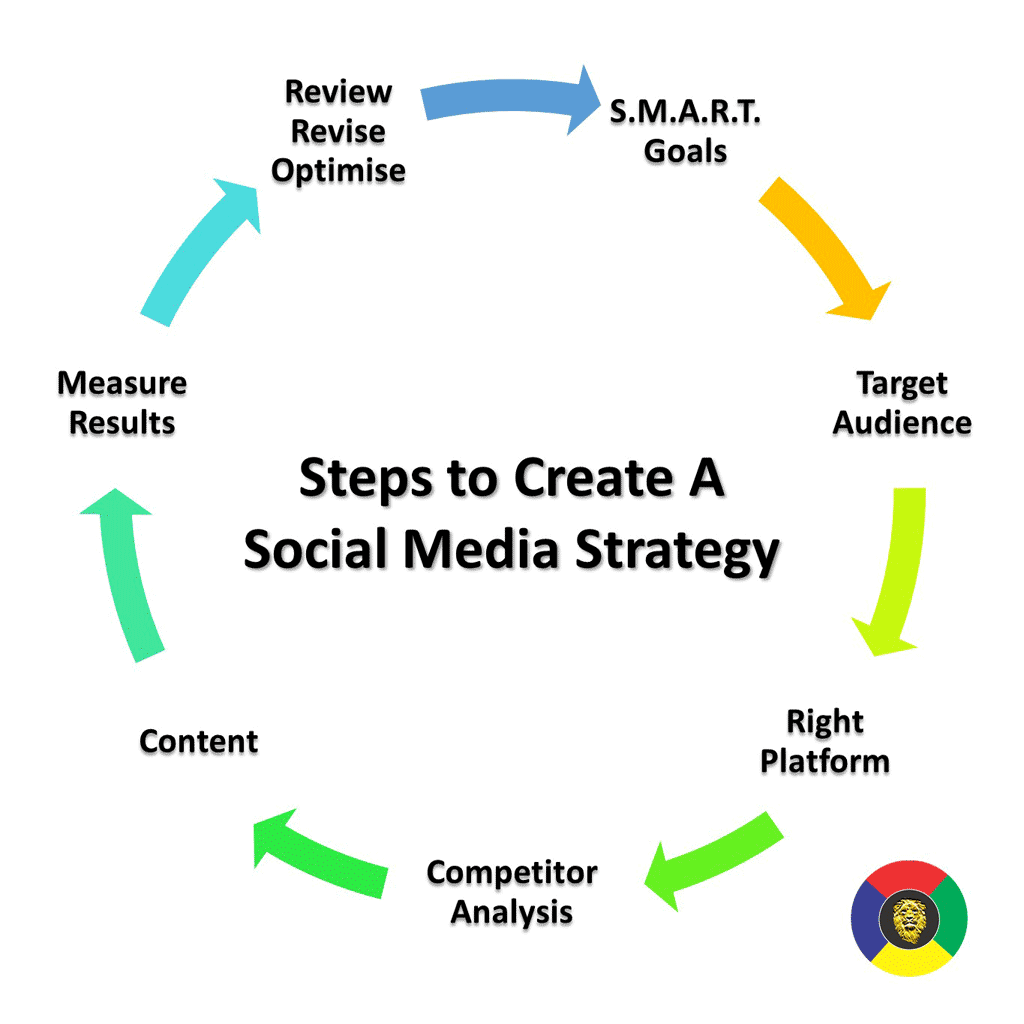
    Step 1: Set Clear Social Media Goals

    The first step is to define what you want to achieve. Your goals should be clear and measurable.

    Common social media goals include:

    • Increasing brand awareness
    • Growing followers
    • Increasing engagement
    • Generating leads
    • Increasing website traffic
    • Promoting products or services
    • Improving customer communication
    • Increasing sales

    Instead of saying “I want more followers,” create a measurable objective such as increasing followers by a specific amount within a particular period.

    Step 2: Understand Your Target Audience

    Knowing your audience is essential for successful social media marketing.

    You should understand:

    • Age group
    • Location
    • Interests
    • Problems and needs
    • Buying behavior
    • Preferred social media platforms
    • Type of content they enjoy

    For example, a fashion business may target people interested in clothing, beauty, lifestyle, and fashion trends. A professional training company may focus on students, job seekers, and working professionals.

    When you understand your audience, you can create content that is more relevant to them.

    Step 3: Choose the Right Social Media Platforms

    You do not need to use every social media platform. Choose platforms that match your audience and business goals.

    Instagram

    Instagram is useful for visual content such as Reels, photos, Stories, product showcases, fashion, beauty, lifestyle, and brand content.

    Facebook

    Facebook can help businesses build communities, share updates, promote products, and communicate with customers.

    YouTube

    YouTube is useful for long-form videos, tutorials, reviews, educational content, Shorts, and detailed demonstrations.

    LinkedIn

    LinkedIn is mainly focused on professional networking, career content, business communication, industry knowledge, and professional branding.

    Choosing the right platforms allows you to focus your efforts instead of spreading your resources too widely.

    Step 4: Create a Strong Content Strategy

    Content is one of the most important parts of a social media strategy. Your content should provide value and match your goals.

    You can create different types of content, such as:

    Educational Content

    Teach your audience something useful through tips, guides, tutorials, and how-to posts.

    Informative Content

    Share industry updates, facts, news, statistics, or useful information.

    Promotional Content

    Promote your products, services, offers, discounts, or new launches.

    Entertainment Content

    Use creative videos, trends, relatable posts, and entertaining content to increase engagement.

    User-Generated Content

    Customer reviews, testimonials, photos, and videos can provide social proof and show real experiences with your brand.

    A good content strategy should maintain a balance between promotional and valuable content.

    Step 5: Create a Content Calendar

    A content calendar helps you organize your social media activities in advance.

    Your calendar can include:

    • Date
    • Platform
    • Content topic
    • Content format
    • Caption
    • Hashtags
    • Call-to-action
    • Publishing time

    For example, you could plan educational content on Monday, a Reel on Wednesday, and promotional content on Friday.

    Planning ahead can save time and help maintain consistency.

    Step 6: Focus on Quality and Consistency

    Posting frequently is useful, but quality should not be ignored. Your content should be clear, visually appealing, useful, and relevant to your audience.

    Consistency is also important. Regular posting helps your audience know when to expect new content.

    Step 7: Use Hashtags and Keywords

    Relevant hashtags and keywords can help users discover your content.

    Instead of using random or unrelated hashtags, choose hashtags connected to your topic, industry, product, or audience.

    Step 8: Engage With Your Audience

    Social media is a two-way communication channel. Do not only post content and leave.

    Respond to comments and messages, ask questions, conduct polls, reply to customer queries, and encourage discussions.

    Step 9: Analyze Your Performance

    Analytics help you understand whether your strategy is working.

    Important metrics include:

    • Reach
    • Impressions
    • Likes
    • Comments
    • Shares
    • Saves
    • Video views
    • Profile visits
    • Website clicks
    • Follower growth
    • Leads and conversions

    Step 10: Improve Your Strategy

    Social media trends and audience behavior change over time. Therefore, your strategy should not remain exactly the same forever.

    Review your performance regularly and identify which content performs well and which content needs improvement.

    Experiment with different topics, formats, captions, posting schedules, and creative ideas. Use your analytics to make informed changes.

    Common Social Media Strategy Mistakes

    Many businesses make simple mistakes that can reduce their social media performance.

    Common mistakes include:

    • Posting without a clear goal
    • Targeting the wrong audience
    • Using too many unrelated hashtags
    • Posting only promotional content
    • Ignoring comments and messages
    • Inconsistent posting
    • Copying competitors without adding value
    • Not checking analytics
    • Focusing only on follower numbers
    • Not adapting to audience interests

    Avoiding these mistakes can make your social media activities more organized and effective.

    Conclusion

    A strong Social Media Strategy can help businesses and creators build their online presence, connect with their target audience, increase engagement, generate leads, and support business growth. The key is to create a clear plan instead of posting content randomly.

    Start by setting specific goals, understanding your audience, selecting the right platforms, creating valuable content, maintaining a content calendar, engaging with followers, and monitoring your analytics.
  • SEO SEM Difference: Complete Guide for Beginners

    SEO SEM Difference: Complete Guide for Beginners

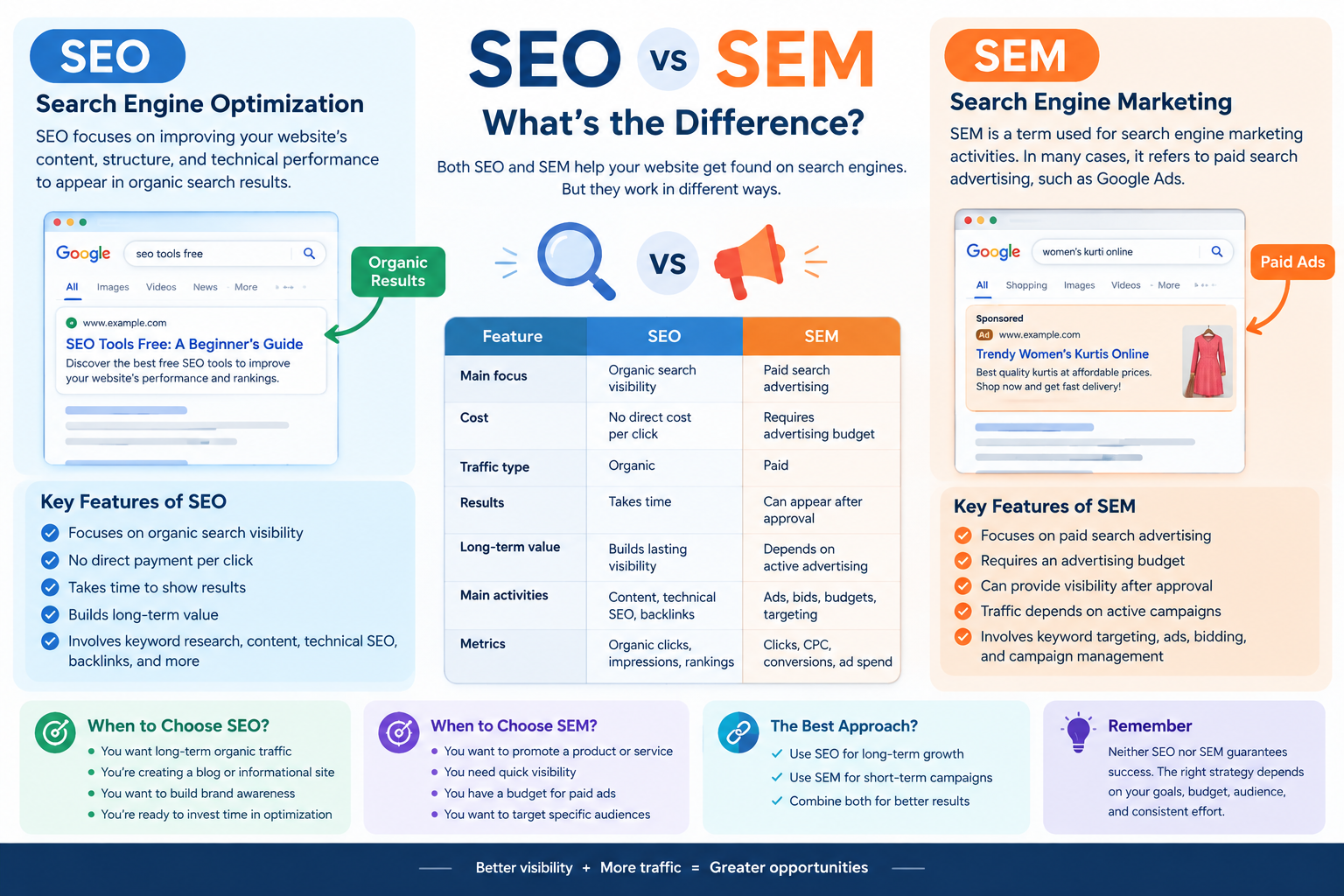
    Understanding the SEO SEM difference is important for anyone learning digital marketing, website optimization, or online business promotion. Both SEO and SEM help websites reach people through search engines such as Google, but they use different approaches to attract visitors.

    SEO focuses on improving organic search visibility, while SEM is commonly used in modern marketing to describe paid search advertising. Both strategies can support a website’s marketing goals, depending on its budget, audience, and business objectives.

    In this blog, we will explain the SEO SEM difference, how both strategies work, their benefits, key metrics, and how beginners can use them to improve their digital marketing knowledge.

    What Is SEO?

    SEO stands for Search Engine Optimization. It is the process of improving a website’s content, structure, and technical performance to help its pages appear in organic search results.

    Organic search results are unpaid listings displayed by search engines when users search for information, products, or services.

    For example, if someone searches for “how to get backlinks,” Google may display blog posts explaining backlink-building strategies. Website owners use SEO techniques to make their content relevant, useful, and accessible to search engines and users.

    How Does SEO Work?

    SEO involves several activities that help improve website visibility. These include:

    • Keyword research: Finding words and phrases that users search for.
    • On-page SEO: Optimizing titles, headings, content, and internal links.
    • Technical SEO: Improving website crawlability, indexing, and technical performance.
    • Off-page SEO: Building relevant external references and backlinks.
    • Content optimization: Creating helpful content that matches search intent.

    SEO does not guarantee a specific ranking or a fixed amount of traffic. Search engine algorithms, competition, content quality, and many other factors influence organic visibility.

    Example of SEO

    Imagine you create a blog titled “SEO Tools Free: A Beginner’s Guide.”

    You can optimize the article by researching relevant keywords, writing useful information, creating an appropriate meta title, adding internal links, and improving the website’s technical structure.

    Over time, search engines may discover and rank the article for relevant searches. The timeline and results will vary depending on your website and the level of competition.

    What Is SEM?

    SEM stands for Search Engine Marketing. The term can have a broad meaning that includes search engine marketing activities such as SEO and paid search advertising. However, in many modern digital marketing contexts, SEM is commonly used to refer specifically to paid search advertising.

    Paid search advertising allows businesses to display sponsored advertisements in search engine results for relevant queries. Google Ads is one example of a platform used for this purpose.

    Advertisers generally pay according to the campaign’s billing model, such as cost per click, and compete through an advertising auction.

    How Does SEM Work?

    A paid search campaign commonly involves the following steps:

    1. Identify relevant keywords and target audiences.
    2. Create advertisements related to the product or service.
    3. Set a budget and campaign settings.
    4. Choose relevant landing pages.
    5. Monitor clicks, costs, and conversions.
    6. Optimize the campaign based on performance.

    Paid ads may appear quickly after approval and when the campaign meets eligibility requirements. However, visibility, traffic, and conversions are not guaranteed.

    Example of SEM

    Suppose you own a clothing business and sell women’s kurtis online. You could create a Google Ads campaign targeting searches such as “buy women’s kurti online.”

    Your advertisement may appear in sponsored search results when it is eligible to participate in the relevant auction. You can then measure the campaign’s clicks, advertising costs, and purchases.

    This is an example of paid search marketing.

    SEO SEM Difference: Key Comparison

    Understanding the SEO SEM difference becomes easier when comparing the two strategies across important factors.

    FeatureSEOSEM (Paid Search)
    Main focusOrganic search visibilityPaid search advertising
    CostNo direct payment per organic clickRequires an advertising budget
    Traffic typeOrganicPaid
    ResultsUsually take time to developCan provide paid visibility after campaign approval
    Long-term valueCan build lasting organic visibilityTraffic typically depends on active advertising
    Main activitiesContent, technical SEO, backlinksAds, bids, budgets, targeting
    Performance metricsOrganic clicks, impressions, rankingsClicks, CPC, conversions, ad spend

    The definition of SEM can vary. Some marketing resources use SEM as an umbrella term for search engine marketing, while others use it mainly for paid search. Clarifying the terminology is important when studying SEO or working with marketing professionals.

    Benefits of SEO

    SEO provides several potential benefits for website owners and businesses.

    1. Builds Organic Visibility

    SEO helps your website compete for relevant unpaid search results. When your content matches users’ search intent and meets search engine quality requirements, it may gain organic visibility.

    2. Supports Long-Term Content Growth

    A useful blog can continue attracting organic visitors after publication. However, traffic may change over time because of competition, algorithm updates, and changing search behavior.

    3. Improves Website Structure

    SEO encourages better navigation, internal linking, mobile usability, and technical accessibility. These improvements can benefit both users and search engines.

    4. Supports Brand Awareness

    Appearing in relevant organic search results can help users discover your website and become familiar with your brand.

    Benefits of SEM

    Paid search advertising provides a different set of potential benefits.

    1. Quick Access to Paid Visibility

    Once a campaign is approved and eligible, advertisements can begin appearing for relevant searches. The exact timing depends on the platform and campaign setup.

    2. Targeted Advertising

    Advertisers can use available targeting options, such as location, language, and search-related signals, to reach selected audiences.

    3. Measurable Results

    Paid advertising platforms provide data about impressions, clicks, costs, and conversions. This information helps businesses evaluate campaign performance.

    4. Budget Management

    Advertisers can set campaign budgets and adjust bids and settings according to their goals. Actual spending and results depend on the campaign’s configuration and auction conditions.

    SEO vs SEM: Which Should You Choose?

    The right strategy depends on your website’s purpose, budget, timeline, and target audience. SEO and SEM can also be used together.

    SEO May Be Useful When:

    • You want to build organic search visibility.
    • You are developing an informational blog.
    • You want to improve website content and structure.
    • You are prepared to invest time in long-term optimization.

    SEM May Be Useful When:

    • You want to advertise a product or service.
    • You have a budget for paid search campaigns.
    • You want to test specific search audiences.
    • You need to measure paid advertising performance.

    For example, an online clothing store may use SEO to publish styling guides and attract organic visitors while using paid search ads to promote selected products.

    Neither strategy guarantees business success. Results depend on execution, competition, user demand, and the quality of the website or campaign.

    Important SEO Metrics

    If you are learning SEO, understanding performance metrics will help you evaluate your work.

    Organic Clicks

    Organic clicks show how many times users visit your website through unpaid search results. Google Search Console provides information about organic search clicks.

    Impressions

    Impressions indicate how often your website’s search results are displayed. A high number of impressions does not necessarily mean users will click on your page.

    Average Position

    Average position is a Search Console metric that summarizes the average position of your site’s search results for reported queries. It should be interpreted carefully because search results vary by query and context.

    Organic Traffic

    Organic traffic refers to visitors who arrive at your website through unpaid search results. Analytics tools can help you monitor this traffic.

    Important SEM Metrics

    Paid search campaigns use different performance indicators to measure results.

    Cost Per Click (CPC)

    CPC refers to the cost associated with a click on an advertisement. The actual amount depends on the advertising platform and campaign billing details.

    Click-Through Rate (CTR)

    CTR measures the percentage of impressions that result in clicks.

    For example, if an advertisement receives 10 clicks from 100 impressions, its CTR is 10%.

    Conversions

    A conversion is a desired action, such as purchasing a product, submitting a form, or signing up for a service.

    Ad Spend

    Ad spend is the amount of money spent on a paid advertising campaign. Tracking spending helps advertisers compare campaign costs with their business objectives.

    Common Mistakes Beginners Should Avoid

    When learning SEO and SEM, avoid assuming that either strategy guarantees immediate results.

    Some common mistakes include:

    • Expecting SEO rankings to improve instantly.
    • Running paid advertisements without a clear objective.
    • Ignoring the relevance of keywords.
    • Focusing only on traffic instead of meaningful conversions.
    • Using misleading titles or advertisements.
    • Failing to monitor campaign performance.

    A clear strategy and regular evaluation can help you make more informed marketing decisions.

    How to Learn SEO and SEM

    If you are a beginner, start by building a strong foundation in SEO. Learn keyword research, on-page optimization, technical SEO, and content writing.

    After understanding organic search, explore paid advertising concepts such as Google Ads, keyword targeting, bidding, campaign budgets, and conversion tracking.

    You can practice by creating a sample website or improving your own blog. Use Google Search Console to learn about organic search performance and explore official Google Ads learning resources to understand paid advertising.

    Combining theoretical knowledge with practical exercises can help you develop useful digital marketing skills.

    Conclusion

    The SEO SEM difference mainly relates to how websites gain visibility through search engines. SEO focuses on organic search optimization, while SEM is commonly used to describe paid search advertising, although the terminology can vary.

    SEO supports content development, website optimization, and organic visibility. SEM can help businesses promote products and services through paid advertisements and measure campaign performance.

    As you continue learning digital marketing, understanding both strategies will help you create a more complete approach to website promotion. Focus on useful content, relevant keywords, clear goals, and consistent performance analysis to develop your SEO and SEM skills.

  • Internal Linking for SEO: A Complete Beginner’s Guide

    Internal Linking for SEO: A Complete Beginner’s Guide

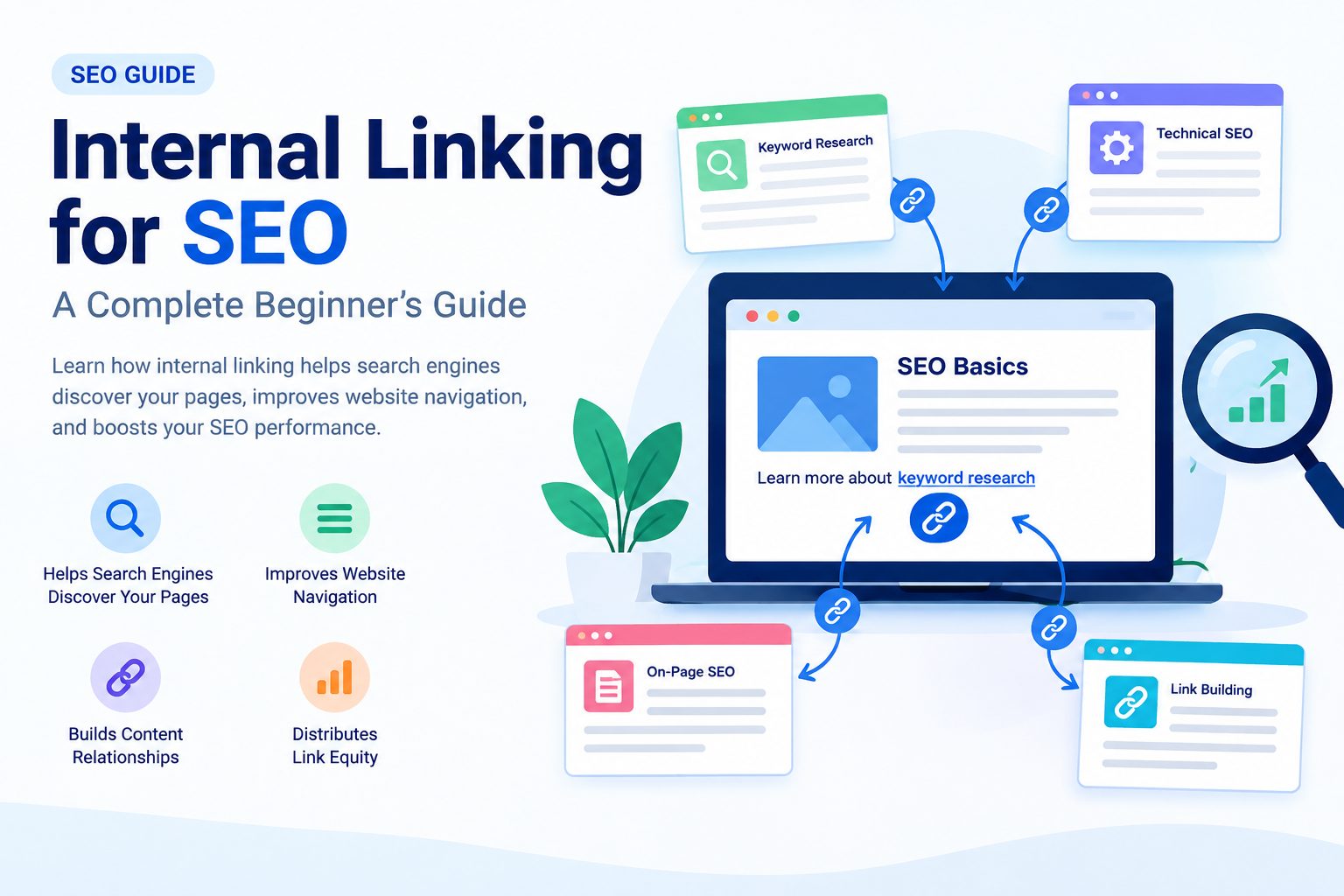
    Internal linking for SEO is an important part of on-page optimization that helps search engines understand your website’s structure and allows visitors to navigate between related pages. By adding relevant links to your blog content, you can connect different webpages, guide users toward useful information, and make your website easier to explore.

    If you are a beginner learning SEO, understanding internal linking can help you build a well-organized website and improve your overall content strategy. In this blog, we will explain what internal linking is, why it matters, its benefits, best practices, and how to add internal links to your website.

    What Is Internal Linking?

    Internal linking is the process of adding a hyperlink from one page of your website to another page on the same website. These links help visitors move between related content without needing to return to the homepage or search for another article.

    For example, if you have a blog about keyword research, you can link to another article about on-page SEO when discussing how keywords are used in content optimization.

    Example:

    “After finding the right keywords, learn more about [On-Page SEO: A Beginner’s Guide].”

    Here, the link connects two related pages on your website. This creates a better navigation experience and helps search engines discover the connected content.

    Why Is Internal Linking Important for SEO?

    Internal linking for SEO provides several benefits for both website visitors and search engines. Let’s understand the main reasons why internal links should be part of your SEO strategy.

    1. Helps Search Engines Discover Your Pages

    Search engines use links to discover and navigate webpages. Internal links can help search engine crawlers find pages that may not be easily accessible through other navigation paths.

    For example, if you publish a new blog about technical SEO and link to it from an existing, relevant article, the internal link provides another way for crawlers to reach that page.

    However, internal links do not guarantee that Google will crawl or index every linked page. Your website’s overall structure and other technical factors also matter.

    2. Improves Website Navigation

    Internal links make it easier for visitors to find related information on your website. Instead of searching for another article manually, users can click a relevant link within your content.

    For example, if your blog explains SEO basics, you can link to articles about:

    • Keyword research
    • On-page SEO
    • Technical SEO
    • Off-page SEO
    • Backlink building

    This helps readers explore additional topics and understand your content more easily.

    3. Helps Search Engines Understand Content Relationships

    Internal linking helps communicate how different pages on your website are connected. When related articles link to each other using descriptive anchor text, search engines can gain additional context about the linked page.

    For example, consider this sentence:

    “Learn more about how to get backlinks to understand off-page SEO.”

    The linked phrase gives users and search engines useful context about the destination page.

    Internal links are one of many signals search engines use to understand website content and relevance.

    4. Distributes Link Equity

    Internal links can help distribute link equity, sometimes referred to as link authority, throughout your website.

    When one page receives external backlinks, some of the value associated with those links may be passed through internal links to other pages. The amount of value transferred depends on various factors, and internal links do not guarantee improved rankings.

    A well-planned internal linking structure can help important pages become more connected within your website.

    Types of Internal Links

    There are several types of internal links you can use when optimizing your website.

    1. Navigational Internal Links

    Navigational links are commonly found in your website’s main menu, header, or navigation section. They help users access important pages such as:

    • Home
    • About Us
    • Services
    • Blog
    • Contact

    These links improve website navigation and allow visitors to find important sections quickly.

    2. Contextual Internal Links

    Contextual internal links are placed within the main content of a webpage. They connect users to related articles, guides, or resources.

    For example, while writing about SEO tools, you can link to a blog explaining keyword research tools.

    Contextual links are particularly useful because they appear naturally within relevant content and can direct readers toward additional information.

    3. Footer and Sidebar Links

    Footer and sidebar links can connect visitors to important pages or related content. They may include links to categories, popular articles, or essential website pages.

    Use these links thoughtfully and avoid adding excessive links that make the page difficult to navigate.

    How to Create an Effective Internal Linking Strategy

    A proper internal linking strategy helps you organize your website and connect related content. Follow these steps to get started.

    1. Identify Related Content

    Start by reviewing your existing blog posts and identifying articles that discuss similar or connected topics.

    For example, if your website focuses on SEO, you might have these articles:

    • What Is SEO?
    • Keyword Research for Beginners
    • On-Page SEO Guide
    • How to Get Backlinks
    • Technical SEO

    You can connect these articles where the links provide additional value to the reader.

    2. Use Descriptive Anchor Text

    Anchor text is the clickable text used in a hyperlink. It should clearly describe the content of the linked page.

    Good example:

    Learn more about keyword research for beginners.

    Less descriptive example:

    Click here to learn more.

    Descriptive anchor text helps users understand where a link will take them. Use natural variations when appropriate, rather than repeating the same keyword in every link.

    3. Link to Important Pages

    Consider linking to pages that are important for your website’s goals, such as detailed guides, service pages, or cornerstone content.

    For example, if you have a comprehensive guide about SEO, you can link to it from several related blog posts where it provides useful additional information.

    This can improve content discovery and help users navigate your website.

    4. Avoid Excessive Internal Links

    Internal links are useful, but adding too many links can make your content confusing and reduce readability.

    There is no fixed ideal number of internal links for every webpage. Instead, add links when they are relevant and helpful.

    Before adding a link, ask yourself:

    • Is this link relevant to the current topic?
    • Will it help the reader?
    • Does it lead to a working webpage?
    • Does the anchor text accurately describe the destination?

    If the answer is yes, the link may be a useful addition.

    Common Internal Linking Mistakes to Avoid

    Broken Internal Links

    A broken link leads to a missing or unavailable page. Regularly check your website for broken links and update or remove them when necessary.

    Irrelevant Links

    Avoid linking to unrelated pages simply to increase the number of internal links. Every link should serve a clear purpose.

    Using the Same Anchor Text Repeatedly

    Using identical anchor text for different destination pages can create confusion. Make sure your anchor text accurately represents the page you are linking to.

    Orphan Pages

    An orphan page is a webpage that has no internal links pointing to it from other pages on your website. These pages can be harder for users and search engines to discover, depending on the website’s other discovery methods.

    Review your website structure and add relevant internal links to important pages.

    How to Add Internal Links in WordPress

    If you use WordPress, adding an internal link is simple.

    1. Open your WordPress dashboard.
    2. Go to Posts and open the blog you want to edit.
    3. Select the text where you want to add a link.
    4. Click the link icon in the editor.
    5. Search for an existing blog or paste its URL.
    6. Apply the link and update your post.

    Always check that the link opens the correct webpage.

    How to Check Internal Links

    You can review your internal linking strategy using SEO tools such as Google Search Console, Semrush, or other website auditing tools. These tools may help you identify issues such as broken links, crawlability problems, and pages with limited internal links.

    For a beginner, start by manually reviewing your published blogs and creating connections between related topics.

    Conclusion

    Internal linking for SEO is an essential practice for building a well-structured website. It helps users discover related content, supports website navigation, and provides search engines with additional information about the relationships between your webpages.

    To improve your internal linking strategy, use descriptive anchor text, connect relevant articles, check for broken links, and avoid unnecessary linking. As you publish more blogs, regularly review your website structure and add internal links where they provide genuine value.

    A strong internal linking strategy, combined with quality content, keyword research, technical SEO, and other optimization techniques, can support your website’s long-term growth.