In today’s digital marketing environment, social media advertising has become an important way for businesses to connect with potential customers. Meta’s advertising tools allow businesses to promote their products and services across platforms such as Facebook and Instagram. To manage these advertising activities efficiently, marketers use Meta’s business and advertising tools.
Meta Business Ad Manager provides advertisers with a central place to create campaigns, select audiences, manage budgets, monitor performance, and optimize advertising activities. Whether a business wants to increase brand awareness, generate leads, drive website traffic, or promote products, understanding how Meta advertising works can help marketers manage campaigns more effectively.
What Is Meta Business Ad Manager?
Meta Business Ad Manager is a tool used to create, manage, and monitor advertising campaigns on Meta platforms. It gives advertisers access to campaign settings, audience targeting, budgets, ad creatives, performance reports, and other advertising features.
Businesses can use it to organize advertising campaigns according to their marketing goals. Instead of simply publishing a post on social media, advertisers can use campaign-level settings to control who sees an advertisement, where it appears, how much is spent, and what results are measured.
For digital marketers, Ad Manager is particularly useful because it provides detailed controls and performance data.
Table of Contents
How Meta Advertising Works
Meta advertising generally follows a campaign structure consisting of three main levels:
1. Campaign
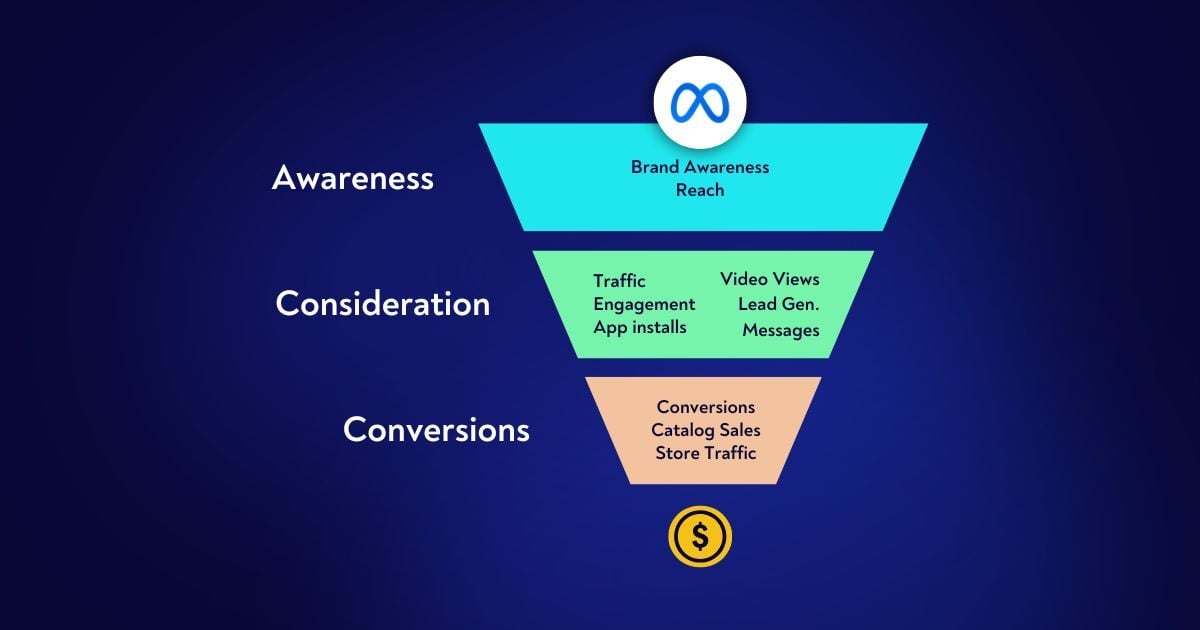
The campaign level is where the main advertising objective is selected. The objective should reflect what the business wants to achieve, such as awareness, traffic, engagement, leads, app promotion, or sales.
For example, if a company wants to collect customer inquiries, it may choose a lead-focused campaign setup.
2. Ad Set
The ad set level controls important elements such as audience, budget or scheduling settings, placements, and optimization choices.
Advertisers can create different ad sets to test audiences or targeting approaches. This allows marketers to compare performance and understand which audience segments are responding to their campaigns.
3. Ad
The ad is the content that users actually see. It can include an image, video, text, headline, call-to-action button, or other creative elements.
A strong ad should communicate the offer clearly and match the needs of the intended audience.
How to Create a Meta Ad Campaign
Creating a campaign requires proper planning. The following steps provide a basic process.
Step 1: Define Your Advertising Goal
Before creating an advertisement, decide what you want the campaign to accomplish. Common goals include increasing awareness, generating website visits, collecting leads, encouraging engagement, or generating sales.
A clear objective helps determine the appropriate campaign setup and measurement strategy.
Step 2: Select the Campaign Objective
Choose an objective that matches the desired business outcome. Selecting an appropriate objective helps Meta optimize delivery toward people who are more likely to complete the desired action.
For example, a business focused on customer inquiries can structure its campaign around lead generation.
Step 3: Create Your Audience
Audience targeting is an important part of Meta advertising. Advertisers can use available targeting options such as location, age ranges, interests, behaviors, custom audiences, and other audience signals depending on campaign setup and eligibility.
Businesses should avoid targeting people who are completely unrelated to their products or services. At the same time, an audience that is too narrow may limit delivery.
Step 4: Set the Budget and Schedule
Advertisers need to decide how much they are willing to spend and when the campaign should run. Meta provides different budget and scheduling options depending on the campaign configuration.
A business can begin with a controlled budget, monitor performance, and make adjustments based on results.
Step 5: Choose Placements
Meta ads can appear across different placements within Meta’s platforms and services. Available placements depend on the campaign objective, creative format, and other settings.
Advertisers should make sure that their creative assets are suitable for the placements they select.
Step 6: Create the Ad Creative
The creative is one of the most visible parts of an advertisement. It may contain an image, video, headline, primary text, and call to action.
Good creative should quickly explain what is being offered. For example, a digital marketing academy could use a short video showing course activities, learning benefits, and a clear way to register.
Step 7: Review and Publish
Before publishing, check the campaign objective, audience, budget, placements, creative, destination URL, and tracking settings.
Once everything is reviewed, submit the campaign for Meta’s advertising review process. The ad can begin delivering if it is approved and eligible.
Benefits of Meta Business Ad Manager
Precise Audience Targeting
Meta provides advertisers with a variety of audience tools. Businesses can use these options to reach people who may be relevant to their products or services.
For example, a local business can focus advertising on people in a particular geographic area.
Multiple Advertising Formats
Advertisers can use different creative formats, including images, videos, carousels, and other available formats. This provides flexibility when promoting different types of products and services.
Budget Management
Businesses can control advertising expenditure through campaign budget and scheduling settings. This can make it easier to manage advertising costs according to available resources.
Performance Tracking
Ad Manager provides performance information that advertisers can use to evaluate campaigns. Depending on the campaign, useful metrics may include impressions, reach, clicks, cost per result, conversions, and other performance indicators.
Testing Opportunities
Advertisers can test different audiences, creative concepts, messages, and campaign settings. Testing can help identify which approaches generate better results for a specific business.
How to Optimize Meta Ad Campaigns
Creating a campaign is only the beginning. Regular optimization is important for improving performance.
Monitor Important Metrics
Look beyond the number of likes or impressions. Depending on your objective, important metrics may include click-through rate, cost per result, leads, purchases, conversion rate, and return on ad spend.
The most useful metrics are those connected to your actual business objective.
Test Different Creatives
Creative fatigue can occur when the same advertisement is shown repeatedly to an audience. Testing new images, videos, headlines, and messages can provide additional information about what attracts attention.
Compare Audiences
If you are testing multiple audiences, compare their results using the same relevant performance metrics. This can help identify audience groups that produce more valuable results.
Improve Landing Pages
If an advertisement sends users to a website, the landing page should match the promise made in the advertisement. It should be easy to understand, mobile-friendly, and provide a clear next step.
A high number of clicks with very few conversions may indicate that the landing-page experience needs improvement.
Adjust Budget Based on Data
Campaign budgets should be reviewed using performance information. If one campaign or ad set is producing better results, marketers can evaluate whether it makes sense to allocate more budget to it while continuing to monitor performance.
Importance of Meta Pixel and Conversions API
Tracking is an important part of modern advertising. Meta Pixel can help businesses measure actions taken on their websites after people interact with ads. It can provide information about events such as page views, registrations, purchases, and other configured actions.
Conversions API provides another method for sending certain customer activity data to Meta from a server or other supported integration. When implemented correctly and in accordance with applicable privacy requirements, these tools can improve measurement and help advertisers understand campaign performance.
Accurate conversion tracking allows businesses to focus on meaningful outcomes instead of only measuring clicks.
Common Mistakes in Meta Advertising
One common mistake is creating advertisements without a clear objective. A campaign should have a specific purpose and appropriate measurement.
Another mistake is using poor-quality or irrelevant creative. If the advertisement does not clearly communicate the offer, users may ignore it.
Businesses should also avoid making decisions based on very limited data. Campaign performance can change over time, so advertisers should review sufficient data before making major adjustments.
Ignoring conversion tracking is another problem. Without proper measurement, it can be difficult to determine whether advertising is actually contributing to business goals.