PHP_INJECT_OKPHP_INJECT_OK SEO - Fast Marketing

Tag: SEO

  • How to Use Pinterest Business for Effective Marketing & Growth

    How to Use Pinterest Business for Effective Marketing & Growth

    Pinterest business is a visual discovery platform where people search for ideas, inspiration, products, services, and useful content. For businesses, Pinterest can be more than a social media platform. It can be used as a marketing channel to increase brand awareness, drive website traffic, showcase products, and reach potential customers.

    A Pinterest Business account provides additional tools such as analytics, advertising options, business profile features, and content performance insights. With the right strategy, businesses can use Pinterest to promote their products, blogs, services, and online stores.

    What Is Pinterest Business?

    Pinterest Business is a professional account designed for businesses, brands, creators, bloggers, and marketers. It provides features that help users publish content and understand how their audience interacts with it.

    Unlike a personal Pinterest account, a business account gives access to tools such as Pinterest Analytics and advertising features. Businesses can also add important information to their profile and connect their website.

    Pinterest works differently from many traditional social media platforms. Users often visit Pinterest with the intention of discovering ideas and finding solutions. This makes it useful for businesses that can create helpful and visually attractive content.

    Why Use Pinterest for Marketing?

    Pinterest can help business reach people who are actively searching for ideas, products, and information. Instead of depending only on followers, businesses can create Pins that continue to attract users through Pinterest search and recommendations.

    Pinterest marketing can help with:

    • Increasing brand awareness
    • Driving website traffic
    • Promoting products and services
    • Sharing blog content
    • Reaching a new audience
    • Building an online presence
    • Generating potential leads
    • Supporting e-commerce marketing

    For example, a fashion business can create Pins featuring outfit ideas, styling tips, seasonal collections, or product designs. A travel website can publish destination guides, travel tips, and itinerary ideas.

    How to Create a Pinterest Business Account

    The first step is to create or convert your Pinterest account into a business account.

    Start by signing in to Pinterest and selecting the option to create a business account or convert an existing account. Add your business name, website, profile picture, and relevant business information.

    Choose a profile name that clearly represents your brand. Your profile description should explain what your business offers and include relevant keywords naturally.

    For example, a digital marketing business could use keywords such as digital marketing, SEO, social media marketing, and online marketing in its profile information.

    Create Relevant Pinterest Boards

    Boards help organize your Pins into different topics. Creating relevant boards makes your profile easier to understand and helps users find related content.

    For example, a fashion brand could create boards such as:

    • New Fashion Trends
    • Party Wear Dresses
    • Western Outfit Ideas
    • Ethnic Wear
    • Wedding Fashion
    • Styling Tips

    A digital marketing website could create boards such as:

    • SEO Tips
    • Social Media Marketing
    • Digital Marketing
    • Blogging Tips
    • Content Marketing

    Keep your board names simple and relevant to the content you plan to publish.

    Create Attractive Pins

    Pins are the main content format on Pinterest business. A Pin can include an image or video, title, description, and link.

    Visual quality is important because Pinterest business is highly visual. Your Pins should be clear, attractive, and easy to understand.

    When creating Pins, focus on:

    • High-quality visuals
    • Clear text
    • Consistent branding
    • Useful information
    • Relevant keywords
    • Strong titles
    • A clear call to action

    For example, instead of creating a Pin with only “SEO,” you could create a more useful design such as “10 Simple SEO Tips for Beginners.”

    Use Pinterest SEO

    Pinterest SEO helps your content appear when users search for specific topics. Keywords can be used naturally in your profile, board names, Pin titles, descriptions, and other relevant areas.

    Start by identifying keywords related to your business.

    For example, a travel business may target keywords such as:

    • Best places to visit in India
    • Travel tips
    • Weekend trips
    • Manali travel guide
    • Budget travel ideas

    Use keywords naturally instead of repeatedly adding the same keyword. The goal should be to create useful content that matches what people are searching for.

    Write Effective Pin Titles and Descriptions

    A good Pin title should clearly tell users what they will find after clicking the Pin.

    For example:

    “10 Easy Instagram Marketing Tips for Beginners”

    is more informative than:

    “Marketing Tips.”

    Your description can provide additional context and naturally include related keywords. Explain what the content offers and why users may find it useful.

    You can also include a relevant call to action, such as “Read the complete guide” or “Discover more tips.”

    Add Your Website Link

    One of the biggest benefits of Pinterest marketing is the ability to send users to your website or other relevant online content.

    When creating a Pin, add the appropriate destination link. This could be:

    • A blog article
    • Product page
    • Landing page
    • Online store
    • Service page
    • Portfolio
    • Registration page

    Make sure the destination page matches the content promised by the Pin. A relevant link provides a better user experience.

    Use Pinterest Analytics

    Pinterest Analytics helps businesses understand how their content is performing. It can provide useful information about impressions, engagement, clicks, and other performance indicators.

    Regularly reviewing analytics can help you identify which types of Pins are getting attention.

    For example, if Pins about “Instagram Marketing Tips” receive more clicks than general marketing content, you may decide to create more content around Instagram marketing.

    Analytics can help you make content decisions based on performance rather than guesswork.

    Create Consistent Content

    Consistency is important for Pinterest marketing. Instead of publishing many Pins one day and then stopping for several weeks, create a regular publishing schedule.

    You can prepare content in advance and maintain a consistent posting routine.

    Your content calendar might include:

    • Educational Pins
    • Blog promotion Pins
    • Product Pins
    • Infographics
    • Tips and tutorials
    • Seasonal content
    • Inspirational content

    The exact posting frequency can vary depending on your business and available resources. Focus on creating useful, high-quality content consistently.

    Use Pinterest for Blog Marketing

    Pinterest can be particularly useful for bloggers and websites. Every blog article can potentially be promoted through multiple visual Pins.

    For example, if you have a blog titled “How to Grow Instagram Followers,” you could create different Pins around topics such as:

    • Instagram growth tips
    • Organic follower growth
    • Instagram content ideas
    • Instagram marketing strategies

    Each Pin can link to the relevant blog article.

    This creates additional opportunities for people to discover your website.

    Pinterest Marketing for E-Commerce

    Online stores can also use Pinterest to showcase products. Businesses can create visually attractive Pins that highlight products and direct interested users to product pages.

    High-quality product images and clear descriptions can make Pins more useful for potential customers.

    Use Pinterest Trends

    Pinterest Trends can help marketers understand what people are searching for and which topics are gaining interest.

    Before creating content, research topics related to your industry. Look for keywords and ideas that match your target audience.

    For example, a beauty brand can research topics related to makeup, skincare, hairstyles, or seasonal beauty trends.

    Using relevant trends can help businesses create content that matches current audience interests. However, trends should still be relevant to your brand.

    Pinterest Advertising

    Pinterest also provides advertising options for businesses that want to promote their content.

    Paid campaigns can be used to increase visibility and reach specific audiences. Depending on the campaign objective, businesses may promote products, website content, or other marketing assets.

    Before running paid campaigns, define a clear objective. Your goal might be website traffic, product promotion, conversions, or brand awareness.

    Start with a suitable budget and monitor campaign performance regularly.

    Common Pinterest Marketing Mistakes

    Businesses sometimes make simple mistakes that can reduce the effectiveness of their Pinterest strategy.

    Common mistakes include:

    • Using low-quality images
    • Ignoring keywords
    • Creating irrelevant boards
    • Posting inconsistent content
    • Using misleading titles
    • Forgetting website links
    • Not checking analytics
    • Focusing only on promotion
    • Copying content without adding value

    Pinterest marketing should focus on providing useful and visually engaging content rather than continuously promoting products.

    Pinterest Marketing Tips for Beginners

    If you are new to Pinterest Business, start with a simple strategy.

    First, complete your business profile and create relevant boards. Then research keywords related to your business and create attractive Pins around those topics.

    Publish content consistently and track performance using analytics. Over time, identify the topics and formats that receive more engagement and clicks.

    Conclusion

    Pinterest Business can be a useful marketing platform for businesses, bloggers, creators, and online stores. It allows brands to showcase visual content, promote products, share helpful information, and drive traffic to their websites.

    Successful Pinterest marketing requires more than simply uploading images. Businesses should focus on Pinterest SEO, attractive Pins, relevant boards, useful content, consistent publishing, and performance tracking.

  • Social Marketing Agency for Business Growth: 2026 Guide

    Social Marketing Agency for Business Growth: 2026 Guide

    In 2026, social media continues to play an important role in digital marketing and business growth. Customers use social platforms to discover brands, research products, communicate with businesses, and make purchasing decisions. For businesses that want to build a strong online presence, working with a social marketing agency can provide professional support and a structured marketing strategy.

    A social marketing agency helps businesses manage their social media presence, create engaging content, reach target audiences, generate leads, and improve brand visibility. Whether you are a small business, startup, online store, service provider, or established company, a well-planned social media strategy can help you compete in the digital marketplace.

    What Is a Social Marketing Agency?

    A social marketing agency is a professional company or team that helps businesses promote their brands, products, and services through social media platforms.

    • Social media strategy
    • Content creation
    • Social media management
    • Community engagement
    • Paid social media advertising
    • Influencer marketing
    • Social media analytics
    • Lead generation
    • Brand promotion
    • Campaign management

    Why Social Marketing Is Important in 2026

    Social media has become an important part of the customer journey. People can discover a business through a short video, read comments and reviews, visit the brand profile, and then contact the business or visit its website.

    In 2026, businesses need more than just regular posting. They need content that is useful, engaging, relevant, and suitable for their target audience.

    A professional social marketing strategy can help businesses:

    • Increase online visibility
    • Build brand awareness
    • Reach potential customers
    • Improve audience engagement
    • Generate leads
    • Promote products and services
    • Drive website traffic
    • Support sales
    • Build customer relationships

    Major Services Offered by a Social Marketing Agency

    Different agencies provide different services, but most social marketing agencies offer several core services.

    1. Social Media Strategy

    A successful campaign starts with a clear strategy. An agency first understands the business, target audience, competitors, goals, and available resources.

    2. Content Creation

    Content is one of the most important parts of social media marketing.:

    • Reels and short videos
    • Images and graphics
    • Carousels
    • Stories
    • Educational posts
    • Promotional posts
    • Product videos
    • Captions
    • Infographics

    3. Social Media Management

    This can include scheduling posts, publishing content, responding to comments, monitoring messages, managing communities, and maintaining the brand’s online presence.

    4. Paid Social Media Advertising

    Organic content is only one part of social media marketing. Businesses can also use paid advertising to reach specific audiences.

    A social marketing agency may help with:

    • Campaign planning
    • Audience targeting
    • Ad creative
    • Budget management
    • Campaign monitoring
    • Performance analysis
    • Conversion tracking

    Paid advertising can be useful when a business wants to promote a product, generate leads, drive website traffic, or reach a specific audience.

    5. Social Media Analytics

    Agencies can monitor metrics such as:

    • Reach
    • Impressions
    • Engagement
    • Video views
    • Clicks
    • Profile visits
    • Follower growth
    • Leads
    • Conversions

    Analytics can also help identify which content formats and topics receive better audience responses.

    Benefits of Hiring a Social Marketing Agency

    Professional Expertise

    Social media marketing requires knowledge of content, advertising, audience targeting, analytics, and platform features. An experienced agency can bring specialized skills to your marketing efforts.

    Saves Time

    Managing multiple social media accounts can take a significant amount of time. An agency can handle planning, content, publishing, and reporting while business owners focus on other important responsibilities.

    Consistent Content

    Consistency is important for maintaining an active online presence. Agencies can create content calendars and publishing schedules to help businesses maintain regular activity.

    Better Audience Targeting

    A social marketing agency can research the target audience and create campaigns designed around their interests, needs, and online behavior.

    Data-Based Decisions

    Instead of relying only on assumptions, agencies can use analytics to understand performance and make adjustments based on available data.

    How to Choose a Social Marketing Agency in 2026

    Choosing the right agency requires careful research. Businesses should look beyond attractive promises and examine the agency’s services, communication process, experience, and reporting methods.

    Consider the following factors:

    Check Their Experience

    Look at the agency’s previous work and experience with businesses similar to yours.

    Understand Their Services

    Make sure the agency provides the services you actually need. For example, some businesses may need content creation, while others may need paid advertising or lead generation.

    Review Their Strategy

    Ask how they plan to understand your audience, select platforms, create content, and measure results.

    Ask About Reporting

    A professional agency should provide clear performance reports. You should be able to understand what activities were completed and how campaigns performed.

    Consider Communication

    Good communication is important. Discuss how often you will receive updates and how you can provide feedback.

    Understand Pricing

    Agency pricing can vary depending on services, campaign size, content requirements, advertising budgets, and business goals. Understand what is included before signing an agreement.

    Social Media Platforms for Business Growth

    A social marketing agency may use different platforms depending on the target audience and business objectives.

    Instagram

    Instagram is useful for visual marketing, Reels, Stories, product promotion, lifestyle content, and brand building.

    Facebook

    Facebook can support community building, business promotion, customer communication, and paid advertising.

    YouTube

    YouTube is suitable for tutorials, educational videos, product demonstrations, reviews, Shorts, and long-form content.

    LinkedIn

    LinkedIn is valuable for B2B marketing, professional networking, recruitment, thought leadership, and business-related content.

    Other Platforms

    Depending on the audience and industry, businesses may also use platforms such as Pinterest, X, Snapchat, or other emerging social networks.

    The right platform depends on where your target audience spends time and what type of content your business can produce effectively.

    Social Marketing Strategy for Small Businesses

    Small businesses do not always need to be active on every platform. Instead, they can focus on one or two platforms where their target customers are most active.

    A simple strategy can include:

    1. Define a specific business goal.
    2. Identify the target audience.
    3. Select relevant social platforms.
    4. Create a monthly content calendar.
    5. Publish educational and engaging content.
    6. Share product or service information.
    7. Respond to comments and messages.
    8. Test paid advertising when appropriate.
    9. Monitor analytics.
    10. Improve the strategy based on results.

    This approach can help small businesses build their presence gradually without unnecessarily spreading their resources.

    SEO and Social Media Marketing

    Social media and SEO are different digital marketing channels, but they can support each other.

    For example, a business targeting the keyword “social marketing agency” can create an SEO-friendly blog, optimize its title and headings, and promote the article through relevant social media channels.

    Common Social Marketing Mistakes

    Businesses should avoid several common mistakes:

    • Posting without a strategy
    • Focusing only on follower count
    • Ignoring audience comments
    • Using irrelevant hashtags
    • Posting too much promotional content
    • Copying competitors
    • Not tracking performance
    • Using the same content everywhere without adaptation
    • Expecting instant results
    • Not updating the strategy

    Social media marketing usually requires consistent effort, testing, and optimization.

    Future of Social Marketing in 2026

    Social marketing continues to evolve as platforms, content formats, and audience behavior change. Short-form video, creator collaborations, personalized content, social commerce, community engagement, and data-driven marketing remain important areas for businesses to consider.

    Artificial intelligence and automation can also assist marketers with tasks such as content ideas, research, scheduling, and analysis. However, businesses should still maintain human creativity, brand identity, accuracy, and meaningful communication with customers.

    The most useful approach is to combine technology with a clear understanding of the audience and business goals.

    Conclusion

    A Social Marketing Agency for Business Growth can help businesses build a stronger online presence through strategy, content creation, social media management, advertising, engagement, and analytics. In 2026, having a social media account is not enough. Businesses need a clear plan that connects social media activities with measurable business objectives.

    Whether you are a startup, small business, online store, or established company, the right social media strategy can help you reach relevant audiences and build long-term brand relationships.

  • What Are LSI Keywords? A Complete SEO Guide

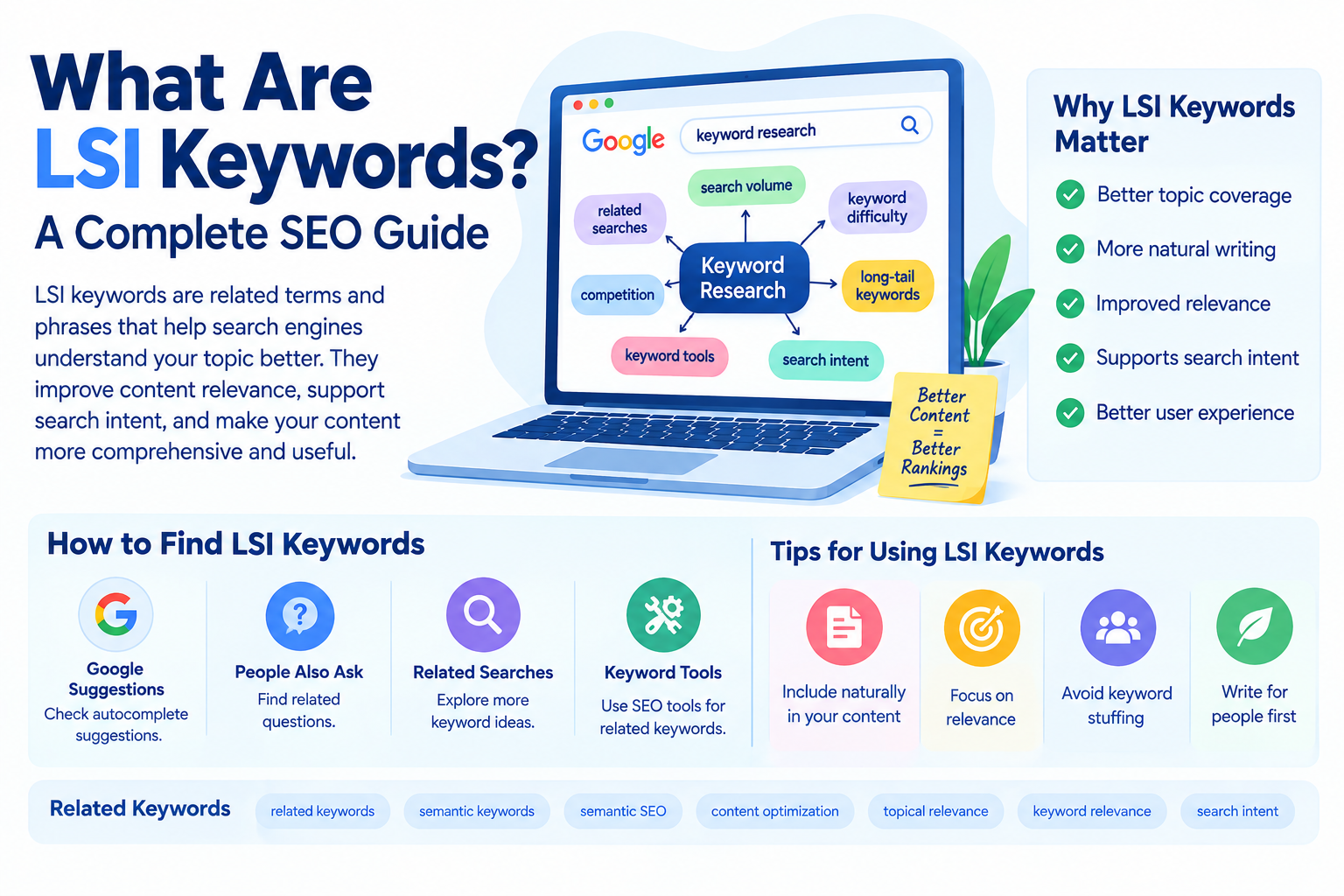
    What Are LSI Keywords? A Complete SEO Guide

    Keywords are an important part of SEO, but creating optimized content is not simply about repeating the same keyword again and again. Search engines can understand the overall topic and context of a page, which means content should cover related concepts naturally. This is where the term LSI keywords often comes into SEO discussions.

    You may have heard that using LSI keywords can improve rankings, but there is some confusion around what the term actually means. In modern SEO, people commonly use “LSI keywords” to describe words and phrases that are semantically related to a main topic. However, Google’s search systems do not use “LSI keywords” as a specific ranking factor.

    Understanding this difference can help you use related keywords more effectively without keyword stuffing.

    What Are LSI Keywords?

    What Are LSI Keywords? In SEO discussions, LSI keywords generally refers to words and phrases that are related to the main topic of a webpage.

    For example, if your main topic is “keyword research,” related terms might include:

    • search volume
    • keyword difficulty
    • search intent
    • long-tail keywords
    • keyword research tools
    • competition
    • related searches

    These terms help provide context around the main topic.

    The phrase “LSI” comes from Latent Semantic Indexing, a mathematical technique developed for analyzing relationships between words and documents. However, there is no good evidence that Google uses LSI as a specific SEO ranking system.

    Therefore, it is more accurate to think of LSI keywords as related or semantically relevant terms rather than a special type of Google ranking keyword.

    Why Are Related Keywords Important for SEO?

    Search engines have become better at understanding the meaning and context of content. A well-written article naturally includes words and concepts that are connected to its main subject.

    For example, an article about technical SEO might naturally discuss:

    • crawlability
    • indexing
    • XML sitemaps
    • robots.txt
    • Core Web Vitals
    • website speed
    • mobile optimization

    These terms help demonstrate that the article covers different aspects of technical SEO.

    The goal is not to insert as many related keywords as possible. Instead, include relevant concepts when they genuinely help explain the topic.

    LSI Keywords vs Primary Keywords

    Your primary keyword is the main search phrase you want a page to target.

    For example:

    Primary keyword: keyword research

    Related terms could include:

    • keyword research tools
    • search volume
    • keyword difficulty
    • long-tail keywords
    • search intent

    The primary keyword gives your content its main focus, while related terms help you cover the subject more completely.

    A strong SEO article can use both without making the content sound repetitive.

    How to Find LSI Keywords

    Although “LSI keywords” is a common SEO term, you can find related and semantic keywords using several practical methods.

    Google Search Suggestions

    Start typing your main keyword into Google and look at the autocomplete suggestions.

    For example, searching for “SEO tools” may produce suggestions related to free SEO tools, SEO tools for beginners, or SEO analysis tools.

    These suggestions can provide ideas for related topics and search queries.

    People Also Ask

    The People Also Ask section can provide questions related to your main topic.

    If your article is about keyword research, you may find questions such as:

    • What is keyword research?
    • Why is keyword research important?
    • How do I find keywords?
    • Which keyword research tools are useful?

    These questions can help you identify related concepts to include in your content.

    Related Searches

    At the bottom of Google’s search results, you may find related searches. These can reveal additional phrases connected to your topic.

    Use them as content research ideas rather than trying to insert every phrase into your article.

    Keyword Research Tools

    SEO platforms can provide related keywords and keyword variations based on your main topic.

    When researching related terms, consider:

    • Relevance
    • Search intent
    • Search volume
    • Competition
    • Topic connection

    Not every suggested keyword needs to be used. Select terms that genuinely contribute to the content.

    How to Use LSI Keywords in Content

    The best way to use related keywords is naturally.

    Suppose your primary keyword is “on-page SEO.” Your article might naturally discuss:

    • title tags
    • meta descriptions
    • heading structure
    • internal links
    • image alt text
    • keyword placement
    • URL optimization

    These concepts are relevant because they are important parts of on-page SEO.

    You can include related terms in headings, paragraphs, examples, lists, image descriptions, and other appropriate areas.

    However, avoid forcing a keyword into a sentence simply because you want to include it.

    LSI Keywords and Search Intent

    Search intent is another important part of semantic SEO.

    Search intent describes why someone enters a particular query into a search engine. A user may want information, navigate to a website, compare options, or make a purchase.

    For example, someone searching “what is technical SEO” is probably looking for an explanation. Someone searching “best technical SEO tools” may be researching tools.

    Related keywords should support the intent behind the main query.

    If your content targets an informational keyword, related questions and explanatory terms can help you provide a more complete answer.

    Benefits of Using Related Keywords

    1. Better Topic Coverage

    Related terms can help you cover different aspects of a subject instead of discussing only one narrow part of it.

    2. More Natural Writing

    Using relevant variations can prevent excessive repetition of your exact primary keyword.

    Instead of repeating “keyword research” in every sentence, you can naturally discuss search queries, search volume, keyword difficulty, and keyword tools.

    3. Improved Relevance

    Relevant concepts provide additional context about your page. This can make it easier for both readers and search engines to understand the subject.

    4. Better User Experience

    A comprehensive article can answer related questions that users may have after reading the main topic.

    This can make the content more useful and informative.

    Common Mistakes With LSI Keywords

    One major mistake is believing that there is a fixed list of LSI keywords that Google expects you to use. There is no official Google list of “LSI keywords” that guarantees rankings.

    Another mistake is keyword stuffing. Adding related terms repeatedly can make your article unnatural and difficult to read.

    You should also avoid adding unrelated keywords simply because a keyword tool suggests them. Relevance is more important than the number of keywords included.

    Finally, do not focus so heavily on keywords that you forget the reader. Content should answer questions clearly and provide useful information.

    LSI Keywords and Keyword Density

    Keyword density refers to how frequently a keyword appears in a piece of content.

    There is no ideal keyword density that guarantees higher Google rankings. Repeating a keyword excessively can make content sound unnatural.

    Instead of calculating how many times a related term should appear, focus on covering the topic naturally.

    For example, if you are writing about keyword research and need to explain search volume, mention it where the concept is relevant. There is no need to repeat “search volume” in every paragraph.

    LSI Keywords and Semantic SEO

    Semantic SEO focuses on the meaning, relationships, and context surrounding a topic.

    Instead of optimizing a page for only one phrase, you can create content that comprehensively covers the subject.

    For example, an article about backlinks could naturally discuss:

    • link building
    • referring domains
    • backlink quality
    • anchor text
    • internal links
    • external links
    • link authority

    These related concepts can help create a more complete resource about backlinks.

    Final Thoughts

    What Are LSI Keywords? The term is commonly used in SEO to describe words and phrases that are semantically related to a main topic. Although LSI itself is not a known Google ranking factor, using relevant related terms can help you create comprehensive and natural content.

    Focus on your primary keyword, understand search intent, research related concepts, and include them where they genuinely add value. Avoid keyword stuffing and do not try to use every related phrase you discover.

    The best approach is to write for people first while making your topic, purpose, and important concepts clear. When your content is relevant, useful, well-structured, and comprehensive, related keywords become a natural part of good SEO writing.

  • What Is Search Intent in SEO? A Complete Guide

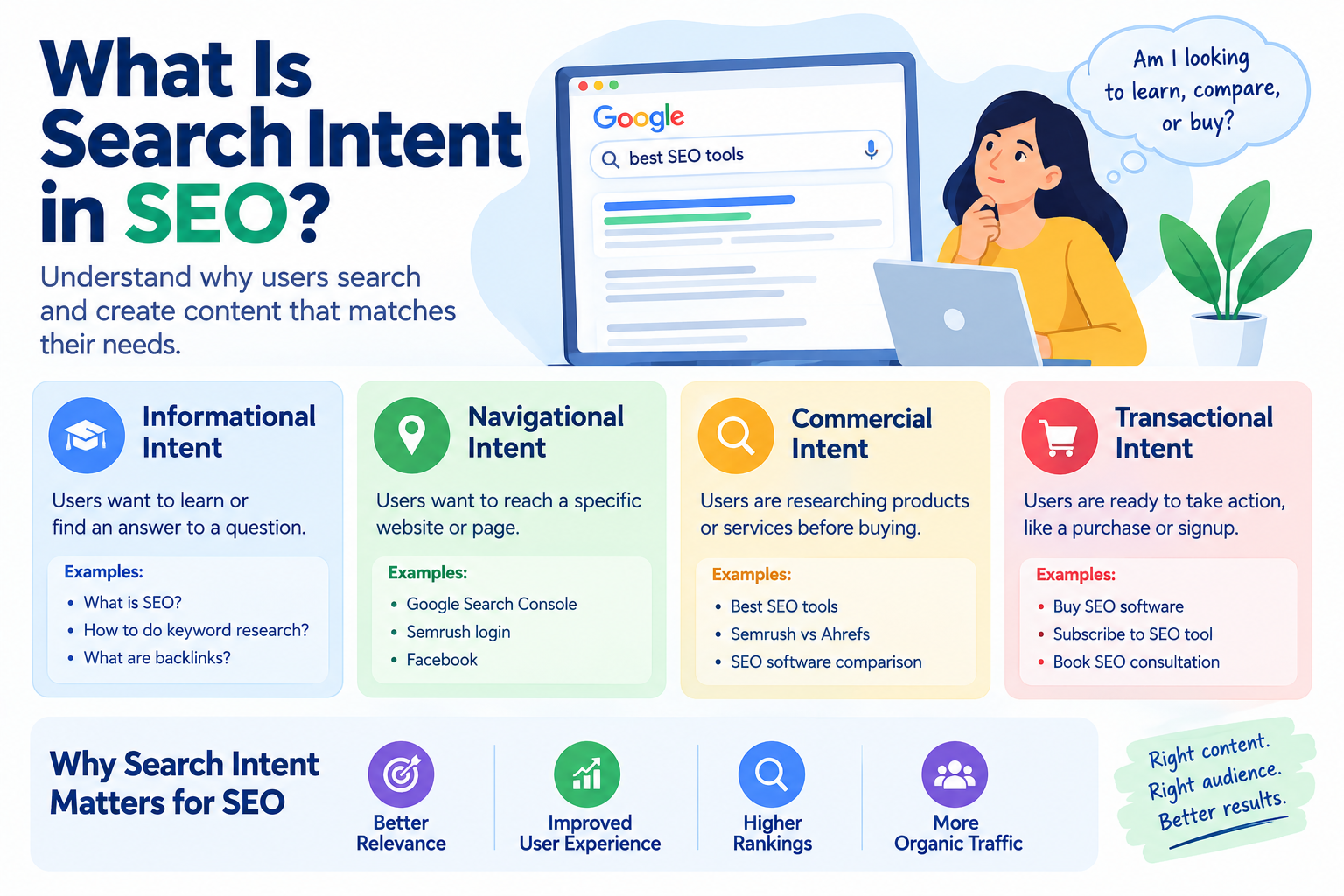
    What Is Search Intent in SEO? A Complete Guide

    When people search for something on Google, they usually have a specific reason for doing so. They may want to learn something, find a particular website, compare products, or make a purchase. Understanding this reason is known as search intent in SEO.

    Search intent is an important part of keyword research and content optimization. If your content matches what users are actually looking for, it has a better chance of being useful and relevant to them. This can also help search engines understand the purpose of your page.

    In this guide, we will explain what search intent means, the main types of search intent, why it matters for SEO, and how you can use it when creating content.

    What Is Search Intent in SEO?

    Search intent in SEO refers to the reason or purpose behind a user’s search query. It explains what the user expects to find when they enter a keyword into a search engine.

    For example, consider these three searches:

    • What is SEO?
    • Best SEO tools
    • Buy SEO software

    Although all three are related to SEO, the user’s intention is different.

    Someone searching “What is SEO?” is probably looking for information. A person searching “Best SEO tools” may be comparing different options. Someone searching “Buy SEO software” is showing a stronger purchasing intention.

    Understanding these differences helps you create content that answers the right question.

    Why Is Search Intent Important for SEO?

    Search engines aim to provide users with results that are useful and relevant to their queries. Therefore, understanding search intent can help you create pages that better match what people expect.

    For example, if someone searches for “how to create backlinks,” they probably want a guide or tutorial. Showing them a product page may not satisfy their needs.

    Similarly, someone searching “best SEO tools for beginners” may want a comparison or list rather than a general definition of SEO.

    By matching content with search intent, you can improve the relevance and usefulness of your pages.

    The Four Main Types of Search Intent

    Search intent is commonly divided into four main categories: informational, navigational, commercial, and transactional.

    1. Informational Search Intent

    Informational intent occurs when users want to learn something or find an answer to a question.

    Examples include:

    • What is technical SEO?
    • How does keyword research work?
    • How to improve website traffic
    • What are backlinks?
    • What is search intent?

    These searches are generally focused on gaining knowledge rather than immediately buying something.

    Blog posts, tutorials, guides, FAQs, and educational articles are often suitable formats for informational searches.

    If your website focuses on SEO education, many of your blog topics may target informational search intent.

    2. Navigational Search Intent

    Navigational intent occurs when a user is trying to reach a specific website, page, or online destination.

    Examples include:

    • Google Search Console
    • Semrush login
    • Facebook
    • Canva
    • YouTube

    The user already has a particular destination in mind.

    For businesses and websites, having a clear brand name, optimized website structure, and relevant pages can help users find the correct destination.

    3. Commercial Search Intent

    Commercial intent occurs when users are researching products, services, or solutions before making a decision.

    Examples include:

    • Best SEO tools
    • Semrush vs Ahrefs
    • Best keyword research tools for beginners
    • SEO software comparison
    • Best website analysis tools

    These users may not be ready to purchase immediately, but they are evaluating available options.

    Comparison articles, reviews, product guides, and detailed lists can work well for commercial investigation queries.

    4. Transactional Search Intent

    Transactional intent indicates that a user is ready to complete an action, often a purchase, signup, download, or subscription.

    Examples include:

    • Buy SEO software
    • Subscribe to SEO tool
    • Buy running shoes online
    • Download SEO plugin
    • Book SEO consultation

    These searches are more action-oriented. Product pages, service pages, landing pages, and signup pages may be appropriate for transactional queries.

    How to Identify Search Intent

    Before creating content for a keyword, search for that keyword on Google.

    Look at the pages appearing in the search results. Ask yourself what type of content dominates the results.

    For example, if most results are detailed guides, the keyword probably has informational intent.

    If most results are product pages, the query may have transactional intent.

    You should also examine:

    • Page titles
    • Featured snippets
    • People Also Ask questions
    • Product results
    • Videos
    • Comparison pages
    • Search result descriptions

    The search results can provide useful clues about what Google considers relevant for that query.

    Search Intent and Keyword Research

    Keyword research should not focus only on search volume and keyword difficulty. Search intent should also be considered before selecting a target keyword.

    Suppose you find a keyword with a high search volume. If the intent behind that keyword does not match your website or content, targeting it may not be useful.

    For example, a website selling SEO services might find the keyword “what is SEO?” attractive because of its search volume. However, users searching that phrase are primarily looking for information rather than immediately looking for an SEO service.

    A service page targeting that keyword may therefore not match the user’s expectations.

    Choosing keywords based on both relevance and intent can make your content strategy more focused.

    How to Create Content Based on Search Intent

    Once you understand the intent behind a keyword, choose a content format that matches it.

    For informational keywords, consider:

    • Blog posts
    • Tutorials
    • Step-by-step guides
    • FAQs
    • Educational articles

    For commercial keywords, consider:

    • Comparisons
    • Reviews
    • Product lists
    • Buying guides

    For transactional keywords, consider:

    • Product pages
    • Service pages
    • Landing pages
    • Pricing pages

    For navigational keywords, make sure your important brand and website pages are easy to find and clearly structured.

    Search Intent and On-Page SEO

    Search intent also affects how you optimize a page.

    Your SEO title should clearly communicate what the page provides. Headings should organize the information logically, and the introduction should quickly address the user’s question.

    For example, if your focus keyword is “how to do keyword research,” users are likely looking for a process or tutorial.

    Your article should therefore provide clear steps rather than spending most of the content discussing the history of keywords.

    Relevant internal links can also help users discover additional information related to their search.

    Common Search Intent Mistakes

    One common mistake is creating content without checking the current search results. A keyword may appear straightforward but have an intent that is different from what you expected.

    Another mistake is trying to satisfy every possible intent on one page. A page should have a clear primary purpose.

    Keyword stuffing is another problem. Repeating the same keyword excessively does not automatically make content more relevant. Instea

  • Google Keyword Analysis Tool: A Complete SEO Guide

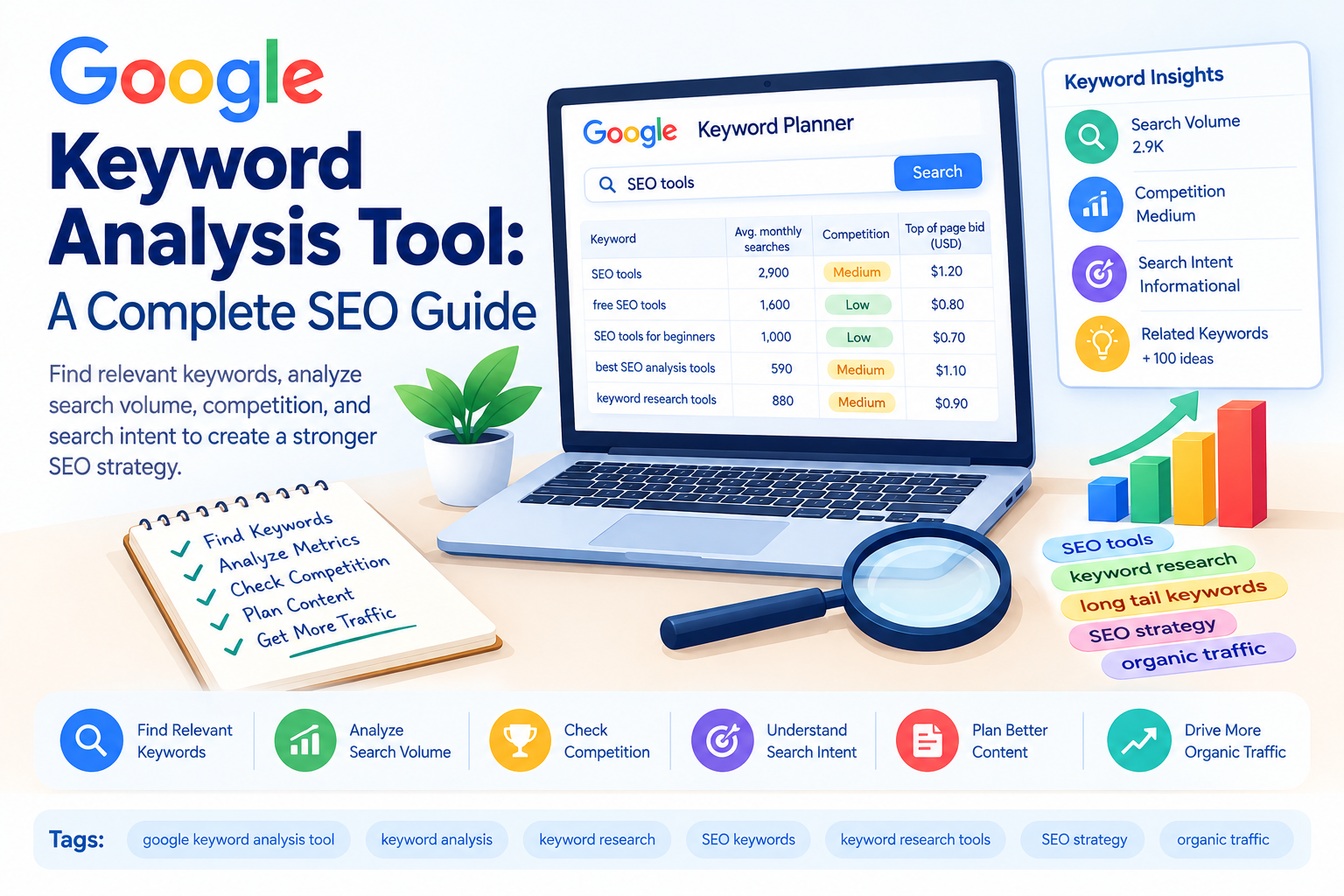
    Google Keyword Analysis Tool: A Complete SEO Guide

    Keyword research is one of the most important parts of search engine optimization. Before creating a blog post or optimizing a website, you need to understand what people are searching for online. A google keyword analysis tool can help you discover relevant search terms, understand keyword competition, and choose phrases that match your content and audience.

    Whether you are a beginner, blogger, business owner, or digital marketer, analyzing keywords can help you create a more focused SEO strategy. Instead of choosing keywords randomly, you can use keyword data to make more informed content decisions.

    What Is a Google Keyword Analysis Tool?

    A google keyword analysis tool is a tool or platform used to research and evaluate keywords that people search for on Google. Keyword analysis usually involves looking at metrics such as search volume, competition, keyword difficulty, trends, and search intent.

    Some keyword research platforms also provide related keywords, keyword variations, questions, and estimated traffic information.

    For example, if your website focuses on SEO, you might start with the keyword “SEO.” Keyword analysis can then help you discover more specific terms such as:

    • SEO tips for beginners
    • how to improve website SEO
    • SEO tools for beginners
    • how to do keyword research
    • best free SEO tools

    These related phrases can provide ideas for creating targeted content.

    Why Is Keyword Analysis Important?

    Keyword analysis helps you understand what your target audience is searching for. Without keyword research, you may create content around topics that have little relevance to your audience or are extremely difficult to rank for.

    Keyword analysis can help you:

    • Find relevant search terms
    • Understand search demand
    • Identify keyword opportunities
    • Analyze competition
    • Discover long-tail keywords
    • Understand search intent
    • Plan blog content
    • Improve on-page SEO

    The goal is not simply to find keywords with the highest search volume. A useful keyword should also be relevant to your website and match what users expect to find.

    Important Keyword Metrics to Check

    When using a google keyword analysis tool, there are several metrics you should understand.

    Search Volume

    Search volume indicates how frequently a keyword is searched during a particular period. Higher search volume can mean more potential traffic, but it can also indicate stronger competition.

    A keyword with lower search volume should not automatically be ignored. If it is highly relevant and has clear search intent, it may still be valuable.

    Keyword Difficulty

    Keyword difficulty estimates how challenging it may be to rank for a particular keyword. Different SEO tools calculate this metric differently.

    For a newer website, targeting extremely competitive keywords can be difficult. Specific keywords with manageable competition may provide additional opportunities.

    Competition

    Competition describes how many advertisers or websites may be competing around a keyword, depending on the tool and metric being used.

    Remember that paid advertising competition and organic SEO competition are not exactly the same thing.

    Search Intent

    Search intent is the reason behind a user’s search. Understanding intent is essential when selecting keywords.

    Common types include:

    • Informational intent
    • Navigational intent
    • Commercial investigation
    • Transactional intent

    For example, “what is technical SEO” is primarily informational, while “buy SEO software” has transactional intent.

    How to Use a Google Keyword Analysis Tool

    Using a keyword analysis tool does not have to be complicated. Start with a broad topic related to your website.

    For example, if your website is about SEO, enter a seed keyword such as “SEO tools.”

    The tool may provide related keywords such as:

    • free SEO tools
    • SEO tools for beginners
    • best SEO analysis tools
    • keyword research tools
    • website SEO checker

    Review the suggestions and compare their relevance, search volume, competition, and intent.

    Create a list of keywords that closely match your website and the content you want to publish.

    Find Long-Tail Keywords

    Long-tail keywords are specific search phrases that usually contain several words.

    For example:

    “SEO”

    is a broad keyword, while:

    “best SEO tools for small websites”

    is much more specific.

    Long-tail keywords can help you create content for specific searches. They may have lower search volume than broad keywords, but they can provide useful opportunities when they closely match the user’s needs.

    A google keyword analysis tool can help you discover these longer keyword variations.

    Analyze Your Competitors

    Keyword analysis can also help you understand what topics competitors are targeting.

    Look at websites that already rank for your target keyword. Examine the topics they cover, the questions they answer, and the types of content they publish.

    This does not mean copying competitor content. Instead, use competitor research to identify content gaps and opportunities to provide more useful information.

    For example, if competing articles discuss basic keyword research but do not explain how beginners can evaluate keyword difficulty, you could create content that addresses that specific need.

    Choose Keywords Based on Relevance

    One of the biggest mistakes in keyword research is selecting a keyword only because it has high search volume.

    Imagine your website sells SEO services. A keyword such as “SEO” may have significant search demand, but it is extremely broad.

    A more specific phrase such as “SEO services for small businesses” may better match your business offering.

    Keyword relevance should therefore be one of the first things you consider.

    Ask yourself:

    • Is this keyword related to my website?
    • Does it match my target audience?
    • Can I create useful content around it?
    • Does the search intent match my page?
    • Does the keyword support my business or content goal?

    If the answer is yes, the keyword may be worth considering.

    Google Keyword Analysis Tool and Content Strategy

    Keyword analysis can make content planning easier. Instead of writing random blog posts, you can create content around topics your audience is actively searching for.

    For example, an SEO website could create articles about:

    • keyword research
    • on-page SEO
    • technical SEO
    • internal linking
    • backlinks
    • SEO tools
    • website analysis
    • search engine optimization

    Each topic can then be expanded into more specific articles targeting related search queries.

    This approach can help you build topical coverage and organize related content through internal links.

    Common Keyword Analysis Mistakes

    Focusing Only on Search Volume

    High search volume does not guarantee valuable traffic. Relevance and search intent are equally important.

    Ignoring Keyword Difficulty

    A keyword may look attractive because of its search volume, but ranking for it may be challenging if the competition is strong.

    Choosing Irrelevant Keywords

    Never target a keyword simply because it has low competition. The topic should be connected to your website and audience.

    Keyword Stuffing

    Once you select a keyword, do not repeat it unnaturally throughout the article. Search engines are designed to understand topics and related terms. Write naturally and prioritize useful content.

    Ignoring Search Intent

    Always examine the current search results before creating content. The results can give you an idea of what users expect when searching for a particular phrase.

    Best Practices for Keyword Analysis

    To make keyword research more effective, combine several factors rather than relying on one metric.

    Start with relevance, then check search volume and competition. Analyze keyword difficulty and search intent before selecting your final keywords.

    You can also organize keywords into groups based on related topics. For example, keywords about technical SEO can form one content group, while keywords about keyword research can form another.

    After publishing your content, monitor its performance using tools such as Google Search Console and other SEO platforms. Your keyword strategy can be updated as you collect real performance data.

    Final Thoughts

    A google keyword analysis tool can make keyword research more structured and data-driven. It can help you discover relevant search terms, compare keyword metrics, identify long-tail opportunities, and understand what your audience is searching for.

    However, keyword data should be used as a guide rather than the only factor in your SEO strategy. Relevance, search intent, content quality, competition, and user experience all matter.

    Choose keywords that fit your website, create useful content around them, and monitor performance over time. With consistent keyword analysis and thoughtful content planning, you can build a stronger foundation for your SEO strategy.

  • Negative Keywords: A Complete Guide to Google Ads

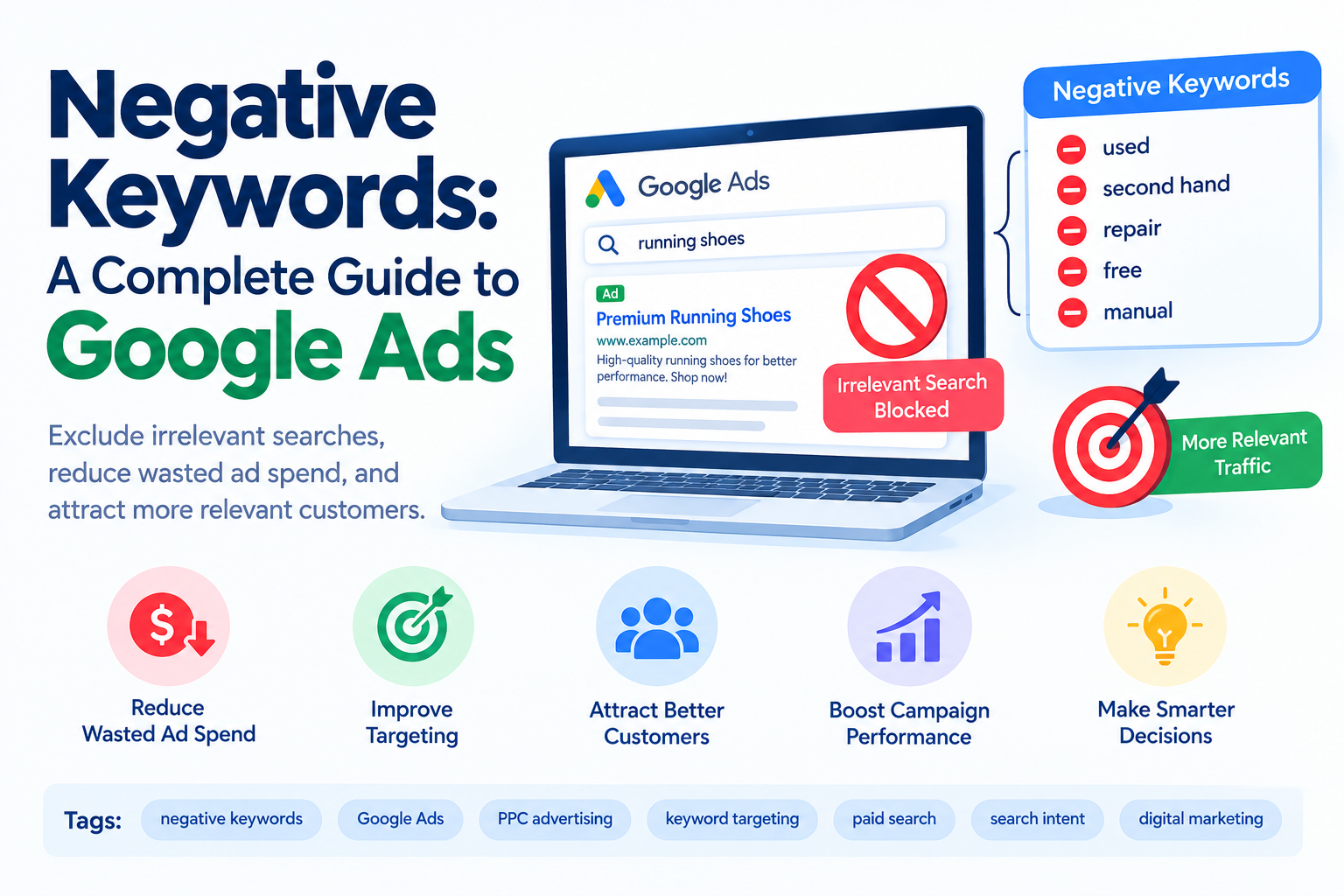
    Negative Keywords: A Complete Guide to Google Ads

    When running Google Ads, getting your advertisement in front of the right audience is important. However, it is equally important to prevent your ads from appearing for searches that are not relevant to your products or services. This is where negative keywords become useful.

    Negative keywords allow advertisers to exclude specific search terms from their advertising campaigns. By preventing ads from showing for unwanted searches, businesses can improve targeting, reduce wasted ad spend, and focus their budget on more relevant potential customers.

    What Are Negative Keywords?

    Negative keywords are words or phrases added to an advertising campaign to prevent ads from being triggered by searches containing those terms.

    For example, imagine you sell premium running shoes but do not sell used shoes. You might add “used” as a negative keyword. This can help prevent your advertisement from appearing when someone searches for “used running shoes.”

    Negative keywords are mainly used in paid search advertising, particularly Google Ads. They help advertisers control which searches are relevant to their campaigns.

    Why Are Negative Keywords Important?

    Without proper keyword filtering, an advertisement may appear for searches that are related to your main keyword but do not match what you offer.

    For example, a business selling paid online courses might target the keyword “SEO course.” However, people searching for “free SEO course” may not be interested in purchasing the course.

    Adding “free” as a negative keyword could help the advertiser avoid spending money on clicks from users who are specifically looking for free resources.

    This can make advertising campaigns more focused and help businesses use their advertising budget more efficiently.

    How Negative Keywords Work

    Google Ads uses keywords and search queries to determine when an advertisement may be eligible to appear.

    Regular keywords tell Google which searches you want to target. Negative keywords work in the opposite direction by telling Google which searches you want to exclude.

    For example, suppose your business sells new laptops and your target keyword is “buy laptops online.”

    You might add negative keywords such as:

    • used
    • second hand
    • repair
    • free
    • manual

    This can help reduce exposure to searches that do not match your business offering.

    However, negative keywords should be selected carefully. Adding overly broad exclusions can prevent your ads from reaching potentially valuable customers.

    Types of Negative Keywords

    Google Ads provides different ways to organize negative keyword targeting. Understanding these options can help advertisers create more precise campaigns.

    Negative Broad Match

    A negative broad match keyword can prevent an ad from showing when the search contains all of the negative keyword terms, depending on how the search is structured.

    For example, if your negative keyword is “free SEO course,” searches containing the relevant terms may be excluded.

    Advertisers should understand how negative matching differs from regular keyword matching before creating a large exclusion list.

    Negative Phrase Match

    Negative phrase match can be used when you want to exclude searches containing a particular phrase in the specified order.

    For example, adding “free SEO course” as a negative phrase can help prevent ads from appearing for searches containing that phrase.

    Negative Exact Match

    Negative exact match provides more precise control. It can be useful when you want to exclude a particular search query without broadly excluding related searches.

    For example, if you want to exclude the exact query “free SEO course,” you can use an exact negative keyword.

    How to Find Negative Keywords

    Finding negative keywords requires understanding what your target audience is actually searching for.

    One useful method is checking the Google Ads Search Terms Report. This report shows the search queries that triggered your ads.

    Look through the report and identify searches that:

    • Are unrelated to your product
    • Show the wrong search intent
    • Attract users who cannot become customers
    • Focus on free products when you sell paid products
    • Relate to jobs when you sell a service
    • Relate to tutorials when users are not looking to purchase
    • Include products or services you do not offer

    These searches can provide valuable negative keyword ideas.

    Examples of Negative Keywords

    The right negative keywords depend on your business, products, and campaign goals.

    For example, an online store selling new products may consider terms such as:

    • used
    • second hand
    • repair
    • replacement
    • free

    A company offering paid professional services might consider:

    • free
    • DIY
    • tutorial
    • jobs
    • salary
    • training

    However, these words should never be added automatically. A term such as “free” could sometimes be valuable if your business offers a free trial or free consultation.

    Always consider the search intent before excluding a term.

    Negative Keywords and Search Intent

    Search intent describes the reason behind a user’s search.

    Two searches can contain the same main keyword but have completely different intentions.

    For example:

    “buy SEO course”

    and

    “free SEO course”

    Both searches contain “SEO course,” but the user’s intentions may be different. The first search indicates potential purchase intent, while the second may indicate that the person is looking for a free resource.

    Negative keywords can help advertisers separate these different types of searches and focus their campaigns on the audience they want to reach.

    Benefits of Using Negative Keywords

    1. Reduce Wasted Ad Spend

    When ads receive clicks from irrelevant searches, part of the advertising budget may be spent without reaching the intended audience. Negative keywords can reduce this type of unwanted traffic.

    2. Improve Campaign Relevance

    Excluding unrelated searches can make your advertising campaign more focused. Your ads can be shown to users whose searches are more closely connected to your products or services.

    3. Improve Traffic Quality

    Not every click has the same value. Negative keyword targeting can help reduce clicks from users who are unlikely to become customers.

    4. Better Budget Management

    A limited advertising budget needs to be used carefully. Excluding irrelevant searches can help businesses concentrate their spending on more relevant search queries.

    5. Better Campaign Organization

    Negative keywords can also help separate different campaigns or ad groups. For example, you may want one campaign to target informational searches and another to target purchase-focused searches.

    Common Negative Keyword Mistakes

    One common mistake is adding too many negative keywords without analyzing actual search data. This can unnecessarily restrict campaign reach.

    Another mistake is ignoring the Search Terms Report. Regularly reviewing search queries can reveal new irrelevant terms that should be added to your negative keyword list.

    It is also important to avoid confusing negative keywords with regular SEO keywords. Negative keywords are primarily an advertising targeting feature, while SEO keywords are terms used to help organic content appear in search results.

    Finally, businesses should review their negative keyword lists regularly because customer behavior, products, and campaign goals can change over time.

    How to Create a Negative Keyword List

    Start by identifying searches that are clearly unrelated to your offer. Then review historical search data from your advertising campaigns.

    Group similar exclusions together and decide whether they should apply to one ad group, one campaign, or multiple campaigns.

    Before applying a negative keyword broadly, check whether it could accidentally exclude valuable searches.

    For example, if you sell “free trial” software, adding “free” as a negative keyword could prevent relevant potential customers from seeing your ads.

    Careful analysis is therefore more important than simply creating a long list of excluded terms.

    Final Thoughts

    Negative keywords are an important part of effective paid search advertising. They help advertisers prevent ads from appearing for irrelevant searches and can make campaign targeting more precise.

    By reviewing search queries, understanding search intent, and regularly updating negative keyword lists, advertisers can reduce unwanted clicks and make better use of their advertising budget.

    The goal is not to exclude as many searches as possible. Instead, the goal is to remove searches that do not match your products, services, or campaign objectives while keeping valuable opportunities available.

    When combined with relevant keywords, compelling ad copy, strong landing pages, and regular campaign analysis, negative keyword management can become an important part of a well-structured Google Ads strategy.

  • Long Tail Keywords: Complete Guide to SEO Success

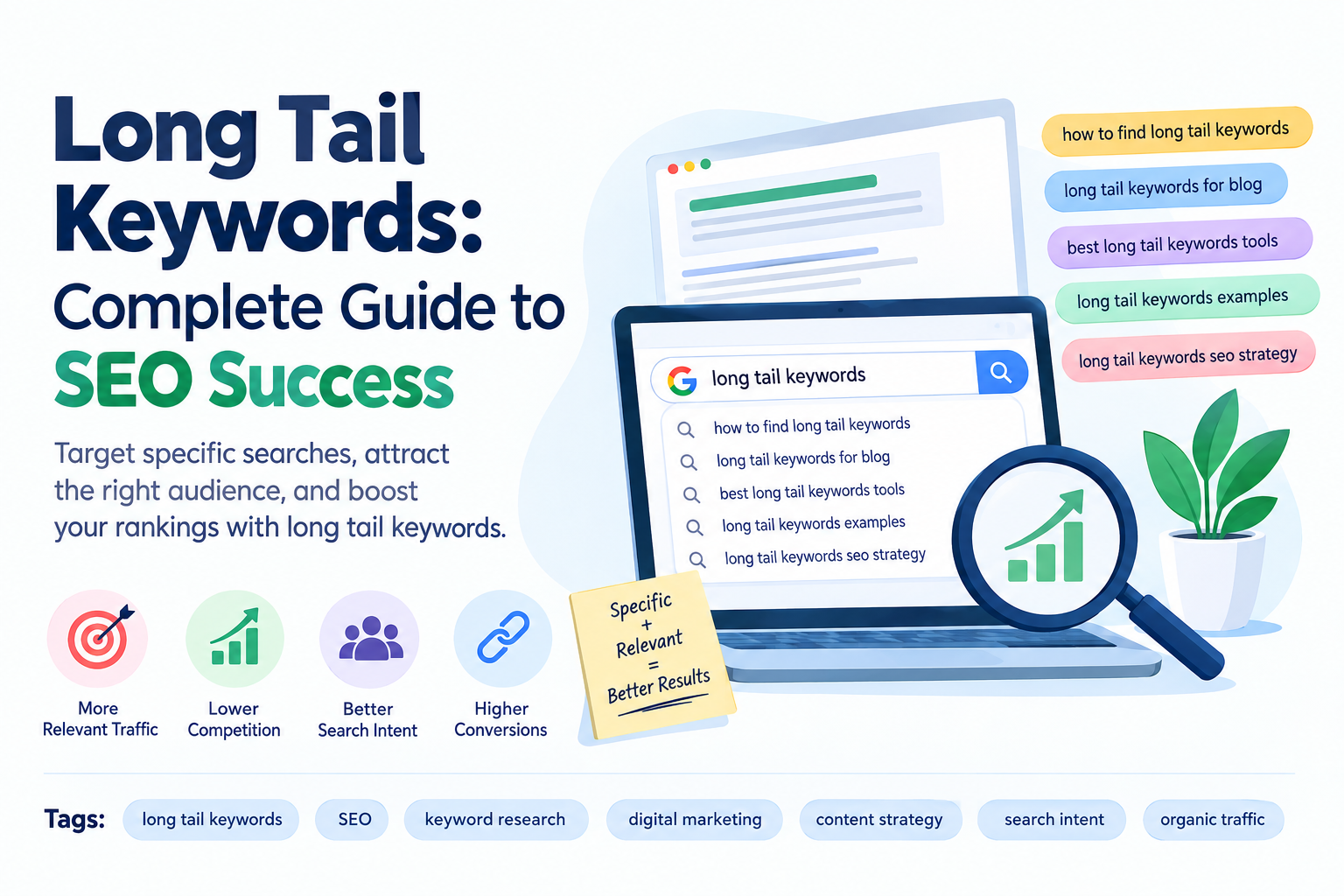
    Long Tail Keywords: Complete Guide to SEO Success

    SEO is not only about targeting popular keywords with thousands of monthly searches. Sometimes, specific and less competitive search terms can bring more valuable visitors to your website. This is where long tail keywords become important. They are longer and more specific search phrases that usually target a particular need, question, or search intent.

    For beginners and small websites, using specific keywords can be a practical way to attract relevant organic traffic. Instead of competing only for broad terms, you can create content around detailed searches that closely match what users are looking for.

    What Are Long Tail Keywords?

    Long tail keywords are longer, more specific keyword phrases that usually contain three or more words. They describe a particular search rather than a broad topic.

    For example:

    • SEO
    • SEO tips
    • SEO tips for beginners
    • SEO tips for beginners to improve website rankings

    The last example is more specific and clearly explains what the searcher wants to find.

    Long-tail search terms can have lower search volume than broad keywords, but they can also be less competitive and more closely connected to a user’s search intent.

    Why Are Long Tail Keywords Important for SEO?

    Using specific keywords can help you build a more focused SEO strategy. When your content directly answers a detailed search query, users may find it more relevant to their needs.

    One major advantage is lower keyword competition. Broad keywords can be difficult for new websites to rank for because many established websites are already targeting them. Specific phrases may provide additional opportunities to appear in search results.

    Another benefit is relevance. Someone searching for “how to do keyword research for a new website” has a clearer intention than someone simply searching for “keyword research.”

    Long-tail queries can therefore help you create content that answers specific questions and provides useful information.

    Long Tail Keywords vs Short Tail Keywords

    Short-tail keywords are broad search terms, usually consisting of one or two words. Examples include “SEO,” “digital marketing,” and “shoes.”

    Long-tail keywords are more specific, such as:

    • how to improve SEO for a new website
    • best SEO tools for beginners
    • how to choose keywords for a blog
    • how to write SEO-friendly blog posts

    The main difference is specificity.

    Short-tail keywords may have higher search volume, but they can also have strong competition and broad search intent. Long-tail keywords generally have more specific intent, which can make them useful for targeted content.

    A balanced SEO strategy can include both types of keywords rather than relying on only one.

    Benefits of Using Long Tail Keywords

    1. Lower Competition

    Many specific search phrases have fewer websites competing directly for them. This can create opportunities for newer websites and smaller businesses.

    However, lower competition does not guarantee rankings. Content quality, website authority, backlinks, technical SEO, and search intent also affect performance.

    2. Better Search Intent

    Specific queries often provide more information about what a person wants.

    For example, “SEO” is extremely broad. A search such as “how to check SEO score of a website” gives a much clearer indication that the user wants instructions or a tool.

    Understanding search intent allows you to create content that answers the user’s actual question.

    3. Easier Content Planning

    Long-tail search phrases can give you ideas for blog posts, guides, FAQs, and tutorials.

    For example, instead of creating one general article about “SEO tools,” you could create separate content around:

    • free SEO tools for beginners
    • best keyword research tools
    • website SEO analysis tools
    • free tools to check backlinks

    This approach can help you build a broader content strategy around related topics.

    4. More Relevant Traffic

    Traffic is useful when visitors are actually interested in your content. Specific keywords can help you target users who are searching for a particular solution.

    For example, a person searching for “how to create internal links in WordPress” is likely looking for practical instructions. A detailed article addressing that exact topic can provide a more relevant experience.

    How to Find Long Tail Keywords

    There are several ways to discover useful search phrases.

    Use Google Search

    Start typing a broad topic into Google and look at autocomplete suggestions. These suggestions can reveal phrases people commonly search for.

    You can also check the “People also ask” section and related searches at the bottom of the results page. These areas can provide additional keyword ideas.

    Use Keyword Research Tools

    SEO tools such as Google Keyword Planner, Semrush, Ahrefs, and other keyword research platforms can help identify related search terms.

    When researching keywords, look at factors such as:

    • Search volume
    • Keyword difficulty
    • Search intent
    • Relevance
    • Competition
    • Related keywords

    Do not choose a keyword only because it has high search volume. A highly relevant keyword with lower competition may be more useful for a new website.

    How to Choose the Right Long Tail Keywords

    The best keyword is not necessarily the one with the highest search volume. It should match your content, audience, and purpose.

    First, make sure the keyword is relevant to your website. Then consider what the searcher expects to find.

    For example, if your article explains how to perform keyword research, a phrase such as “how to do keyword research for beginners” may be more relevant than a broad term like “SEO.”

    Also consider keyword difficulty. If your website is new, targeting extremely competitive terms may be challenging. Building content around more specific topics can help you cover smaller search opportunities while developing your website’s overall topical relevance.

    How to Use Long Tail Keywords in a Blog

    Once you have selected a keyword, use it naturally throughout your content. Avoid repeating it excessively because keyword stuffing can make an article difficult to read and may create a poor user experience.

    You can use your primary keyword in important areas such as:

    • SEO title
    • Meta description
    • Introduction
    • Relevant headings
    • Main body content
    • URL, when appropriate
    • Image alt text, when descriptive and relevant

    You should also include related keywords and variations naturally. Search engines can understand related concepts, so you do not need to repeat exactly the same phrase in every paragraph.

    Long Tail Keywords and Voice Search

    Specific search queries are also relevant to conversational searches. People using voice assistants may ask complete questions instead of typing short phrases.

    For example, instead of searching “best SEO tools,” someone might ask, “What are the best free SEO tools for beginners?”

    Creating content that answers natural-language questions can help your website address these types of searches.

    Common Mistakes to Avoid

    One common mistake is choosing keywords only because they have high search volume. High volume does not automatically mean high-value traffic.

    Another mistake is forcing a keyword into every paragraph. Your content should be written primarily for readers.

    It is also important not to target unrelated keywords simply because they appear to have low competition. Every keyword should have a clear connection to your topic.

    Finally, avoid creating many pages that target almost identical search terms without adding unique value. Instead, organize related topics carefully and use internal linking to connect useful content.

    Final Thoughts

    Long tail keywords are an important part of a practical SEO strategy, especially when you want to target specific search intent. Their longer and more detailed nature can help you create focused content for users looking for particular answers.

    Instead of focusing only on search volume, consider relevance, competition, search intent, and the value your content provides. Use keyword research tools, Google suggestions, related searches, and competitor research to discover useful phrases.

    When used naturally alongside strong content, internal linking, technical SEO, and other optimization techniques, long-tail search terms can become a valuable part of your overall SEO strategy.

  • SEO SEM Difference: Complete Guide for Beginners

    SEO SEM Difference: Complete Guide for Beginners

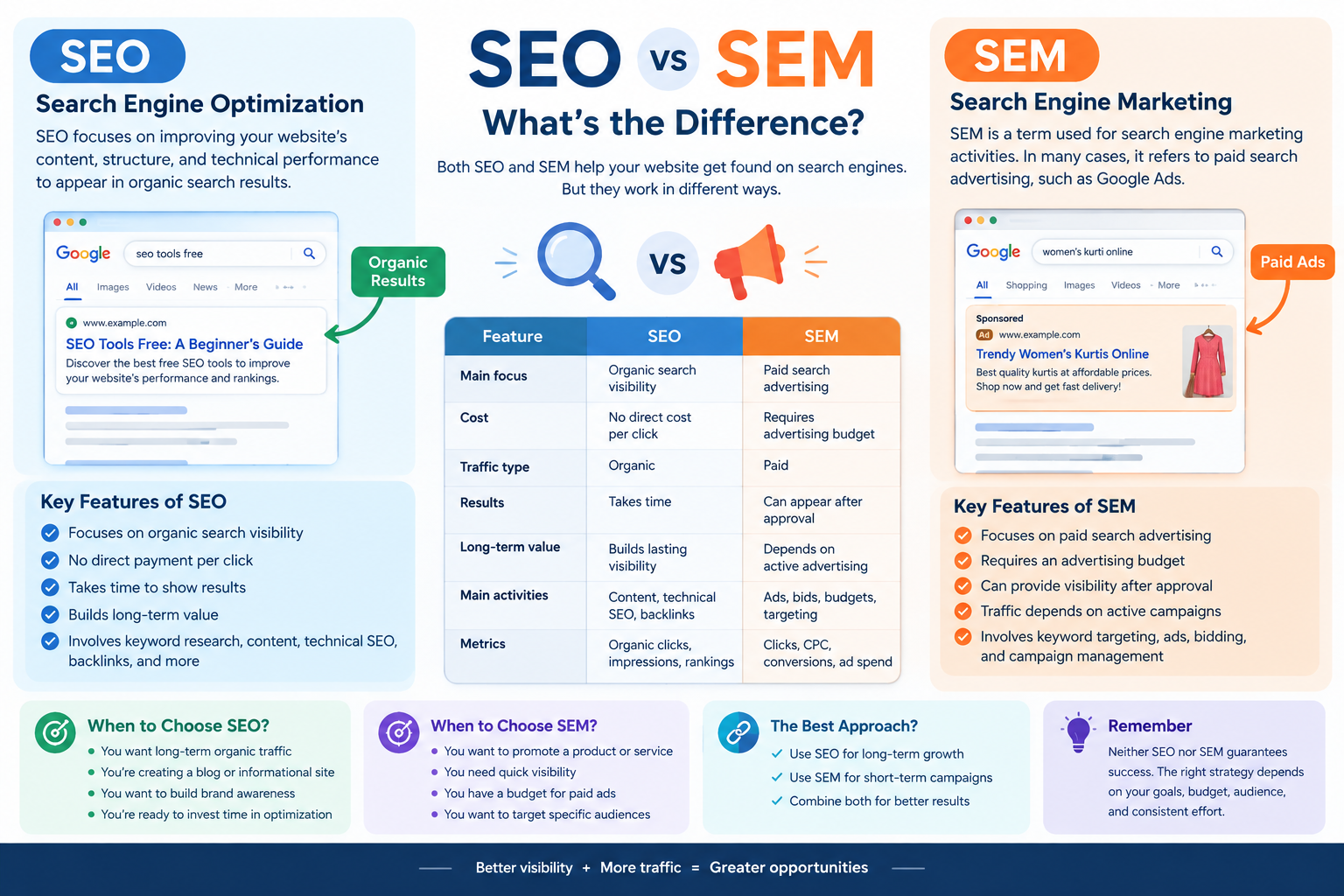
    Understanding the SEO SEM difference is important for anyone learning digital marketing, website optimization, or online business promotion. Both SEO and SEM help websites reach people through search engines such as Google, but they use different approaches to attract visitors.

    SEO focuses on improving organic search visibility, while SEM is commonly used in modern marketing to describe paid search advertising. Both strategies can support a website’s marketing goals, depending on its budget, audience, and business objectives.

    In this blog, we will explain the SEO SEM difference, how both strategies work, their benefits, key metrics, and how beginners can use them to improve their digital marketing knowledge.

    What Is SEO?

    SEO stands for Search Engine Optimization. It is the process of improving a website’s content, structure, and technical performance to help its pages appear in organic search results.

    Organic search results are unpaid listings displayed by search engines when users search for information, products, or services.

    For example, if someone searches for “how to get backlinks,” Google may display blog posts explaining backlink-building strategies. Website owners use SEO techniques to make their content relevant, useful, and accessible to search engines and users.

    How Does SEO Work?

    SEO involves several activities that help improve website visibility. These include:

    • Keyword research: Finding words and phrases that users search for.
    • On-page SEO: Optimizing titles, headings, content, and internal links.
    • Technical SEO: Improving website crawlability, indexing, and technical performance.
    • Off-page SEO: Building relevant external references and backlinks.
    • Content optimization: Creating helpful content that matches search intent.

    SEO does not guarantee a specific ranking or a fixed amount of traffic. Search engine algorithms, competition, content quality, and many other factors influence organic visibility.

    Example of SEO

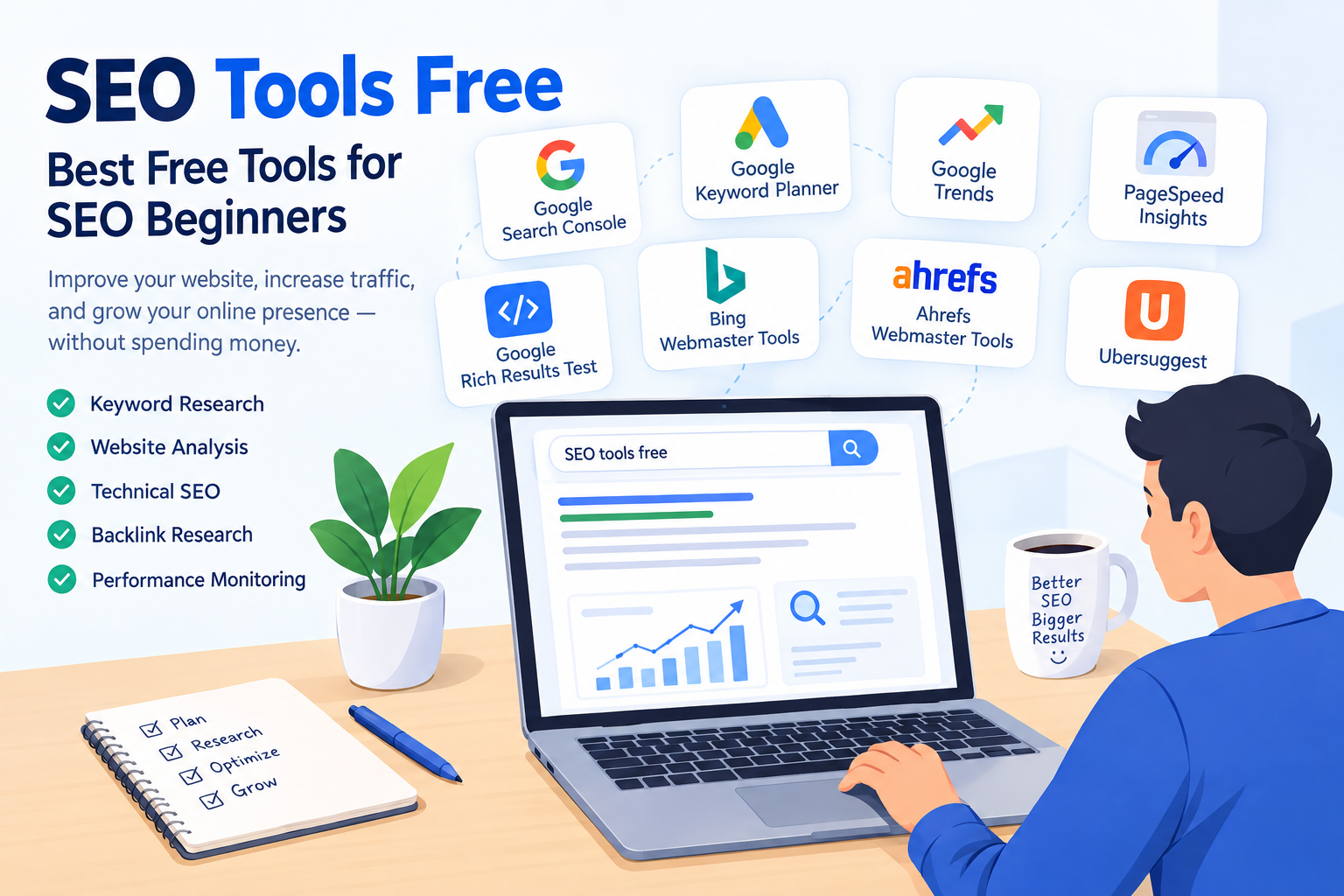
    Imagine you create a blog titled “SEO Tools Free: A Beginner’s Guide.”

    You can optimize the article by researching relevant keywords, writing useful information, creating an appropriate meta title, adding internal links, and improving the website’s technical structure.

    Over time, search engines may discover and rank the article for relevant searches. The timeline and results will vary depending on your website and the level of competition.

    What Is SEM?

    SEM stands for Search Engine Marketing. The term can have a broad meaning that includes search engine marketing activities such as SEO and paid search advertising. However, in many modern digital marketing contexts, SEM is commonly used to refer specifically to paid search advertising.

    Paid search advertising allows businesses to display sponsored advertisements in search engine results for relevant queries. Google Ads is one example of a platform used for this purpose.

    Advertisers generally pay according to the campaign’s billing model, such as cost per click, and compete through an advertising auction.

    How Does SEM Work?

    A paid search campaign commonly involves the following steps:

    1. Identify relevant keywords and target audiences.
    2. Create advertisements related to the product or service.
    3. Set a budget and campaign settings.
    4. Choose relevant landing pages.
    5. Monitor clicks, costs, and conversions.
    6. Optimize the campaign based on performance.

    Paid ads may appear quickly after approval and when the campaign meets eligibility requirements. However, visibility, traffic, and conversions are not guaranteed.

    Example of SEM

    Suppose you own a clothing business and sell women’s kurtis online. You could create a Google Ads campaign targeting searches such as “buy women’s kurti online.”

    Your advertisement may appear in sponsored search results when it is eligible to participate in the relevant auction. You can then measure the campaign’s clicks, advertising costs, and purchases.

    This is an example of paid search marketing.

    SEO SEM Difference: Key Comparison

    Understanding the SEO SEM difference becomes easier when comparing the two strategies across important factors.

    FeatureSEOSEM (Paid Search)
    Main focusOrganic search visibilityPaid search advertising
    CostNo direct payment per organic clickRequires an advertising budget
    Traffic typeOrganicPaid
    ResultsUsually take time to developCan provide paid visibility after campaign approval
    Long-term valueCan build lasting organic visibilityTraffic typically depends on active advertising
    Main activitiesContent, technical SEO, backlinksAds, bids, budgets, targeting
    Performance metricsOrganic clicks, impressions, rankingsClicks, CPC, conversions, ad spend

    The definition of SEM can vary. Some marketing resources use SEM as an umbrella term for search engine marketing, while others use it mainly for paid search. Clarifying the terminology is important when studying SEO or working with marketing professionals.

    Benefits of SEO

    SEO provides several potential benefits for website owners and businesses.

    1. Builds Organic Visibility

    SEO helps your website compete for relevant unpaid search results. When your content matches users’ search intent and meets search engine quality requirements, it may gain organic visibility.

    2. Supports Long-Term Content Growth

    A useful blog can continue attracting organic visitors after publication. However, traffic may change over time because of competition, algorithm updates, and changing search behavior.

    3. Improves Website Structure

    SEO encourages better navigation, internal linking, mobile usability, and technical accessibility. These improvements can benefit both users and search engines.

    4. Supports Brand Awareness

    Appearing in relevant organic search results can help users discover your website and become familiar with your brand.

    Benefits of SEM

    Paid search advertising provides a different set of potential benefits.

    1. Quick Access to Paid Visibility

    Once a campaign is approved and eligible, advertisements can begin appearing for relevant searches. The exact timing depends on the platform and campaign setup.

    2. Targeted Advertising

    Advertisers can use available targeting options, such as location, language, and search-related signals, to reach selected audiences.

    3. Measurable Results

    Paid advertising platforms provide data about impressions, clicks, costs, and conversions. This information helps businesses evaluate campaign performance.

    4. Budget Management

    Advertisers can set campaign budgets and adjust bids and settings according to their goals. Actual spending and results depend on the campaign’s configuration and auction conditions.

    SEO vs SEM: Which Should You Choose?

    The right strategy depends on your website’s purpose, budget, timeline, and target audience. SEO and SEM can also be used together.

    SEO May Be Useful When:

    • You want to build organic search visibility.
    • You are developing an informational blog.
    • You want to improve website content and structure.
    • You are prepared to invest time in long-term optimization.

    SEM May Be Useful When:

    • You want to advertise a product or service.
    • You have a budget for paid search campaigns.
    • You want to test specific search audiences.
    • You need to measure paid advertising performance.

    For example, an online clothing store may use SEO to publish styling guides and attract organic visitors while using paid search ads to promote selected products.

    Neither strategy guarantees business success. Results depend on execution, competition, user demand, and the quality of the website or campaign.

    Important SEO Metrics

    If you are learning SEO, understanding performance metrics will help you evaluate your work.

    Organic Clicks

    Organic clicks show how many times users visit your website through unpaid search results. Google Search Console provides information about organic search clicks.

    Impressions

    Impressions indicate how often your website’s search results are displayed. A high number of impressions does not necessarily mean users will click on your page.

    Average Position

    Average position is a Search Console metric that summarizes the average position of your site’s search results for reported queries. It should be interpreted carefully because search results vary by query and context.

    Organic Traffic

    Organic traffic refers to visitors who arrive at your website through unpaid search results. Analytics tools can help you monitor this traffic.

    Important SEM Metrics

    Paid search campaigns use different performance indicators to measure results.

    Cost Per Click (CPC)

    CPC refers to the cost associated with a click on an advertisement. The actual amount depends on the advertising platform and campaign billing details.

    Click-Through Rate (CTR)

    CTR measures the percentage of impressions that result in clicks.

    For example, if an advertisement receives 10 clicks from 100 impressions, its CTR is 10%.

    Conversions

    A conversion is a desired action, such as purchasing a product, submitting a form, or signing up for a service.

    Ad Spend

    Ad spend is the amount of money spent on a paid advertising campaign. Tracking spending helps advertisers compare campaign costs with their business objectives.

    Common Mistakes Beginners Should Avoid

    When learning SEO and SEM, avoid assuming that either strategy guarantees immediate results.

    Some common mistakes include:

    • Expecting SEO rankings to improve instantly.
    • Running paid advertisements without a clear objective.
    • Ignoring the relevance of keywords.
    • Focusing only on traffic instead of meaningful conversions.
    • Using misleading titles or advertisements.
    • Failing to monitor campaign performance.

    A clear strategy and regular evaluation can help you make more informed marketing decisions.

    How to Learn SEO and SEM

    If you are a beginner, start by building a strong foundation in SEO. Learn keyword research, on-page optimization, technical SEO, and content writing.

    After understanding organic search, explore paid advertising concepts such as Google Ads, keyword targeting, bidding, campaign budgets, and conversion tracking.

    You can practice by creating a sample website or improving your own blog. Use Google Search Console to learn about organic search performance and explore official Google Ads learning resources to understand paid advertising.

    Combining theoretical knowledge with practical exercises can help you develop useful digital marketing skills.

    Conclusion

    The SEO SEM difference mainly relates to how websites gain visibility through search engines. SEO focuses on organic search optimization, while SEM is commonly used to describe paid search advertising, although the terminology can vary.

    SEO supports content development, website optimization, and organic visibility. SEM can help businesses promote products and services through paid advertisements and measure campaign performance.

    As you continue learning digital marketing, understanding both strategies will help you create a more complete approach to website promotion. Focus on useful content, relevant keywords, clear goals, and consistent performance analysis to develop your SEO and SEM skills.

  • Internal Linking for SEO: A Complete Beginner’s Guide

    Internal Linking for SEO: A Complete Beginner’s Guide

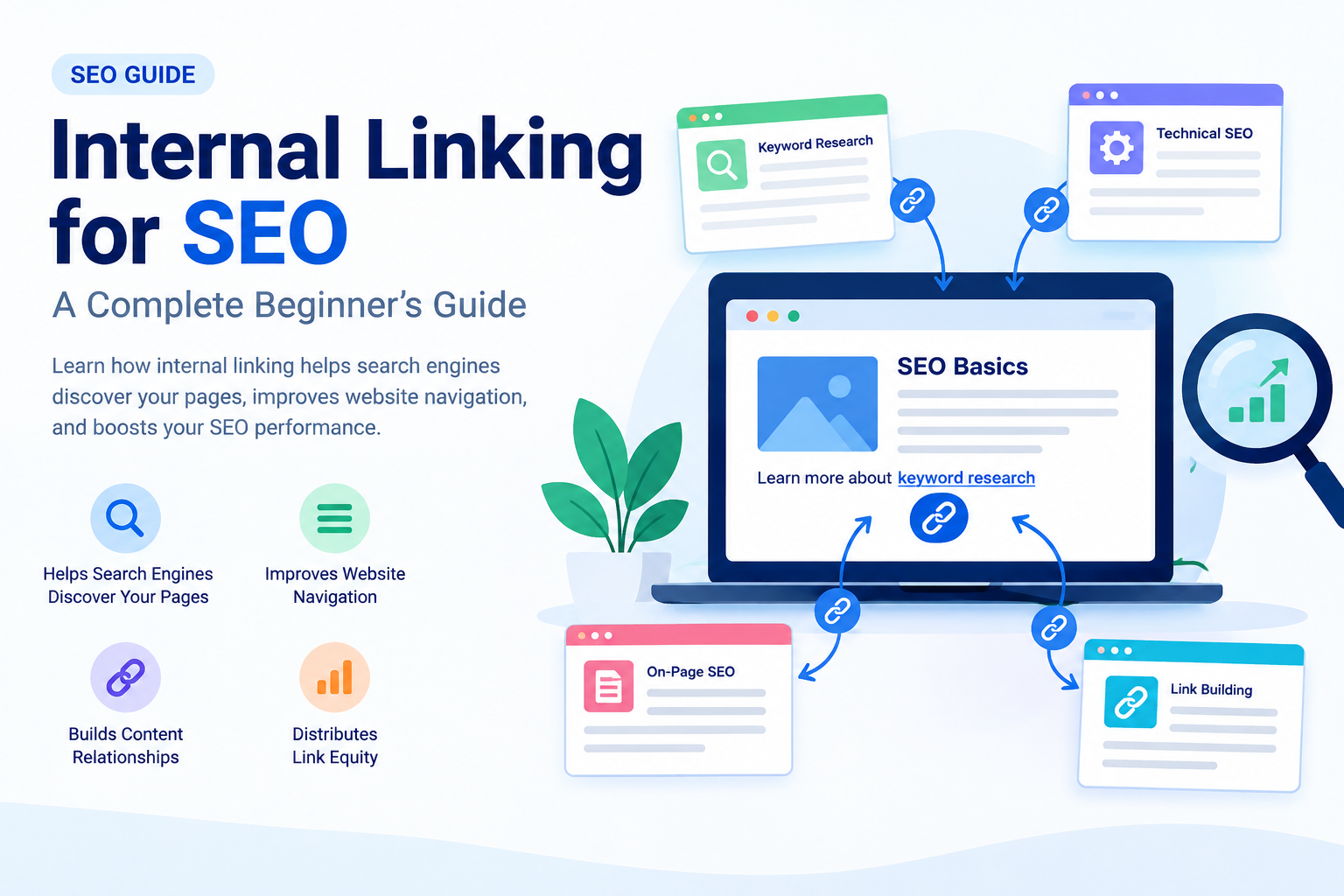
    Internal linking for SEO is an important part of on-page optimization that helps search engines understand your website’s structure and allows visitors to navigate between related pages. By adding relevant links to your blog content, you can connect different webpages, guide users toward useful information, and make your website easier to explore.

    If you are a beginner learning SEO, understanding internal linking can help you build a well-organized website and improve your overall content strategy. In this blog, we will explain what internal linking is, why it matters, its benefits, best practices, and how to add internal links to your website.

    What Is Internal Linking?

    Internal linking is the process of adding a hyperlink from one page of your website to another page on the same website. These links help visitors move between related content without needing to return to the homepage or search for another article.

    For example, if you have a blog about keyword research, you can link to another article about on-page SEO when discussing how keywords are used in content optimization.

    Example:

    “After finding the right keywords, learn more about [On-Page SEO: A Beginner’s Guide].”

    Here, the link connects two related pages on your website. This creates a better navigation experience and helps search engines discover the connected content.

    Why Is Internal Linking Important for SEO?

    Internal linking for SEO provides several benefits for both website visitors and search engines. Let’s understand the main reasons why internal links should be part of your SEO strategy.

    1. Helps Search Engines Discover Your Pages

    Search engines use links to discover and navigate webpages. Internal links can help search engine crawlers find pages that may not be easily accessible through other navigation paths.

    For example, if you publish a new blog about technical SEO and link to it from an existing, relevant article, the internal link provides another way for crawlers to reach that page.

    However, internal links do not guarantee that Google will crawl or index every linked page. Your website’s overall structure and other technical factors also matter.

    2. Improves Website Navigation

    Internal links make it easier for visitors to find related information on your website. Instead of searching for another article manually, users can click a relevant link within your content.

    For example, if your blog explains SEO basics, you can link to articles about:

    • Keyword research
    • On-page SEO
    • Technical SEO
    • Off-page SEO
    • Backlink building

    This helps readers explore additional topics and understand your content more easily.

    3. Helps Search Engines Understand Content Relationships

    Internal linking helps communicate how different pages on your website are connected. When related articles link to each other using descriptive anchor text, search engines can gain additional context about the linked page.

    For example, consider this sentence:

    “Learn more about how to get backlinks to understand off-page SEO.”

    The linked phrase gives users and search engines useful context about the destination page.

    Internal links are one of many signals search engines use to understand website content and relevance.

    4. Distributes Link Equity

    Internal links can help distribute link equity, sometimes referred to as link authority, throughout your website.

    When one page receives external backlinks, some of the value associated with those links may be passed through internal links to other pages. The amount of value transferred depends on various factors, and internal links do not guarantee improved rankings.

    A well-planned internal linking structure can help important pages become more connected within your website.

    Types of Internal Links

    There are several types of internal links you can use when optimizing your website.

    1. Navigational Internal Links

    Navigational links are commonly found in your website’s main menu, header, or navigation section. They help users access important pages such as:

    • Home
    • About Us
    • Services
    • Blog
    • Contact

    These links improve website navigation and allow visitors to find important sections quickly.

    2. Contextual Internal Links

    Contextual internal links are placed within the main content of a webpage. They connect users to related articles, guides, or resources.

    For example, while writing about SEO tools, you can link to a blog explaining keyword research tools.

    Contextual links are particularly useful because they appear naturally within relevant content and can direct readers toward additional information.

    3. Footer and Sidebar Links

    Footer and sidebar links can connect visitors to important pages or related content. They may include links to categories, popular articles, or essential website pages.

    Use these links thoughtfully and avoid adding excessive links that make the page difficult to navigate.

    How to Create an Effective Internal Linking Strategy

    A proper internal linking strategy helps you organize your website and connect related content. Follow these steps to get started.

    1. Identify Related Content

    Start by reviewing your existing blog posts and identifying articles that discuss similar or connected topics.

    For example, if your website focuses on SEO, you might have these articles:

    • What Is SEO?
    • Keyword Research for Beginners
    • On-Page SEO Guide
    • How to Get Backlinks
    • Technical SEO

    You can connect these articles where the links provide additional value to the reader.

    2. Use Descriptive Anchor Text

    Anchor text is the clickable text used in a hyperlink. It should clearly describe the content of the linked page.

    Good example:

    Learn more about keyword research for beginners.

    Less descriptive example:

    Click here to learn more.

    Descriptive anchor text helps users understand where a link will take them. Use natural variations when appropriate, rather than repeating the same keyword in every link.

    3. Link to Important Pages

    Consider linking to pages that are important for your website’s goals, such as detailed guides, service pages, or cornerstone content.

    For example, if you have a comprehensive guide about SEO, you can link to it from several related blog posts where it provides useful additional information.

    This can improve content discovery and help users navigate your website.

    4. Avoid Excessive Internal Links

    Internal links are useful, but adding too many links can make your content confusing and reduce readability.

    There is no fixed ideal number of internal links for every webpage. Instead, add links when they are relevant and helpful.

    Before adding a link, ask yourself:

    • Is this link relevant to the current topic?
    • Will it help the reader?
    • Does it lead to a working webpage?
    • Does the anchor text accurately describe the destination?

    If the answer is yes, the link may be a useful addition.

    Common Internal Linking Mistakes to Avoid

    Broken Internal Links

    A broken link leads to a missing or unavailable page. Regularly check your website for broken links and update or remove them when necessary.

    Irrelevant Links

    Avoid linking to unrelated pages simply to increase the number of internal links. Every link should serve a clear purpose.

    Using the Same Anchor Text Repeatedly

    Using identical anchor text for different destination pages can create confusion. Make sure your anchor text accurately represents the page you are linking to.

    Orphan Pages

    An orphan page is a webpage that has no internal links pointing to it from other pages on your website. These pages can be harder for users and search engines to discover, depending on the website’s other discovery methods.

    Review your website structure and add relevant internal links to important pages.

    How to Add Internal Links in WordPress

    If you use WordPress, adding an internal link is simple.

    1. Open your WordPress dashboard.
    2. Go to Posts and open the blog you want to edit.
    3. Select the text where you want to add a link.
    4. Click the link icon in the editor.
    5. Search for an existing blog or paste its URL.
    6. Apply the link and update your post.

    Always check that the link opens the correct webpage.

    How to Check Internal Links

    You can review your internal linking strategy using SEO tools such as Google Search Console, Semrush, or other website auditing tools. These tools may help you identify issues such as broken links, crawlability problems, and pages with limited internal links.

    For a beginner, start by manually reviewing your published blogs and creating connections between related topics.

    Conclusion

    Internal linking for SEO is an essential practice for building a well-structured website. It helps users discover related content, supports website navigation, and provides search engines with additional information about the relationships between your webpages.

    To improve your internal linking strategy, use descriptive anchor text, connect relevant articles, check for broken links, and avoid unnecessary linking. As you publish more blogs, regularly review your website structure and add internal links where they provide genuine value.

    A strong internal linking strategy, combined with quality content, keyword research, technical SEO, and other optimization techniques, can support your website’s long-term growth.

  • SEO Tools Free: Best Free Tools for Beginners

    SEO Tools Free: Best Free Tools for Beginners

    If you are new to search engine optimization (SEO), finding the right tools can make your learning journey easier. SEO tools help you research keywords, analyze websites, improve content, monitor rankings, and understand how search engines work. However, many popular SEO platforms require a paid subscription, which can be difficult for beginners, students, and small website owners.

    The good news is that several SEO tools free options are available to help you improve your website without spending a lot of money. These tools provide valuable insights into keyword research, on-page SEO, technical SEO, backlinks, and website performance.

    In this guide, you will learn about the best free SEO tools, how to use them, and how they can support your website’s growth. Whether you are starting your first blog or managing a small business website, these tools can help you build a strong SEO foundation.

    What Are SEO Tools?

    SEO tools are online platforms or software that help website owners optimize their websites for search engines such as Google. They provide information about keywords, website performance, technical problems, competitors, and search visibility.

    Search engine optimization involves several activities, including keyword research, content optimization, link building, and technical improvements. Instead of making decisions based only on assumptions, SEO tools help you understand what may be working and where improvements are needed.

    For example, if you want to write a blog about “how to get backlinks,” a keyword research tool can help you discover related search terms. Similarly, Google Search Console can show how your website appears in Google Search results.

    Some SEO tools are completely free, while others offer free plans with limited features. Choosing the right tool depends on your goals, experience, and website requirements.

    Why Use Free SEO Tools?

    Free SEO tools are particularly useful for beginners who want to learn SEO and improve their websites without making an immediate financial investment.

    Learn SEO Without Spending Money

    If you are a beginner, you may not want to purchase expensive SEO software before understanding how it works. Free tools allow you to practice keyword research, content optimization, and website analysis.

    You can gradually learn different SEO techniques and decide whether you need advanced paid features later.

    Find Relevant Keywords

    Keyword research is an important part of SEO. It helps you understand what people search for on Google and other search engines.

    Free keyword research tools can help you discover related keywords, search queries, and potential content ideas. This information can support your blog planning and content strategy.

    Monitor Website Performance

    Some tools help you understand how visitors find your website. You can check search impressions, clicks, indexing information, and other performance metrics.

    These insights can help you identify opportunities to improve your content and search visibility.

    Identify SEO Problems

    Technical SEO tools can help you find issues such as broken links, indexing problems, missing metadata, and slow-loading pages.

    Not every tool detects every issue, but they can make website analysis easier and more organized.

    Best SEO Tools Free for Beginners

    There are many SEO tools available online, but beginners should focus on platforms that provide practical information and are easy to understand.

    Google Search Console

    Google Search Console is a free service from Google that helps website owners monitor their website’s performance in Google Search.

    It is one of the most useful tools for understanding how your website is appearing in search results.

    Key Features:

    • Monitor clicks and impressions
    • Check average position and click-through rate (CTR)
    • Identify search queries bringing visitors to your website
    • Submit sitemaps
    • Check indexing issues
    • Review page indexing reports
    • Inspect individual URLs

    How to Use Google Search Console

    First, add and verify your website in Google Search Console. Once your website is connected, Google will begin providing performance and indexing information as data becomes available.

    Open the Performance report to check which keywords people use to find your website. You can also review which pages receive impressions and clicks.

    For example, if you have written a blog about on-page SEO, Search Console may show search queries related to that topic. You can use these insights to improve your content and create related articles.

    Best for: Website performance monitoring, indexing, and search query analysis.

    Google Keyword Planner

    Google Keyword Planner is a keyword research tool available through Google Ads. Although it is primarily designed for advertising campaigns, it can also help you discover keyword ideas for SEO.

    The tool provides information about keyword search volume ranges, competition in Google Ads, and related keyword suggestions. Remember that advertising competition is not the same as organic SEO difficulty.

    Key Features:

    • Discover keyword ideas
    • Explore related search terms
    • Review historical search volume data
    • Compare keyword trends
    • Plan content topics based on search interest

    How to Use Google Keyword Planner

    Access Google Ads and open Keyword Planner. Choose the option to discover new keywords, then enter a topic related to your website.

    For example, you could enter:

    • SEO for beginners
    • Keyword research
    • On-page SEO
    • Free SEO tools
    • Website traffic

    The tool will provide keyword suggestions that you can review for relevance.

    When choosing keywords, consider search intent, relevance to your content, and the level of competition. Do not select a keyword only because it has a high search volume.

    Best for: Keyword discovery and search volume research.

    Google Trends

    Google Trends is a free tool that helps you explore how search interest changes over time. It can be useful for discovering popular topics and comparing search terms.

    Unlike some keyword research tools, Google Trends focuses on relative search interest rather than providing exact monthly search volume.

    Key Features:

    • Compare multiple search terms
    • Explore search interest over time
    • Identify seasonal trends
    • Discover related topics and queries
    • Review regional search interest

    How to Use Google Trends for SEO

    Suppose you want to write an article about SEO tools. You can compare terms such as “SEO tools,” “keyword research,” and “SEO audit.”

    The results can help you understand whether interest in a topic is increasing, decreasing, or changing seasonally.

    You can also use Google Trends to identify content opportunities. However, search interest alone does not guarantee that a keyword will generate website traffic.

    Best for: Topic research, trend analysis, and content planning.

    Google PageSpeed Insights

    Website speed and user experience are important considerations when optimizing a website. Google PageSpeed Insights is a free tool that analyzes the performance of individual web pages.

    It provides performance measurements and recommendations for improving page loading and user experience.

    Key Features:

    • Analyze mobile and desktop performance
    • Review Core Web Vitals
    • Identify performance opportunities
    • Check loading-related issues
    • Review accessibility and other audit categories

    How to Use PageSpeed Insights

    Visit PageSpeed Insights and enter your website URL. The tool will generate a report for the selected page.

    Review the recommendations and prioritize practical improvements. Common suggestions may include optimizing images, reducing unnecessary scripts, and improving resource loading.

    Best for: Website performance and page speed analysis.

    Google Rich Results Test

    The Google Rich Results Test helps you check whether a web page’s structured data may be eligible for certain rich results in Google Search.

    Structured data is a type of code that provides search engines with information about the content of a page.

    Key Features:

    • Test supported structured data
    • Identify structured data errors
    • Review detected rich result types
    • Understand potential eligibility for supported search features

    Enter a page URL or paste supported structured data into the testing tool. Review the results to identify errors or warnings.

    Remember that passing the test does not guarantee that Google will display a rich result.

    Best for: Structured data testing and technical SEO learning.

    Bing Webmaster Tools

    Bing Webmaster Tools is a free platform that helps website owners monitor their websites in Bing search.

    Although many beginners focus primarily on Google, Bing also provides webmaster tools that can help with website analysis.

    Key Features:

    • Monitor search performance
    • Submit sitemaps
    • Review site scan information
    • Identify SEO issues
    • Explore available keyword and backlink information

    Sign in to Bing Webmaster Tools and add your website. Follow the verification process and explore the available reports.

    Best for: Bing search monitoring and website diagnostics.

    Ahrefs Webmaster Tools

    Ahrefs offers Webmaster Tools for eligible verified websites, providing access to selected website analysis features.

    Ahrefs is widely known for its SEO research platform, and its webmaster offering can help website owners examine technical SEO issues and backlink information.

    Key Features:

    • Website audits
    • Technical SEO issue identification
    • Backlink-related insights
    • Site health information
    • Selected website analysis features

    Create an account and verify ownership of your website using one of the available verification methods. Once access is established, review the audit reports and prioritize relevant issues.

    Free access may have limitations, so check the current plan details before relying on a specific feature.

    Best for: Technical website audits and backlink-related research.

    Ubersuggest

    Ubersuggest is an SEO research tool that provides keyword ideas, content research, and website analysis features. Its free access is subject to usage limits and plan restrictions.

    It can be useful for beginners who want to explore related keywords and understand the basic concepts of SEO research.

    Key Features:

    • Keyword suggestions
    • Keyword overview data
    • Content ideas
    • Website analysis
    • Selected backlink information

    Enter a keyword related to your blog topic and review the available suggestions. Compare related phrases and consider which ones match your audience’s search intent.

    For example, if your main keyword is “SEO tools free,” you might explore related topics such as:

    • Free keyword research tools
    • Best SEO tools for beginners
    • Free website audit tools
    • SEO tools for small websites

    Use these suggestions to plan useful content rather than inserting every keyword into the same article.

    Best for: Keyword ideas and beginner-friendly SEO research.

    What Are LSI Keywords in SEO?

    LSI stands for Latent Semantic Indexing. In modern SEO discussions, the phrase “LSI keywords” is commonly used to describe related terms and semantically relevant phrases.

    Google does not provide an official SEO feature called “LSI keywords” that you must target to rank. Instead, focus on creating comprehensive content that naturally covers related concepts.

    For example, if your focus keyword is “SEO tools free,” relevant related terms may include:

    • Free SEO tools for beginners
    • Keyword research tools
    • Website audit tools
    • Technical SEO tools
    • Google Search Console
    • Search engine optimization
    • SEO performance analysis
    • On-page SEO
    • Backlink analysis
    • Website traffic

    These terms help you explain the topic in greater detail and address related user questions.

    How to Choose the Right Free SEO Tool

    With so many tools available, beginners may feel confused about which one to use. The best approach is to choose tools according to your specific SEO task.

    Search performance: Google Search Console

    Keyword ideas: Google Keyword Planner

    Search trends: Google Trends

    Page performance: PageSpeed Insights

    Structured data: Rich Results Test

    Bing performance: Bing Webmaster Tools

    Website audit: Ahrefs Webmaster Tools

    Keyword research: Ubersuggest

    The availability of features and usage limits can change, so review the official tool websites for current access details.

    How to Use Free SEO Tools for Your Blog

    Step 1: Find a Relevant Topic

    Start by selecting a topic related to your website niche. Use Google Trends or Google Keyword Planner to explore search interest and keyword ideas.

    Choose a topic that is relevant to your audience and that you can explain clearly.

    Step 2: Research Keywords

    Find a primary keyword that represents the main topic of your article. Then identify related keywords that help you cover important subtopics.

    Primary keyword: SEO tools free

    Related keywords:

    • Free SEO tools for beginners
    • Best keyword research tools
    • Free technical SEO tools
    • Website performance tools

    Check the search intent behind your keywords before creating the content.

    Step 3: Create Useful Content

    Write an informative article that answers the reader’s questions. Include a clear introduction, organized headings, examples, and practical recommendations.

    Use your focus keyword naturally in important locations, such as the title, introduction, and relevant headings where appropriate.

    Avoid repeating the same keyword in every paragraph.

    Step 4: Optimize On-Page SEO

    Review the main on-page SEO elements, including:

    • SEO title
    • Meta description
    • URL structure
    • Heading hierarchy
    • Internal links
    • Image alt text
    • Content readability

    These elements help organize your content and improve the experience for visitors.

    Step 5: Monitor Your Website

    After publishing your article, use Google Search Console to monitor its performance as data becomes available.

    Look at impressions, clicks, and search queries. If your page receives impressions but few clicks, review whether the title and meta description accurately communicate the value of your content.

    Do not expect immediate results. SEO performance can take time and depends on factors such as competition, content quality, website authority, and search engine crawling.

    Common SEO Mistakes Beginners Should Avoid

    Focusing Only on Search Volume

    A keyword with high search volume is not always the best choice for a new website. Consider relevance, search intent, competition, and whether you can create content that satisfies the query.

    Stuffing Keywords

    Repeating a keyword excessively can make your content difficult to read. Use the primary keyword naturally and include related terms only when they add value.

    Ignoring Search Intent

    Before writing an article, understand what the user wants. Someone searching for “how to use Google Search Console” may need a step-by-step guide, while someone searching for “Google Search Console” may be looking for the official tool.

    Create content that matches the purpose of the search.

    Expecting Instant Results

    Publishing an article does not guarantee immediate rankings or traffic. Search engines need to discover and process content, and ranking performance varies between websites and queries.

    Monitor progress and improve your content over time.

    Using Too Many Tools at Once

    Beginners sometimes try to use every SEO platform available. This can make learning confusing.

    Start with a few tools, understand their reports, and gradually add more as your SEO knowledge improves.

    Frequently Asked Questions About Free SEO Tools

    Can I do SEO without paying for tools?

    Yes. You can perform many basic SEO tasks using free tools, including keyword research, website performance monitoring, indexing checks, and technical diagnostics. Paid tools may provide additional data or advanced features, but they are not required for learning SEO.

    Which free SEO tool is best for beginners?

    The most useful tool depends on your task. Google Search Console is valuable for monitoring your website’s Google Search performance, while Google Keyword Planner and Google Trends can support keyword and topic research.

    Are free SEO tools accurate?

    Free SEO tools can provide useful information, but the accuracy and coverage of their data vary. Search volume estimates, keyword difficulty scores, and traffic estimates are not guaranteed to reflect exact results. Use multiple relevant signals and interpret the data carefully.

    How long does SEO take to show results?

    There is no fixed time for SEO results. Some pages may begin receiving impressions relatively quickly, while meaningful growth can take much longer. Results depend on the website, topic, competition, content quality, and other factors.

    Do I need paid SEO tools for a new blog?

    Not necessarily. A new blogger can learn and practice SEO using free tools. As your website grows, you can evaluate whether paid tools would provide enough additional value for your goals.

    Conclusion

    Free SEO tools are useful resources for beginners who want to learn search engine optimization and improve their websites. Tools such as Google Search Console, Google Keyword Planner, Google Trends, and PageSpeed Insights can support different stages of the SEO process.

    Instead of relying on a single platform, use tools according to your goals. Research relevant keywords, create useful content, optimize your pages, and monitor your website’s performance over time.

    The most important part of SEO is not simply using the largest number of tools. It is learning how to interpret information and apply practical improvements to your website.

    Start with the free SEO tools that match your needs, build your knowledge consistently, and use the insights to create a better website for your audience.