In today’s digital world, businesses need effective ways to reach potential customers online. Meta Ads Manager is one of the most widely used platforms for creating, managing, and analyzing paid advertising campaigns on Meta’s platforms, including Facebook and Instagram. It provides businesses with tools to select audiences, set budgets, create advertisements, track performance, and improve campaigns based on results.
Whether you are a small business owner, digital marketer, freelancer, or beginner, understanding Meta Ads Manager can help you create more organized and targeted advertising campaigns.
What Is Meta Ads Manager?
Meta Ads Manager is a platform provided by Meta that allows advertisers to create and manage paid advertising campaigns. It gives advertisers control over important elements such as campaign objectives, target audiences, budgets, placements, ad creatives, and performance tracking.
Instead of showing an advertisement to everyone, advertisers can define the type of people they want to reach. For example, a clothing business may target people interested in fashion, while a local academy may focus on students or young professionals in a particular location.
Meta Ads Manager follows a structured system with three main levels:
- Campaign – Defines the overall advertising objective.
- Ad Set – Controls audience, budget, schedule, placements, and other delivery settings.
- Ad—Contains the actual creative, such as image, video, headline, primary text, and call-to-action.
Understanding these three levels is essential for managing Meta advertising effectively.
Why Is Meta Ads Manager Important?
Meta Ads Manager is useful because it provides advertisers with detailed control over their campaigns. Businesses can reach specific groups of people instead of relying only on organic social media content.
Some important benefits include:
- Targeted advertising: Advertisers can select audiences based on factors such as location, age range, interests, behaviors, and other available targeting options.
- Flexible budgeting: Businesses can decide how much they want to spend and manage campaign spending according to their goals.
- Multiple ad formats: Advertisers can use images, videos, carousels, and other available formats.
- Performance tracking: Metrics help advertisers understand how their campaigns are performing.
- Audience remarketing: Businesses can create audiences based on interactions with their content, website, or other eligible sources.
- Campaign optimization: Advertisers can compare results and make changes based on performance data.
How to Create an Ad in Meta Ads Manager
Creating a Meta advertisement involves several steps. A clear process helps reduce mistakes and makes campaign management easier.
1. Choose a Campaign Objective
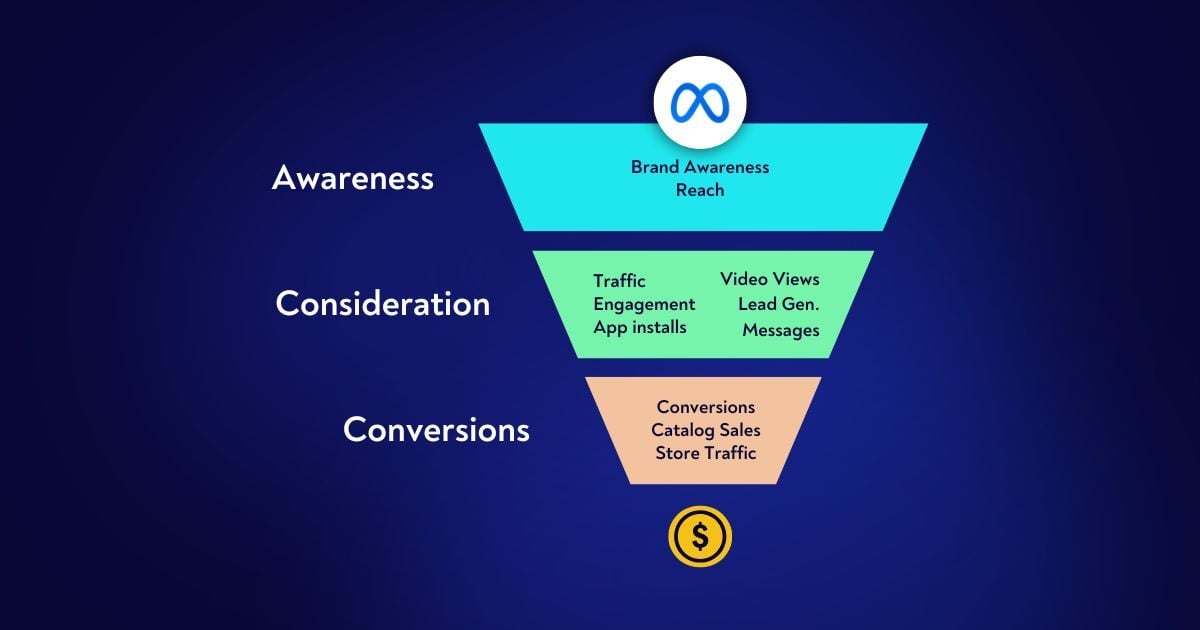
The first step is selecting an objective that matches your business goal. Depending on Meta’s current campaign setup, objectives can cover areas such as:
- Awareness
- Traffic
- Engagement
- Leads
- App promotion
- Sales
For example, a business that wants customers to submit an inquiry form may choose a lead-focused objective, while an online store may use a sales-focused objective.
The objective should match the action you want your audience to take.
2. Set Up the Campaign
After selecting an objective, create the campaign and provide the required campaign settings. You may also have options related to budget strategy, special ad categories, and campaign-level controls.
At this stage, it is important to keep your campaign structure simple and organized, especially when you are learning Meta advertising.
3. Define Your Target Audience
Audience selection is one of the most important parts of advertising. Meta provides different ways to define audiences.
You can use factors such as:
- Location
- Age range
- Available demographic options
- Interests
- Behaviors
- Custom audiences
- Lookalike audiences, where available
For example, a digital marketing academy in Hisar could build a campaign around people in its service area who may be interested in education, marketing, business, or career-related topics.
However, targeting should be based on your actual customer profile rather than selecting a large number of unrelated interests.
4. Set Your Budget and Schedule
Budget determines how much you are willing to spend on your advertising campaign. Meta generally provides options for controlling spending at the campaign or ad-set level, depending on the setup.
You can establish:
- Daily budget
- Lifetime budget
- Start date
- End date
- Delivery settings where available
Start with a budget appropriate for your business and campaign objective. After collecting enough data, you can evaluate the results before making significant changes.
5. Select Ad Placements
Placements determine where your advertisements may appear across Meta’s available inventory. Depending on the campaign and settings, placements can include locations across Facebook, Instagram, Messenger, and other Meta surfaces.
Automatic or Advantage+ placements may allow Meta’s system to distribute ads across eligible placements based on its delivery system. Manual placement options may also be available for some campaigns.
Choose placements according to your audience, creative format, and campaign requirements.
6. Create Your Ad Creative
The ad is the part your audience actually sees. Your creative should communicate the main message quickly and clearly.
Common elements include:
- Primary text
- Image or video
- Headline
- Description where available
- Call-to-action button
A good advertisement should have a clear message and visual connection to the product or service.
For example, a digital marketing course advertisement could use a short video showing students learning SEO, social media marketing, Google Ads, and Meta Ads, followed by a clear call to action such as “Learn More.”
Important Meta Ads Metrics
After launching an advertisement, you need to monitor its performance. Meta Ads Manager provides different metrics that help advertisers understand campaign results.
Reach
Reach represents the number of people who saw your content or advertisement.
Impressions
Impressions represent the number of times an advertisement was displayed. One person can generate multiple impressions.
Click-Through Rate (CTR)
CTR helps measure how frequently people clicked an ad after seeing it. A higher CTR can indicate that the creative and message are attracting attention, although CTR should always be considered alongside other campaign metrics.
Cost Per Click (CPC)
CPC indicates the average cost associated with clicks, depending on the metric and reporting setup being used.
Cost Per Result
This helps advertisers understand how much they are spending to generate the selected campaign result.
Conversion or Lead Results
For campaigns designed to generate leads, sales, or other actions, these results are especially important because they connect advertising activity with the intended business outcome.
How to Optimize Meta Ads
Launching a campaign is only the beginning. Regular monitoring can help identify opportunities for improvement.
First, review the campaign’s main objective and determine whether it is producing the intended result. Next, compare different creatives, audiences, and placements where appropriate.
You can improve campaigns by:
- Testing different images or videos
- Improving ad copy
- Testing different calls to action
- Reviewing audience performance
- Checking placement performance
- Monitoring cost per result
- Removing or adjusting consistently weak variations
- Scaling carefully when performance is stable
Avoid making too many changes at once because it can make it difficult to understand which change affected performance.
Common Mistakes to Avoid
Beginners often make several common mistakes when using Meta Ads Manager.
Choosing the wrong objective: Your campaign objective should match your actual business goal.
Poor targeting: An audience that is too broad or poorly matched to the product may produce inefficient results.
Weak creatives: Even good targeting may not perform well if the advertisement does not communicate a clear message.
Ignoring performance data: Decisions should be based on campaign results rather than assumptions.
Changing campaigns too frequently: Frequent changes can make performance difficult to evaluate.
Not tracking conversions: If your goal is leads or sales, measuring only clicks may not tell you whether the campaign is achieving its business purpose.